

Our verdict and overall rating

Our verdict on SiteGround
Best suited to a WordPress owner who values maintenance tools enough to budget for renewal. GrowBig is the practical starting comparison for staging; StartUp suits one small site that does not need it.
Research-based editorial opinion. Five equally weighted criteria; no measured speed, uptime or support results and no customer-rating aggregate.
SiteGround at a glance
| At a glance | Verified information |
|---|---|
| Hosting types | Shared/web, managed WordPress, WooCommerce and cloud; shared plans shown below. |
| Starting price | US StartUp: $35.88 for 12 months; renewal $17.99/mo, billed $215.88 per year before applicable tax. |
| Free SSL | Yes; CDN and email are also included. |
| Control panel | Site Tools. |
| Entry resources | StartUp: 1 website, 10 GB storage. |
| Backups | Daily on all listed tiers; on-demand copies from GrowBig. |
| Staging | GrowBig and GoGeek; GoGeek also lists Git and white-label access. |
| Support / refund | 24/7 human support; 30-day shared-hosting refund policy, subject to exclusions. |
Plans, prices and renewal costs
Price snapshot: September 7, 2026. US / USD shared-hosting offer · 12 months prepaid · confirm applicable tax at checkout. These are the selected offers, not every available billing option. Optional extras are excluded. Check the final tax treatment and order total before payment.
| Plan / term | Intro rate | First payment | Renewal | Key inclusions |
|---|---|---|---|---|
| StartUp | $2.99/mo | $35.88 12 months | $17.99/mo · $215.88 per 12 months | 1 site · 10 GB · daily backups |
| GrowBig | $4.99/mo | $59.88 12 months | $29.99/mo · $359.88 per 12 months | Unlimited sites · 50 GB · staging and on-demand backups |
| GoGeek | $7.99/mo | $95.88 12 months | $44.99/mo · $539.88 per 12 months | Unlimited sites · 100 GB · Git, white label and priority support |
What the numbers mean for your budget
StartUp costs $251.76 across the initial year and one annual renewal at the displayed US rates, before applicable tax. GrowBig costs $419.76 over those two years. Its $168 difference buys a maintenance workflow as well as capacity: decide whether staging and on-demand copies will be used regularly. GoGeek totals $635.76 over the same two years and is harder to justify for a single small site unless its collaboration or support features meet a defined need.
Monthly equivalents are rounded. A prepaid offer is not a month-to-month contract; first-term extras do not necessarily recur.
A budget you can compare
| Plan and market | First bill / service | Renewal | Included / check |
|---|---|---|---|
| SiteGround StartUp US / USD storefront · checked 2026-09-07 | $35.88 for 12 months | $215.88 / 12 months | 1 site · 10 GB · daily backups Official offer source |
| Offer | 12 months: allocated / cash | 24 months: allocated / cash | 36 months: allocated / cash |
|---|---|---|---|
| SiteGround StartUp USD · 12-month first term | $35.88 / $35.88 | $251.76 / $251.76 | $467.64 / $467.64 |
We allocate the first payment across all months it covers, including any bonus months. Cash includes whole billing periods needed to reach the chosen horizon. Renewal rates are held constant for this illustration; they are not guaranteed future quotes. Unknown bills remain unverified. Domains, optional services and taxes are excluded unless explicitly added. Read the calculation method.
Adjust this offer and compare alternatives. The market, currency and verification date are labeled on each table. The screenshot below records the corresponding published offer.
Server locations and what they mean
| Region | Published locations | Scope |
|---|---|---|
| North America | Ashburn, Virginia; Council Bluffs, Iowa; Dallas, Texas; Los Angeles, California | Four US origin data centers. |
| Europe | London; Madrid; Eemshaven; Frankfurt; Paris | UK, Spain, Netherlands, Germany and France. |
| Asia Pacific | Singapore; Sydney | Singapore and Australia origins. |
The official server-location guide lists 11 origins. CDN edge coverage is a different network. SiteGround also documents backups in another location, so choosing an origin country does not by itself describe every copy of your data. Review the backup location if this affects your requirements.
Check the official location information before selecting a server.
A closer look at the official offer
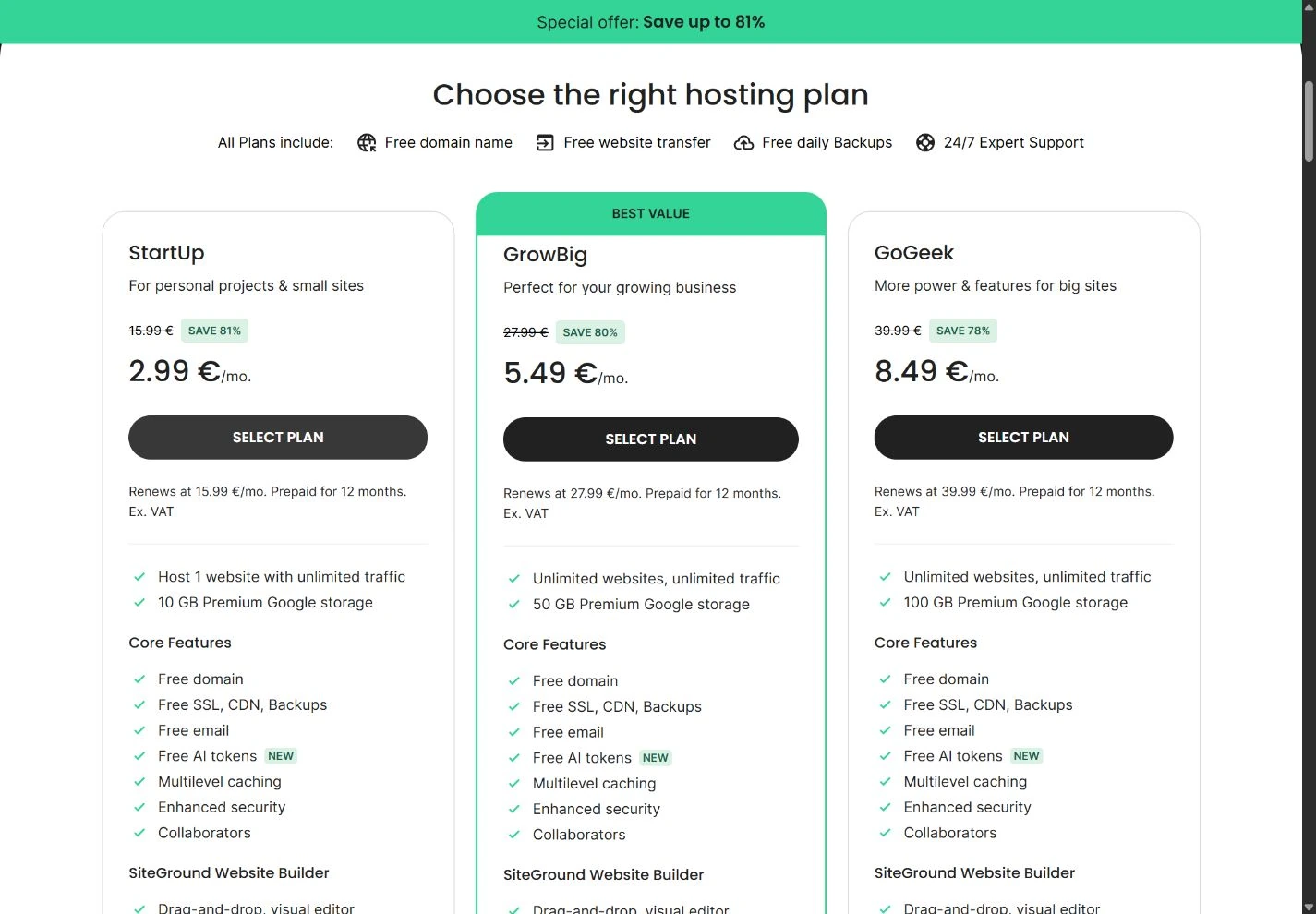
The image records a public page, not a paid customer dashboard or a test result. It may show a region-specific promotion that changes after the capture date. Our tables keep the important figures readable on a phone; use the full-size image to inspect the original context.
The case for SiteGround
Managing a website is a recurring job. Updates need a safe place to run, backups need to be recoverable and an occasional mistake needs a clear route back. SiteGround’s appeal is the set of website management features around the hosting account, especially for people maintaining WordPress projects.
The host uses Site Tools rather than cPanel. That is neither automatically better nor worse: it changes the interface and the routines your team learns. If you already have cPanel instructions, delegated access arrangements or an agency deployment process, include the cost of adapting those workflows in the decision.
Reasons to consider it
- A managed-hosting focus that is relevant to regular WordPress maintenance.
- Daily backups are listed on the current hosting range.
- A documented distinction between entry hosting and tiers with more workflow tools.
Reasons to look elsewhere
- A substantial increase between the first-year promotion and standard renewal.
- Staging and some advanced tools depend on the plan.
- Proprietary account tooling requires a different workflow from cPanel.
SiteGround is more compelling when those tools prevent real work or risk. For a five-page static website changed twice a year, an elaborate WordPress workflow may offer little extra value. For a site where a plugin update can interrupt enquiries, safer maintenance can matter more than the first invoice.
Choose the plan around the job
The official web-hosting page presents StartUp, GrowBig and GoGeek. The entry plan is aimed at a small project; the higher tiers add resources and features. Check the live feature comparison before ordering, especially if staging is part of the reason you chose this provider.
| Your situation | What to prioritize | A question to answer |
|---|---|---|
| One simple WordPress site | Basic capacity and reliable recovery. | Will the entry tier handle the actual application and backup needs? |
| Frequent design or plugin changes | A staging workflow and a controlled publishing process. | Is staging included in the exact plan you are selecting? |
| Several client websites | Access separation, capacity and maintenance coordination. | Can clients and collaborators receive appropriately limited access? |
| An active store | Dynamic performance, order continuity and recovery frequency. | What happens to new orders when staging changes or backups are restored? |
Provider visit estimates are useful orientation, not guaranteed capacity. Ten thousand visits to cached articles can be easier to serve than a much smaller number of complex shopping sessions. Evaluate the underlying resource constraints and the behavior of your own application.
Price the website after the introductory year
$2.99/mo. US StartUp: $35.88 for 12 months; renewal $17.99/mo, billed $215.88 per year before applicable tax. This is a snapshot of the cited offer on September 7, 2026. Your country, currency, tax treatment and billing term can change the checkout total.
In the US offer checked on September 7, 2026, the first 12 months of StartUp cost $35.88 before applicable tax and optional additions. The listed $17.99 monthly renewal equivalent makes a 12-month renewal $215.88. The difference is large enough to include in your initial budget, even if you are happy with the service.
Compare the plan you will actually need. If staging is essential and requires a higher tier, the entry promotion is not your decision price. Add the domain, paid plugins, email requirements and any services outside the host. Compare the cost over a common time horizon against your alternatives.
A planned migration every time a promotion expires can save money on paper while consuming hours and introducing risk. A more useful question is whether you can sustain the renewal price without needing to leave. Put both options into the cost calculator, including realistic migration labour.
Staging, backups and the danger of overwriting live data
A staging copy makes it possible to experiment privately. It does not make every “push to live” safe. Suppose you create a staging copy of a shop on Monday and receive orders on Tuesday. Replacing the entire live database with Monday’s staging database can remove those newer orders.
Write down what needs to move: a theme file, a configuration change, selected content or the complete database. If the host’s staging workflow cannot preserve the required live data, use a narrower deployment method. Schedule a maintenance window when the work affects transactional data.
Similarly, a daily backup does not make every restore harmless. Confirm the age of the recovery point and identify what was added afterward. Recover to a private location when possible, compare the data and then decide how to bring the site back. An off-account backup helps if access to the hosting account itself becomes the problem.
Make the recovery process a documented routine that someone else can follow. The real value of a backup is not that a dashboard says it exists; it is that the right person can restore it when the main site is unavailable.
Evaluate the performance of your real workload
SiteGround describes performance technologies on its product page. We treat those as provider specifications, not as our own benchmark. No speed, uptime or support-response score in this review has been measured by HostingRanker.
To evaluate your workload, start with one representative content page and one dynamic task. Use a consistent test location and device profile. Check the page before adding optional marketing scripts, then after the full setup. This separates application weight from hosting response time.
For stores, test uncached product search, cart changes and checkout in the provider’s supported testing environment. Do not run aggressive load tests against shared infrastructure without permission. Ask support how resource limits are exposed and how to recognize when a slow query or plugin is the bottleneck.
Keep a dated record of the test configuration. An isolated fast result has little predictive value if it used a different theme, an empty database or a cached homepage while your customers mainly interact with dynamic pages.
Migration and the first maintenance cycle
Start by copying your DNS records and documenting where email is hosted. Website migration, domain transfer and email migration are separate operations. Combining all three changes at once makes failures harder to diagnose.
- Take a complete backup of files and the database, and store it outside the old host.
- Prepare the destination and verify the supported software versions.
- Preview the migrated website privately and check forms, images, logins and scheduled tasks.
- Plan the final database copy around incoming orders or other user writes.
- Change only the necessary DNS records, then monitor both environments.
- Keep the old account active until the new website and mail routes are verified.
After the move, run one normal update cycle. Confirm that your team can access staging, make a change, take a backup and recover without relying on a single person’s memory. That experience is more relevant to long-term fit than the number of buttons in the dashboard.
Alternatives and our verdict
Hostinger: compare it when an integrated setup and lower initial commitment cost matter. Check an equivalent backup and workflow tier rather than comparing unrelated entry offers.
eUKhost: compare its cPanel range for a UK-focused site, particularly if you prefer a familiar control panel and want to examine published local hosting details.
Namecheap: compare it for a small conventional site where a simpler cost structure and cPanel are more important than a managed WordPress toolset.
Choose SiteGround because you expect to use its workflow tools and can justify the renewal price. Avoid buying a higher plan solely for a visit estimate or a generic speed promise. Read Hostinger vs SiteGround for a direct decision framework and keep the current checkout terms alongside your budget.
Check SiteGround plans (affiliate link, opens in a new tab)How we reached the rating
| Criterion · 20% each | Score / 5 | Why it received this score |
|---|---|---|
| Value and commitment | 3.0 | A low first year gives way to materially higher renewal costs; assess the ongoing workflow value. |
| Included features | 4.5 | SSL, CDN, email and daily backups are included; GrowBig adds staging and on-demand copies. |
| Backup and recovery | 4.5 | Documented daily backups and higher-tier on-demand recovery support routine maintenance. |
| Administration and support options | 4.5 | Site Tools and tier-specific WordPress staging give a clear path for managing updates. |
| Pricing and documentation clarity | 4.5 | The US cards show the introductory price, annual prepayment and renewal rate together; confirm applicable tax in the final order. |
Overall: (3.0 + 4.5 + 4.5 + 4.5 + 4.5) ÷ 5 = 4.2/5, rounded to one decimal. Scores reflect the documented offer and its fit for the reader described in our verdict. A small score difference should not override an essential requirement.
Scale: 1 = substantial documented limitations; 2 = limited fit or evidence; 3 = adequate with material trade-offs; 4 = strong documented fit; 5 = exceptionally complete in this coverage set. Half-points express an intermediate judgment. Missing information lowers confidence or documentation scores, not an invented measurement of service quality. Full rating methodology.
Compare the next decision
SiteGround pricing: what the US plans really cost
Compare StartUp, GrowBig and GoGeek using US first-year prices, annual renewals and a three-year budget.
Best hosting for multiple websites: plan for 3 or 10 sites
Compare eligible hosting tiers for three or ten websites, with shared capacity, backup needs and full-term costs.
Best web hosting for a small business: budget for keeping it running
Choose among our hosting partners by email, recovery, administration and predictable ongoing costs for a company website.
Best WordPress hosting: choose the maintenance workflow
Compare documented WordPress hosting features, staging and backup limits, with a practical update-and-recovery checklist.
Frequently asked questions
Does every SiteGround plan include staging?
Do not assume so. Staging is plan-dependent; check the current feature table and select a tier that explicitly includes the workflow you need.
Is SiteGround the fastest WordPress host?
We have not established that. Published platform features and provider marketing do not replace comparable measurements of a real website.
Why does SiteGround cost more at renewal?
The cited introductory price applies to the initial term. Standard renewal is separately listed, so calculate both before making a purchase.
Can a staging push overwrite store orders?
A full database replacement can overwrite live changes made after the staging copy was created. Check the deployment method and preserve transactional data before publishing.
Sources & editorial notes
USD pricing and the public offer screenshot were checked on September 7, 2026. Other product documentation was checked on September 6, 2026. Prices are dated observations; check the final billing and tax terms before purchase.
- SiteGround: captured US plans, prices and renewal terms USD offer and original screenshot checked September 7, 2026.
- SiteGround: WordPress staging knowledge base
- SiteGround: origin and backup locations
- SiteGround: data centers and CDN coverage
- eu.siteground.com · official plans and billing evidence
- www.siteground.com · official plans and billing evidence
This guide combines published documentation with our editorial analysis. We have not measured provider performance or conducted an independent security audit. Read our methodology. Report a correction.

About the author
Vlastimil Stich
Vlastimil founded HostingRanker in 2020. His work spans 3D graphics, entrepreneurship and investing, with close to 100 web projects created during his business career. He writes about hosting, website infrastructure and the practical decisions behind building and maintaining a website.