

Our verdict and overall rating

Our verdict on Hostinger
A strong starting point for a small website when integrated administration matters. Unlimited is the more useful comparison for a site that needs daily backups; Premium is the lower-cost route for simpler content.
Research-based editorial opinion. Five equally weighted criteria; no measured speed, uptime or support results and no customer-rating aggregate.
Hostinger at a glance
| At a glance | Verified information |
|---|---|
| Hosting types | Web/shared, managed WordPress, WooCommerce, cloud and VPS; this table covers the web/cloud offer. |
| Starting price | $2.99/mo equivalent; 48 months prepaid. |
| Free SSL | Yes, on the listed web plans. |
| Control panel | hPanel. |
| Entry resources | Premium: 3 websites, 20 GB SSD. |
| Backups | Weekly on Premium; daily on Unlimited and Cloud Startup. |
| Email and domain | Initial email allowance and eligible domain offer last one year; price later renewals separately. |
| Support / refund | 24/7 support; 30-day money-back policy, with product exclusions. |
Plans, prices and renewal costs
Price snapshot: September 6, 2026. Web and cloud hosting · 48-month offer · VAT excluded. These are the selected offers, not every available billing option. Optional extras are excluded. Check the final tax treatment and order total before payment.
| Plan / term | Intro rate | First payment | Renewal | Key inclusions |
|---|---|---|---|---|
| Premium | $2.99/mo | $143.52 48 months | $10.99/mo | 3 websites · 20 GB SSD · weekly backups |
| Unlimited | $3.99/mo | $191.52 48 months | $16.99/mo | Unlimited websites · 50 GB NVMe · daily backups and CDN |
| Cloud Startup | $7.99/mo | $383.52 48 months | $25.99/mo | Unlimited websites · 100 GB NVMe · daily/on-demand backups |
What the numbers mean for your budget
Premium ties up $143.52 at purchase even if the site is used for only one year. Unlimited adds $48 over the same initial 48 months. That is a concrete upgrade to consider for daily backups and CDN, rather than paying for an unproven expectation of speed. The advertised Premium renewal rate equates to $131.88 for 12 months; this is an annualized comparison, not a verified renewal invoice or commitment length.
Monthly equivalents are rounded. A prepaid offer is not a month-to-month contract; first-term extras do not necessarily recur.
A budget you can compare
| Plan and market | First bill / service | Renewal | Included / check |
|---|---|---|---|
| Hostinger Premium US / USD storefront · checked 2026-09-06 | $143.52 for 48 months | $10.99/mo equivalent; invoice term unconfirmed | 3 websites · 20 GB SSD · weekly backups Official offer source |
| Offer | 12 months: allocated / cash | 24 months: allocated / cash | 36 months: allocated / cash |
|---|---|---|---|
| Hostinger Premium USD · 48-month first term | $35.88 / $143.52 36 service months remain after the horizon | $71.76 / $143.52 24 service months remain after the horizon | $107.64 / $143.52 12 service months remain after the horizon |
We allocate the first payment across all months it covers, including any bonus months. Cash includes whole billing periods needed to reach the chosen horizon. Renewal rates are held constant for this illustration; they are not guaranteed future quotes. Unknown bills remain unverified. Domains, optional services and taxes are excluded unless explicitly added. Read the calculation method.
Adjust this offer and compare alternatives. The market, currency and verification date are labeled on each table. The screenshot below records the corresponding published offer.
Server locations and what they mean
| Region | Published locations | Scope |
|---|---|---|
| Europe | France, Germany, Lithuania, Netherlands, United Kingdom | Web and cloud locations in the current support guide. |
| Asia | India, Indonesia, Malaysia | Availability is determined during setup. |
| Americas | USA: Phoenix, Boston, Asheville; Brazil | Asheville is listed for web/cloud, not VPS. |
Use the current hPanel choices as the final list. Agency and VPS plans have separate coverage. CDN points in Japan, Australia or South Africa do not establish that your origin database can be placed there. A server move also needs a maintenance and backup plan.
Check the official location information before selecting a server.
A closer look at the official offer
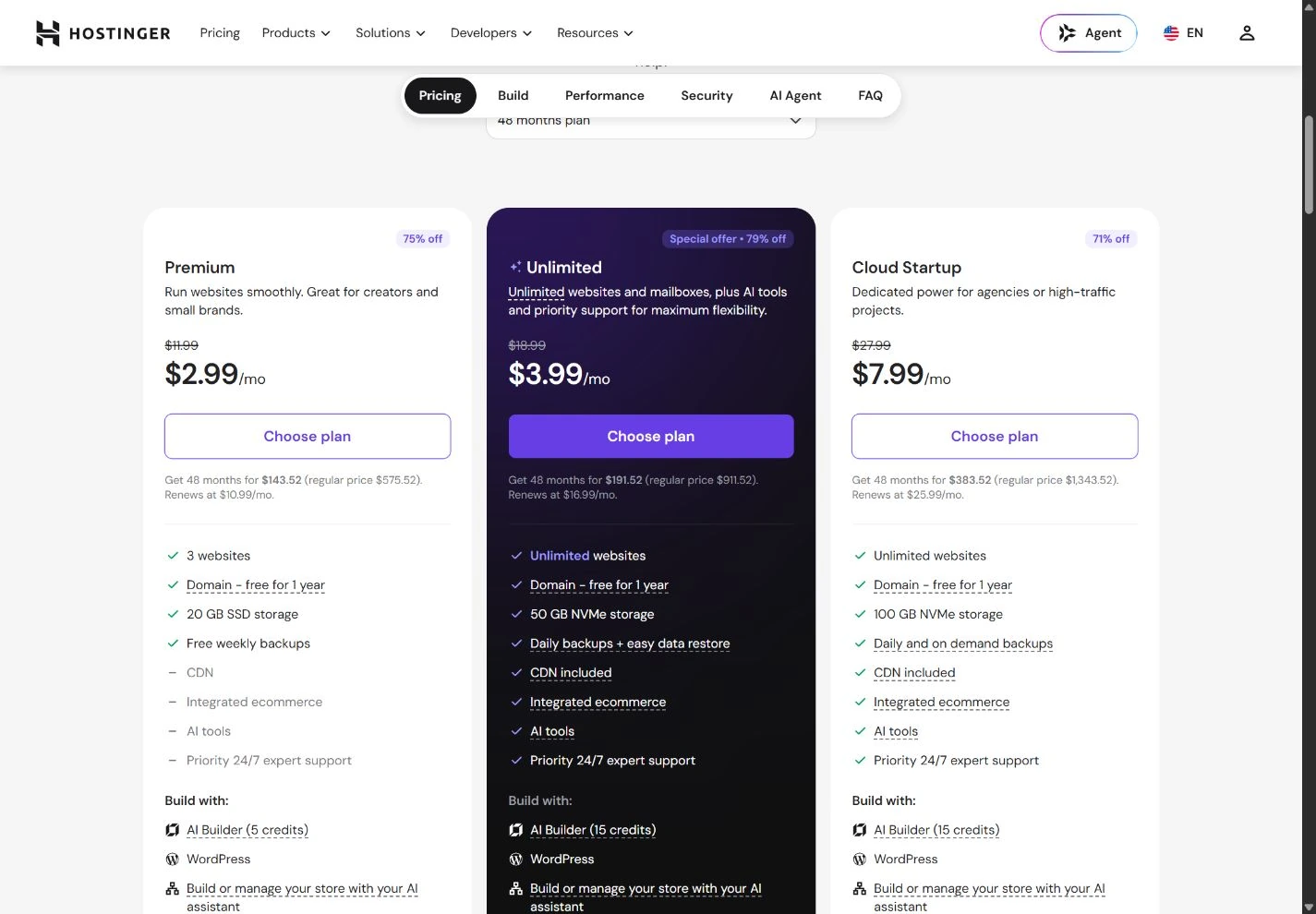
The image records a public page, not a paid customer dashboard or a test result. It may show a region-specific promotion that changes after the capture date. Our tables keep the important figures readable on a phone; use the full-size image to inspect the original context.
Who Hostinger suits
A new website has several moving parts: a domain, DNS, email, hosting and the application that creates the pages. Hostinger brings several of those decisions into one account. That is useful for a solo business owner who wants a manageable starting point and is comfortable learning a proprietary dashboard.
The important distinction is between the host and the way you build. A WordPress website hosted at Hostinger remains a WordPress project with its own themes, plugins and database. A site created inside a proprietary builder can have a different export and migration path. Choosing the brand does not settle that architectural decision.
Reasons to consider it
- An integrated route for domain, hosting and website setup.
- hPanel can reduce the number of separate administrative tools to learn.
- Published entry and higher-tier backup differences make a needs-based choice possible.
Reasons to look elsewhere
- A long promotional term ties up cash before you know how the project will develop.
- The renewal rate is materially higher than the introductory rate in the cited offer.
- A proprietary builder may make a future move more involved than moving WordPress.
For a complex application, first check runtime support, background processes, database requirements and deployment access. A familiar brand or an “unlimited” website allowance does not establish that a shared plan can run your software.
Read the plan table before the promotion
The current web-hosting page lists Premium, Unlimited and Cloud Startup in the version we checked. Premium lists three websites and 20 GB of SSD storage; the higher listed tiers change storage and backup arrangements. Do not rely on an older review’s plan names when placing an order.
| Decision | Why it matters | What to verify |
|---|---|---|
| Website allowance | Separate domains consume the plan allowance. | Count active projects, staging needs and planned launches. |
| Storage | Files, databases and mail can all affect usage. | Measure the existing site and leave room for backups and growth. |
| Email inclusion | A free first year can become a recurring cost. | Mailbox count, storage and the price after the included period. |
| Website software | WordPress and builder projects have different exit paths. | Confirm which product you are buying before designing the site. |
Resource constraints deserve more attention than the maximum number of websites. A small brochure site and an active store can have similar file sizes but very different demands on CPU and database work. Ask support how the plan handles an exhausted resource limit and whether an upgrade can be made without moving the account.
The real cost of the first term and renewal
$2.99/mo. Premium: $143.52 for 48 months; advertised renewal $10.99/mo, excluding VAT. This is a snapshot of the cited offer on September 6, 2026. Your country, currency, tax treatment and billing term can change the checkout total.
The illustrated Premium purchase is $143.52 paid upfront for 48 months. Dividing that bill by 48 produces the advertised $2.99 figure; it does not make the purchase a $2.99 monthly subscription. At the stated renewal rate, 12 months would be equivalent to $131.88 before applicable taxes, although your actual renewal invoice depends on the renewal term offered.
This can still be a reasonable arrangement for a project you expect to maintain for years. It is a less comfortable fit for an experiment that might close after three months. Compare cash paid, the length of commitment and the amount you are prepared to lose if the project changes direction.
Make a second line for domain renewal, paid email after any included period, premium themes and plugins. Use our hosting cost calculator with the figures from your own checkout. Keep a copy of the order summary showing the billing term, renewal amount and optional add-ons.
Backups and routine WordPress maintenance
Premium lists weekly backups, while the higher tiers shown on the cited page include daily arrangements. A weekly schedule may be acceptable for a rarely changed brochure site. It is a different proposition for a shop taking orders every day: restoring a backup from several days earlier could remove transactions or customer changes.
Work backward from the data you can afford to lose. If the answer is one working day, a weekly backup schedule alone is not enough. If the answer is minutes, even a daily backup may be inadequate. Confirm the retention period, whether database and file backups are synchronized and whether you can download a complete copy.
For WordPress, keep a recovery copy outside the hosting account and test it on a private staging installation. Perform updates in small groups. After changing a theme or plugin, check the contact form, navigation, images, search and any checkout path. Hosting management does not transfer responsibility for every plugin choice to the host.
How to evaluate speed without trusting a badge
We have not run a controlled Hostinger speed or uptime benchmark for this review. Hardware labels and server technology describe parts of the platform; they do not establish the speed of your finished site. A heavy theme, third-party scripts or slow database queries can dominate the result.
During your evaluation period, create a representative page using the same theme, images and integrations you intend to launch. Check it from the region where your visitors are located. Test both a cached page and a dynamic task such as search or a logged-in account. Record the URL, date, test region and changes made between runs.
If the first response is slow, ask whether the cause is distance, resource usage, a plugin or an uncached database operation. Upgrading blindly can hide an inefficient application without resolving it. Our Core Web Vitals guide explains how to separate server response from rendering and interaction problems.
A sensible first-week setup
- Choose the software first. Decide between WordPress, a proprietary builder or uploaded files based on ownership and maintenance needs.
- Secure the account. Use a unique password and enable the account’s available multifactor protection. Store recovery information outside the account.
- Prepare DNS deliberately. Record existing website and email records before changing nameservers. Moving hosting should not accidentally stop mail.
- Verify recovery. Download a backup, understand the restore interface and test the process on a private copy.
- Test real journeys. Submit a form, check confirmation email, open the site on a phone and validate every important link.
- Record the next bill. Put the renewal date, total and cancellation instructions in your business records.
If you are migrating, leave the old host active until DNS has settled and both website and email checks pass. The migration checklist sets out the sequence and rollback decisions.
Alternatives and our verdict
SiteGround: compare it when WordPress maintenance and a staging workflow are more important than minimizing the first invoice. Match equivalent feature tiers and compare renewal totals.
Namecheap: compare it for a small cPanel website when you want a different dashboard and a shorter initial hosting commitment. Examine the entry plan’s backup limitations.
InterServer: consider it when paying over a shorter billing cycle is a priority. Ask for the exact current monthly renewal rate and included resources.
Our conclusion is conditional: Hostinger is a practical starting point when its software choices and commitment length fit your project. The lower headline price is helpful only if you can live with the renewal price and the selected plan’s recovery arrangements. Before buying, read the Hostinger vs SiteGround comparison if those two are on your shortlist.
Check Hostinger plans (affiliate link, opens in a new tab)How we reached the rating
| Criterion · 20% each | Score / 5 | Why it received this score |
|---|---|---|
| Value and commitment | 4.0 | Low first-term cost, offset by four years of prepayment and a substantial renewal increase. |
| Included features | 4.0 | The web range includes SSL and site-building tools; CDN and daily backups require a higher tier. |
| Backup and recovery | 3.5 | Premium has weekly backups. The higher tiers improve frequency, but an independent recovery copy is still needed. |
| Administration and support options | 4.5 | hPanel brings common setup tasks together, with a documented migration and server-transfer path. |
| Pricing and documentation clarity | 4.0 | The price cards show the prepaid total and renewal rate, although email inclusions expire after a year. |
Overall: (4.0 + 4.0 + 3.5 + 4.5 + 4.0) ÷ 5 = 4.0/5, rounded to one decimal. Scores reflect the documented offer and its fit for the reader described in our verdict. A small score difference should not override an essential requirement.
Scale: 1 = substantial documented limitations; 2 = limited fit or evidence; 3 = adequate with material trade-offs; 4 = strong documented fit; 5 = exceptionally complete in this coverage set. Half-points express an intermediate judgment. Missing information lowers confidence or documentation scores, not an invented measurement of service quality. Full rating methodology.
Compare the next decision
Hostinger pricing: the first bill, renewal and the right tier
Choose a Hostinger hosting tier by website count, backup needs and the cash tied up in a 48-month offer.
Hostinger vs InterServer: prepayment, flexibility and recovery
Compare Hostinger Premium with InterServer Standard for a conventional website, including actual monthly and annual billing.
Month-to-month web hosting: pay for flexibility deliberately
Find verified monthly billing in our partner coverage and see why a monthly-equivalent headline is not a monthly contract.
Hostinger vs HostPapa: a small-business bundle comparison
Compare the right tier for a business website, email and maintenance, including prepayment and first-year-only extras.
Hostinger vs UltaHost: shared plans without mismatched promises
Match shared-hosting plans by site count, storage and recovery, then compare two-year and four-year cash commitments.
Best hosting for multiple websites: plan for 3 or 10 sites
Compare eligible hosting tiers for three or ten websites, with shared capacity, backup needs and full-term costs.
Best web hosting for a small business: budget for keeping it running
Choose among our hosting partners by email, recovery, administration and predictable ongoing costs for a company website.
Best WordPress hosting: choose the maintenance workflow
Compare documented WordPress hosting features, staging and backup limits, with a practical update-and-recovery checklist.
Frequently asked questions
Is Hostinger billed monthly?
Monthly billing may be available, but the $2.99 Premium snapshot in this review requires a 48-month prepaid purchase. Check the term selected in the cart.
Can I move a Hostinger website to another host?
A conventional WordPress or file-based site can generally be migrated with its files and database. Proprietary builder projects have different export limitations, which you should check before building.
Is the cheapest plan enough for an online store?
Decide from order volume, resource needs and acceptable data loss. A weekly backup by itself is a weak recovery plan for a store receiving daily orders.
Did HostingRanker test Hostinger uptime?
No. This is a research-based review of published features and purchasing trade-offs. We do not present an uptime percentage or a speed score as our own measurement.
Sources & editorial notes
Sources checked on September 6, 2026. Product details can change by country, platform and billing term. Prices shown are snapshots, not live quotes.
- Hostinger: captured plans and commercial terms
- Hostinger: free-domain eligibility
- Hostinger: backup documentation
- Hostinger: locations by hosting product
- www.hostinger.com · official plans and billing evidence
This guide combines published documentation with our editorial analysis. We have not measured provider performance or conducted an independent security audit. Read our methodology. Report a correction.

About the author
Vlastimil Stich
Vlastimil founded HostingRanker in 2020. His work spans 3D graphics, entrepreneurship and investing, with close to 100 web projects created during his business career. He writes about hosting, website infrastructure and the practical decisions behind building and maintaining a website.