

Our verdict and overall rating

Our verdict on Elementor
A strong option to investigate when you already want WordPress and need visual control over layouts. Start with Free to establish whether the workflow fits. Choose Advanced Solo when one site needs popups, custom code or store design; choose One only after identifying useful credit-based services. Hosting and ongoing WordPress maintenance remain separate decisions.
Research-based editorial opinion. Five equally weighted criteria; no measured speed, uptime or support results and no customer-rating aggregate.
Elementor at a glance
| At a glance | Verified information |
|---|---|
| Product reviewed | WordPress Editor plugin, Pro licenses and One bundles; Elementor Host is a separate offering |
| Free option | Basic visual editor; a WordPress site and hosting are still needed |
| Entry paid option | $60/year Essential for one site; no popup, eCommerce or custom CSS/code features |
| Advanced site allowances | Solo: 1; Advanced: 3; Expert: 25 |
| One billing | $180 first year, then $228/year at the captured rate; 25,000 credits each month |
| Updates and renewal | Auto-renewal is enabled by default; canceled paid licenses lose updates and support after expiry |
| Our evidence | Public pricing and documentation review with original captures; no paid-editor or performance test |
Plans, prices and renewal costs
Price snapshot: September 7, 2026. Elementor Editor and One · USD annual subscriptions · hosting and applicable tax excluded. These are the selected offers, not every available billing option. Optional extras are excluded. Check the final tax treatment and order total before payment.
| Plan / term | Intro rate | First payment | Renewal | Key inclusions |
|---|---|---|---|---|
| Free | $0.00 | Free | Free editor; hosting is separate | Basic visual page editing; no Pro license |
| Essential · 1 site | $5.00/mo | $60.00 12 months | Then-current list price; exact renewal unverified | 57 Pro widgets, Theme Builder and forms; no popups, eCommerce or custom CSS/code |
| Advanced Solo · 1 site | $7.00/mo | $84.00 12 months | Then-current list price; exact renewal unverified | 85 Pro widgets, popups, eCommerce, custom CSS/code |
| Advanced · 3 sites | $9.00/mo | $108.00 12 months | Then-current list price; exact renewal unverified | Advanced feature set for up to 3 sites |
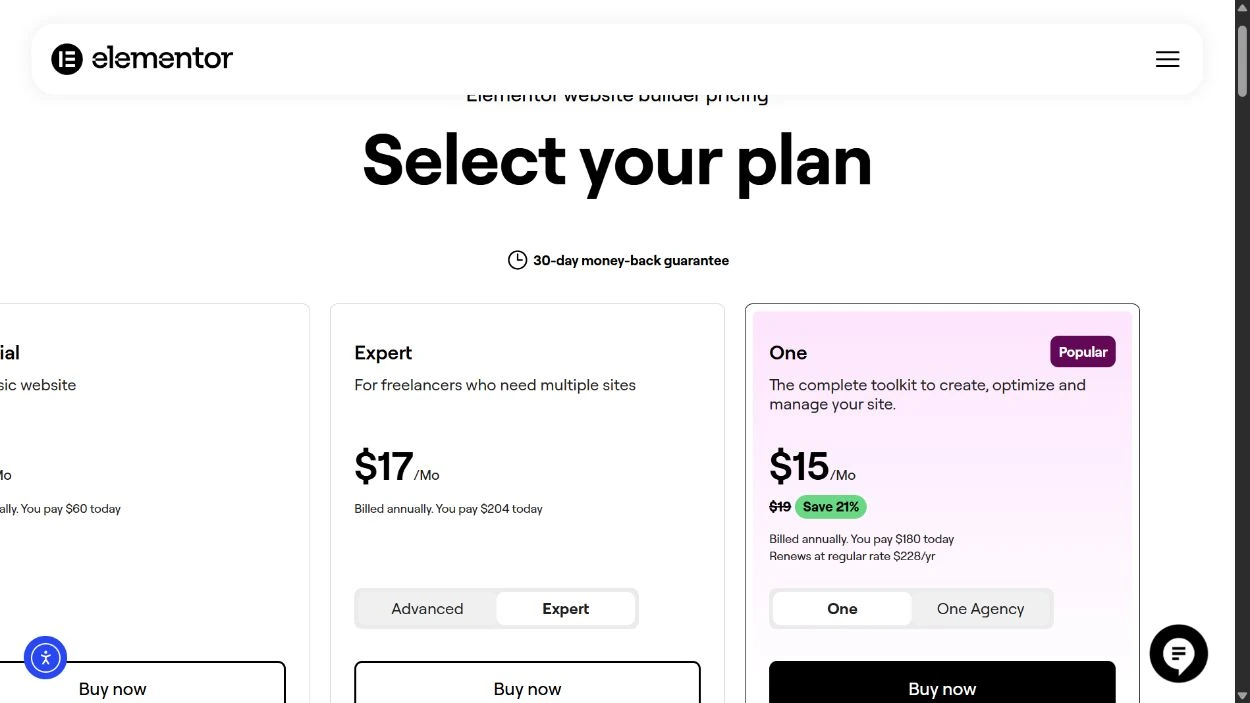
| Expert · 25 sites | $17.00/mo | $204.00 12 months | Then-current list price; exact renewal unverified | Advanced feature set for up to 25 sites |
| One · 1 site | $15.00/mo | $180.00 12 months | $228 per year at the captured renewal rate | Pro editor and connected tools; 25,000 shared credits per month |
| One Agency · unlimited sites | $36.00/mo | $432.00 12 months | $540 per year at the captured renewal rate | Agency bundle with a shared monthly credit allowance; check usage needs |
What the numbers mean for your budget
For one site, Advanced Solo adds $24 to Essential in the first year and unlocks the listed popup, custom-code and eCommerce tools. Three Solo licenses would cost $252 initially; Advanced covers three sites for $108, a $144 difference if all three need that feature set. One costs $636 over three years at its displayed initial and renewal rates, before hosting or tax. Exact numeric renewal bills for Essential, Advanced and Expert were not separately established, so we do not present their introductory annual prices as guaranteed multiyear totals.
Monthly equivalents are rounded. A prepaid offer is not a month-to-month contract; first-term extras do not necessarily recur.
A budget you can compare
| Editor choice | First year | Three years at verified renewal rates | Excluded from this budget |
|---|---|---|---|
| Essential · 1 site | $60.00 | Unknown: exact renewal amount unverified | Hosting, domain, applicable tax and optional services |
| Advanced Solo · 1 site | $84.00 | Unknown: exact renewal amount unverified | Hosting, domain, applicable tax and optional services |
| Advanced · 3 sites | $108.00 | Unknown: exact renewal amount unverified | Hosting, domain, applicable tax and optional services |
| Expert · 25 sites | $204.00 | Unknown: exact renewal amount unverified | Hosting, domain, applicable tax and optional services |
| One · 1 site | $180.00 | $636.00 | Hosting, domain, applicable tax and optional services |
| One Agency · unlimited sites | $432.00 | $1,512.00 | Hosting, domain, applicable tax and optional services |
One: $180 + $228 + $228 = $636. One Agency: $432 + $540 + $540 = $1,512. These calculations hold the captured renewal rates constant; they are not a price guarantee. We leave other multiyear totals unknown until a numeric renewal is established. One credits expire monthly and do not roll over.
For a new site, add a hosting budget and a domain renewal allowance. For an existing site, count only the costs that would actually change. Our website cost guide also covers maintenance and the work beyond a license.
Hosting, compatibility and ownership
| Requirement | Published position | Practical consequence |
|---|---|---|
| WordPress hosting | Editor and One prices do not include hosting | Choose a host and maintain WordPress, plugins and backups separately |
| Memory allowance | 256 MB WP memory minimum for Elementor alone; 512 MB recommended | Check the WordPress memory limit, not just the hosting account RAM figure |
| Environment | PHP and database compatibility requirements are published separately | Use a maintained compatible PHP version and test other plugins before updating |
A domain and an Editor license do not create a hosted website by themselves. Elementor Host is a separately sold service with its own bundle; compare the exact inclusions before buying a second license.
A closer look at the official offer
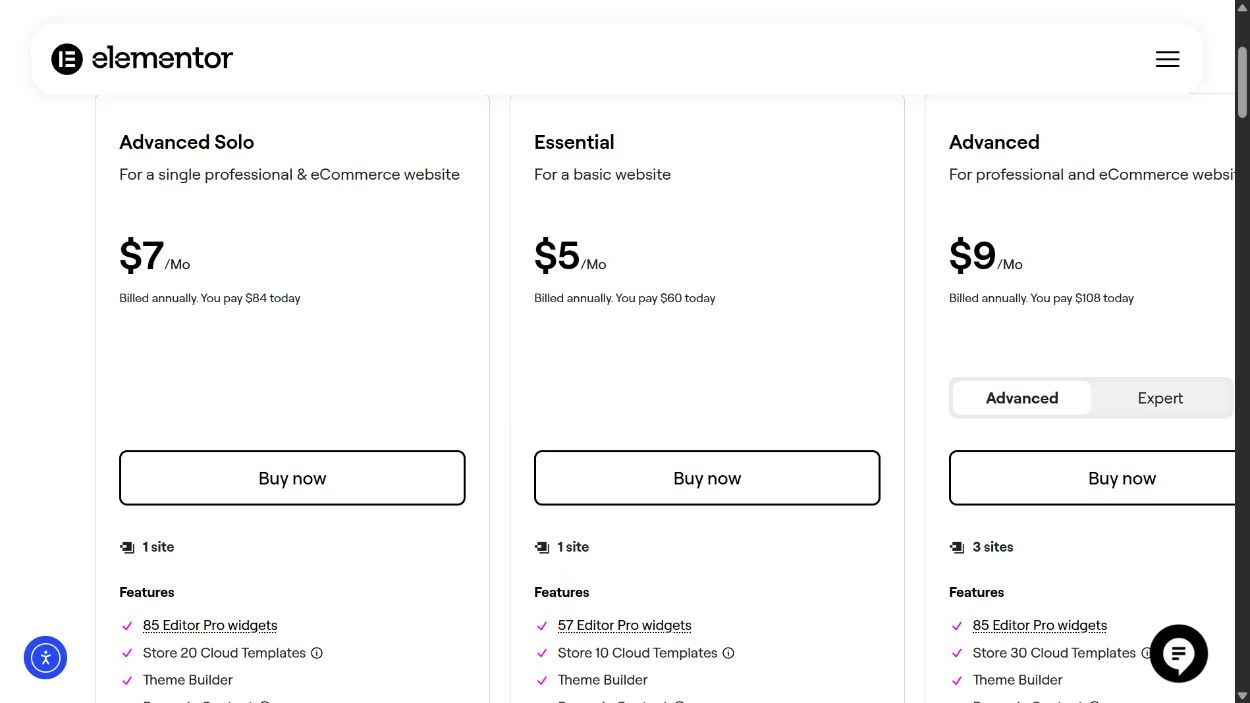
The image records a public page, not a paid customer dashboard or a test result. It may show a region-specific promotion that changes after the capture date. Our tables keep the important figures readable on a phone; use the full-size image to inspect the original context.
Where Elementor fits and where it adds work
Reasons to consider it
- Free provides a way to explore the basic visual workflow before buying a license.
- Paid tiers distinguish one-site, three-site and 25-site needs.
- Theme templates, forms and higher-tier popup or store tools can reduce the need for separate design components.
Trade-offs to account for
- An Editor subscription does not include a hosted WordPress site.
- Essential omits important advanced features; a Pro label alone does not tell you the feature set.
- Annual renewal, plugin compatibility and expiring One credits require ongoing attention.
Editor, One and Host are three different decisions
Elementor Editor is a visual page-building plugin for WordPress. Free covers basic visual editing. Paid Pro licenses expand the design tools and licensed site allowance. You still need a WordPress installation, a compatible hosting environment and a domain if you want a public branded site.
Elementor One combines the Pro editor with connected services such as AI creation, image optimization and other site tools under a shared credit allowance. It does not turn the Editor pricing page into a hosting plan. The captured FAQ explicitly separates hosting from these subscriptions.
Elementor Host is a separately sold hosting product. Its chosen bundle can change which editor features are included, so read the actual inclusions before buying an additional Editor license. This review’s price and value analysis covers Editor and One; it does not claim a hands-on assessment of Elementor Host.
For an existing WordPress site, the decision is often an incremental software expense. For a new business website, it is only one line in the budget. Hosting, domain renewal, content, email, maintenance and integrations can still require separate time or money. Our website builder versus WordPress guide helps decide whether that ownership model suits you.
Free and Pro: buy the feature you need
| Need | Free | Essential | Advanced Solo / Advanced / Expert |
|---|---|---|---|
| Basic visual page editing | Available | Available | Available |
| Pro Theme Builder and dynamic content | No Pro license | Included | Included |
| Pro Form Builder | No Pro license | Included | Included |
| Popup Builder | No | No | Included |
| Custom CSS / code tools in the paid feature table | No | No | Included |
| eCommerce tools in the paid feature table | No | No | Included |
| Listed Pro widgets | None | 57 | 85 |
A simple informational site: start with Free and a representative page. If your needs remain within basic editing, a promotion is not a reason to add an annual bill. Free does not remove WordPress hosting or maintenance costs.
A one-site lead-generation project: Essential includes Theme Builder, dynamic content and forms in the captured table. At $60 for the year, it can fit a defined design without advanced overlays or store tools. If a popup is part of the actual brief, however, Essential fails that requirement even though it is a paid Pro plan.
A store or more customized one-site design: Advanced Solo costs $84 initially, $24 more than Essential. The listed popup, custom CSS/code and eCommerce tools are the reason to pay that difference. Store design features do not replace the underlying commerce system, product work, payment fees or operational responsibilities.
This is a feature-based shortlist, not a claim that buying more widgets makes a website better. Select the smallest plan that passes the real requirements, then keep the page structure and integrations manageable.
One, three or 25 sites: do the license arithmetic
| Your actual requirement | First-year starting point | Why |
|---|---|---|
| 1 site without advanced popup / store tools | Essential · $60 | Its lower feature set may be sufficient. |
| 1 site requiring those advanced tools | Advanced Solo · $84 | The useful upgrade is the feature set, not extra site slots. |
| 3 sites needing the advanced tools | Advanced · $108 | Three separate Solo licenses would cost $252 initially. |
| Up to 25 sites needing the Pro feature set | Expert · $204 | Assess used sites and client ownership before buying spare capacity. |
Advanced covers three sites for $108 initially. Against three Essential licenses at $180, that is $72 less while providing the higher feature set. Against three Solo licenses at $252, it is $144 less. These comparisons assume the same person or organization can appropriately manage the licenses and all three sites actually need the paid editor.
Expert’s $204 first-year cost is $8.16 per site only when all 25 slots are used. That arithmetic is not a recurring-price guarantee and does not justify opening unnecessary projects. A freelancer with three active clients should also price handover: who owns the subscription, who receives renewal notices and what happens when the maintenance relationship ends?
Keep client billing and ownership clear. A shared license may be convenient, but the client should understand which updates and services depend on the ongoing arrangement. Document the installed plugins and a usable backup at handover, not just the design files.
Is One worth the additional subscription cost?
One’s captured first-year price is $180, followed by $228 per year. It includes 25,000 shared credits each month. That makes it $96 more than Advanced Solo initially for one site. The decision is whether the included connected services replace work or subscriptions you would otherwise use.
The credit pool supports different services; 25,000 credits does not mean 25,000 of every action. Check the current consumption rate for the operations you expect to perform. Credits expire monthly and do not roll over. A seasonal project with one heavy launch month cannot assume that unused prior months will accumulate for that launch.
Make a small usage worksheet: list the actions, expected monthly volume and current credit cost. Include the time to review generated text or images and to inspect optimized output. Accessibility or consent-related tools still require configuration and judgment about the actual site; a subscription does not by itself establish compliance.
One Agency is listed at $432 initially and $540 per year on renewal, with unlimited site licensing and a shared monthly credit allowance. Unlimited sites is not unlimited credit use. Review its current allowance, team needs and client permissions before comparing it with Expert. If the need is simply Pro design on a few sites, the smaller Editor licenses deserve consideration first.
A practical workflow for a maintainable design
Begin with a small design system: heading styles, body text, spacing, button states and a restrained color palette. Build a representative page with a real navigation menu, a long heading, an image, a form and the most complex content block you expect to publish. Reusing consistent components makes later changes easier than individually styling every section.
Check that page on narrow mobile widths before reproducing it across the site. Inspect long labels, columns, popup close controls, focus outlines and error messages. A visual editor’s responsive controls help with layout decisions; they do not prove the result is readable or keyboard-accessible.
Keep functionality deliberate. Every additional widget pack or integration adds something else to update and troubleshoot. If a feature requires custom CSS or code, record its purpose and test it after relevant updates. The ability to edit visually does not remove the need to understand which component owns a piece of behavior.
For a client site, hand over a small editing guide: which fields are safe to change, which templates affect multiple pages and how to preview before publishing. A design that the owner can maintain reliably is more useful than one that looks impressive only in the initial demonstration.
Hosting requirements and performance: what we can verify
Elementor’s published requirements specify at least 256 MB of WordPress memory for Elementor alone and recommend 512 MB. A hosting plan’s total RAM is not the same setting as WordPress’s memory limit. Ask whether the required limit can be configured, and allow for the theme, other plugins and the workload rather than treating the minimum as a universal capacity recommendation.
Use a maintained PHP version compatible with the current editor and your other plugins. Check the official requirements before installation or a major upgrade. Older minimum versions in documentation should not be interpreted as advice to select software that is no longer maintained.
We have not installed a paid Elementor license or measured a representative website. Therefore, we do not claim a particular Core Web Vitals score, loading-time improvement or penalty. The practical verification is to test your real page before and after a change, using the same content and conditions. Our Core Web Vitals guide explains what to measure.
If you need hosting separately, compare Hostinger, SiteGround or Hosting.com by application limits, recovery and ongoing cost. These are hosting alternatives within our partners, not claims that Elementor certifies them or that we tested the combination.
Renewal, expiration and moving the site
Automatic renewal is enabled by default. The account provides a control for disabling it. That prevents a future automatic renewal according to the subscription’s rules; it does not itself request a refund for a payment already made. Check the renewal date, amount and applicable refund terms while you still have time to act.
The public pricing and terms describe a 30-day money-back offer for eligible new annual subscriptions, with exclusions including renewals or upgrades in the terms. Confirm eligibility for the exact bundle and purchase route rather than assuming every Elementor charge is covered.
When a Pro license expires, the documentation describes losing updates, support and premium access. Existing designs can continue while the required plugin remains active, but that is not a promise of indefinite compatibility. Updating the Free plugin while an old Pro version remains frozen can create version mismatches. Deactivating a component is a separate action from letting the license expire and can affect what is rendered.
Moving a WordPress site to another host is also different from removing its page builder. Files and the database can be migrated, but designs that depend on Pro widgets or templates still depend on those components. Budget time for rebuilding and verifying layouts if you later change the design system. Keep a full backup and test the move before replacing the live site.
Our recommendation by starting point
New to the workflow: use Free on a representative page first. A clear feature gap is a better upgrade trigger than the existence of a discount. One business site: choose Essential only if its exclusions are acceptable; price Advanced Solo when popups, custom code or eCommerce design are required. Several paid sites: compare Advanced or Expert against actual used licenses and a documented client handover process.
One or One Agency: select the bundle after a monthly credit and workflow calculation. If the included tools do not replace a real need, the smaller Editor plan can leave more budget for hosting, maintenance or content. Keep the hosting subscription separate in every comparison.
Elementor offers a useful visual design route within WordPress. Its value depends on the work you want to do, the features the selected tier includes and the person responsible for maintaining the result. That is the basis of our recommendation; we have not assigned a tested performance or usability score.
Visit Elementor (affiliate link, opens in a new tab)How we reached the rating
| Criterion · 20% each | Score / 5 | Why it received this score |
|---|---|---|
| Feature fit | 4.0 | The Free and Pro range covers basic editing through forms, theme templates and store design, with meaningful tier differences. |
| Design workflow | 4.0 | Published responsive and reusable design tools support a structured workflow; output still requires accessibility and device checks. |
| Ownership and maintenance | 3.5 | WordPress hosting remains a separate choice, while Pro widgets and layouts create a continuing plugin dependency. |
| Subscription value | 3.5 | Site-count tiers offer useful choices; annual commitment, unknown numeric Pro renewals and expiring One credits complicate a budget. |
| Documentation and transparency | 4.0 | The feature table identifies important exclusions and One renewal rates; we have not tested the editor or a paid installation. |
Overall: (4.0 + 4.0 + 3.5 + 3.5 + 4.0) ÷ 5 = 3.8/5, rounded to one decimal. Scores reflect the documented offer and its fit for the reader described in our verdict. A small score difference should not override an essential requirement.
Scale: 1 = substantial documented limitations; 2 = limited fit or evidence; 3 = adequate with material trade-offs; 4 = strong documented fit; 5 = exceptionally complete in this coverage set. Half-points express an intermediate judgment. Missing information lowers confidence or documentation scores, not an invented measurement of service quality. Full rating methodology.
Compare the next decision
Frequently asked questions
Does Elementor Pro include website hosting?
The Editor and One plans covered here do not include hosting. Elementor Host is a separate product; check its bundle before purchasing an additional Editor license.
Is the $5 Essential price a monthly payment?
No. The captured offer is $60 billed annually, displayed as a $5 monthly equivalent, before applicable tax.
Does Essential include popups or eCommerce design tools?
The current pricing table excludes Popup Builder, eCommerce and custom CSS/code from Essential. Advanced Solo and the larger Advanced / Expert licenses include those listed features.
Do Elementor One credits roll over?
No. The official FAQ says unused credits expire monthly. Check consumption rates and the allowance for the actual plan before budgeting usage.
What happens after a Pro subscription expires?
Existing designs can continue while the required plugin stays active, but updates, support and premium access are lost. Compatibility is not guaranteed indefinitely; deactivating a required plugin can separately affect the site.
Has HostingRanker tested Elementor on a paid site?
No. This is a public-documentation and pricing review, with original screenshots and our own cost comparisons. It does not present hands-on editor or performance results.
Sources & editorial notes
Public product documentation, USD price cards and original browser captures were checked on September 7, 2026. These are dated research observations, not paid-account tests. Confirm the final order, tax and renewal terms before purchase.
- Elementor: Editor / One USD prices and plan feature matrix
- Elementor: WordPress, memory and system requirements
- Elementor: Free editor and subscription pricing conditions
- Elementor: One credit expiry and plan questions
- Elementor: managing automatic renewal
- Elementor: Pro expiry, plugin use and update compatibility
- Elementor: subscription, refund and support terms
- Elementor Host: separate hosting product
This guide combines published documentation with our editorial analysis. We have not measured provider performance or conducted an independent security audit. Read our methodology. Report a correction.

About the author
Vlastimil Stich
Vlastimil founded HostingRanker in 2020. His work spans 3D graphics, entrepreneurship and investing, with close to 100 web projects created during his business career. He writes about hosting, website infrastructure and the practical decisions behind building and maintaining a website.