


What is ExitLag?
ExitLag is a subscription service that optimizes the network path between your device and supported online games. Think of it as an alternative route for game traffic: useful when the route your connection normally takes is inefficient or unstable. It is available through desktop and mobile apps, with separate account and billing decisions for individuals or groups.
That distinction matters because “lag” is an everyday word for several different problems. A character snapping backward can be a connection symptom; an overloaded graphics card can make the picture stutter even when the connection is excellent. Buying a routing service without separating those problems is an easy way to add a subscription that does not solve the issue.
Like other subscription software, ExitLag should be judged against the problem you need it to solve. Its purpose differs from the encrypted browsing connection described in what a VPN protects. ExitLag’s own overview describes the service as a traffic optimizer rather than a traditional VPN.
How does ExitLag work?
The normal path from your home to a game server passes through networks you do not control. A route can be longer or more congested than another available route. ExitLag’s routing infrastructure aims to provide a more useful path, while its multipath description says packets can travel over multiple routes to reduce dependence on a single problematic path.
Conceptual illustration only. It does not represent a measured route, latency reduction or guaranteed failover.
A longer-looking path is not necessarily slower: congestion and interconnection quality matter as well as distance. Equally, adding a relay can make an already good route worse. The practical question is whether your matches become more consistent with the service enabled.
Keep the destination constant while evaluating that question. Switching from a distant game region to a nearby one at the same time as enabling ExitLag would make the comparison inconclusive. A routing improvement also does not move the actual game server into your city or remove the time signals need to travel.
Does ExitLag work, and when is it worth trying?
| What you notice | A useful first check | Where ExitLag fits |
|---|---|---|
| High ping in one game, while other games behave normally | Compare the same server region at different times. | A reasonable trial candidate if the problem lies on that route. |
| Ping spikes or rubber-banding during busy hours | Pause uploads and downloads; compare Ethernet with Wi-Fi. | May help if the remaining issue is beyond your local network. |
| Packet loss across every device at home | Check cables, signal quality and your ISP connection. | Fix the local connection first; a new route cannot restore a failed link. |
| Low FPS or stutter while playing offline | Check frame times, temperature, graphics settings and background load. | Investigate device performance separately from routing. |
| Everyone in the same match freezes together | Check the game’s service-status channel. | A server-side fault is not a sensible reason to buy a routing subscription. |
| Stable low ping and no noticeable connection problems | Keep a baseline and avoid adding variables. | There may be little benefit; keep the direct connection if it performs better. |
Our verdict is conditional: try it for a repeatable routing problem; keep it only for a repeatable improvement. The product can be useful without being necessary for every gamer. A friend’s successful result on another ISP, in another city or on another server does not establish your outcome.
For competitive play, consistency can matter more than the lowest number on a dashboard. A route with occasional severe spikes may feel worse than a slightly slower route that remains stable. Record disconnections and the frequency of spikes alongside your usual ping.
Features explained: routing, diagnostics and PC tools
| Feature | Documented purpose | How to evaluate it |
|---|---|---|
| AI route optimization / multipath | Select routes and reduce dependence on a single network path. | Compare the same game region with the service off and on. |
| Network Analyzer | Network scanning, monitoring and game-ping information; listed as free on the desktop page. | Use it to form a baseline, then check the game’s own telemetry. |
| Multi-Internet | Use available internet connections and switch between them. | Requires additional working connections; check mobile-data costs. |
| Traffic Shaper | Limit competing app traffic, with exceptions. | Check whether stopping a download already fixes the issue. |
| Performance Boost / PC Boost | System tweaks and RAM-related tools. | Test separately so an FPS change is not mistaken for a routing result. |
Feature names and availability can change between apps. The desktop feature page and mobile product page describe different interfaces; do not assume a Windows setting exists on iPhone. Mobile documentation also lists device monitoring, such as temperature and battery information.
Change one feature at a time. If you enable route optimization, change Windows performance settings and lower graphics quality in one pass, you will not know which action helped. Save your original settings before experimenting and prefer changes you understand and can reverse.
What the ExitLag interface looks like
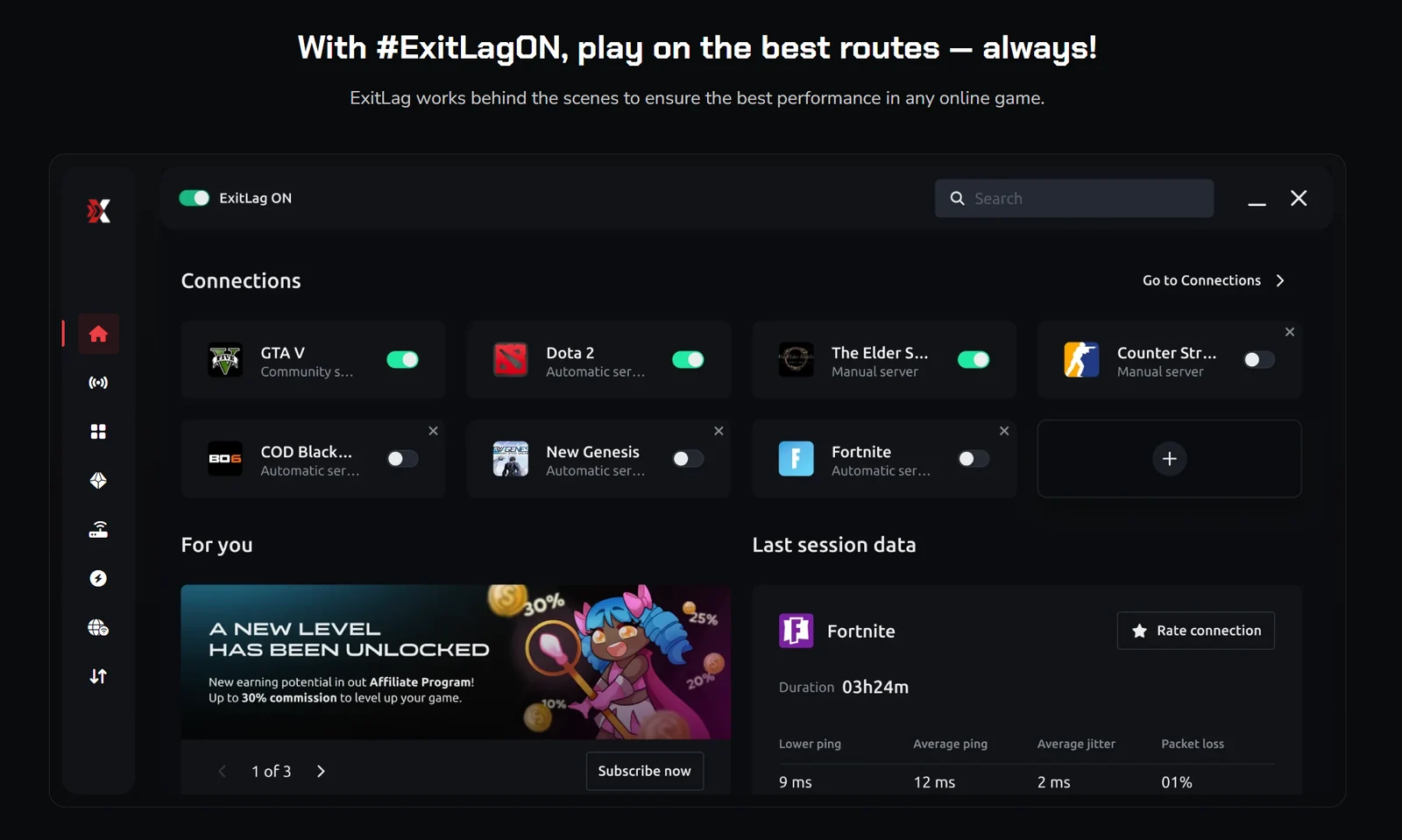
The illustration shows why it is useful to think in terms of individual games and sessions. Check which game is enabled, which region is selected and whether the session you are measuring is actually using that configuration. A successful connection indicator is a setup check; it is not evidence that latency improved.
ExitLag pros and cons
Reasons to consider it
- A focused option for diagnosing route-related gaming problems.
- A no-card trial for eligible new users, with a clear testing window.
- Individual and group plans, plus short billing commitments.
- Desktop diagnostics and controls that can support a structured comparison.
- Official apps for both major mobile platforms as well as Windows.
Reasons to be cautious
- Improvement depends on the game, destination, ISP and time of day.
- A per-player monthly headline can obscure a larger prepaid bill.
- Physical distance and server faults remain outside a routing tool’s control.
- Group-plan value falls when paid player slots go unused.
- Gaming optimization does not establish anonymous or private browsing.
These are purchasing trade-offs, not a numerical performance score. We have not produced a controlled benchmark that would justify claiming a particular percentage reduction in ping or ranking ExitLag above every alternative.
ExitLag pricing: Solo, Duo and Squad in USD
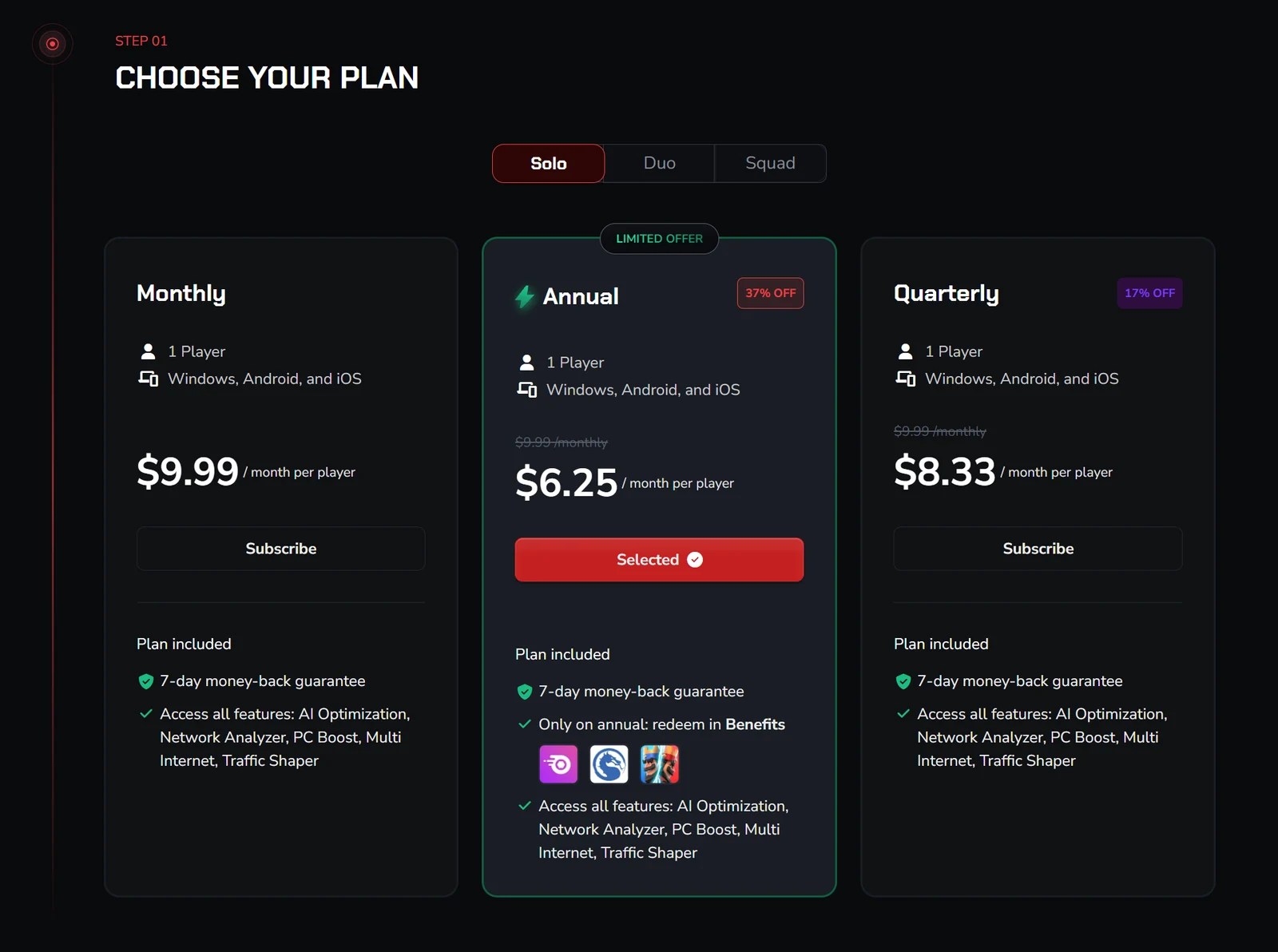
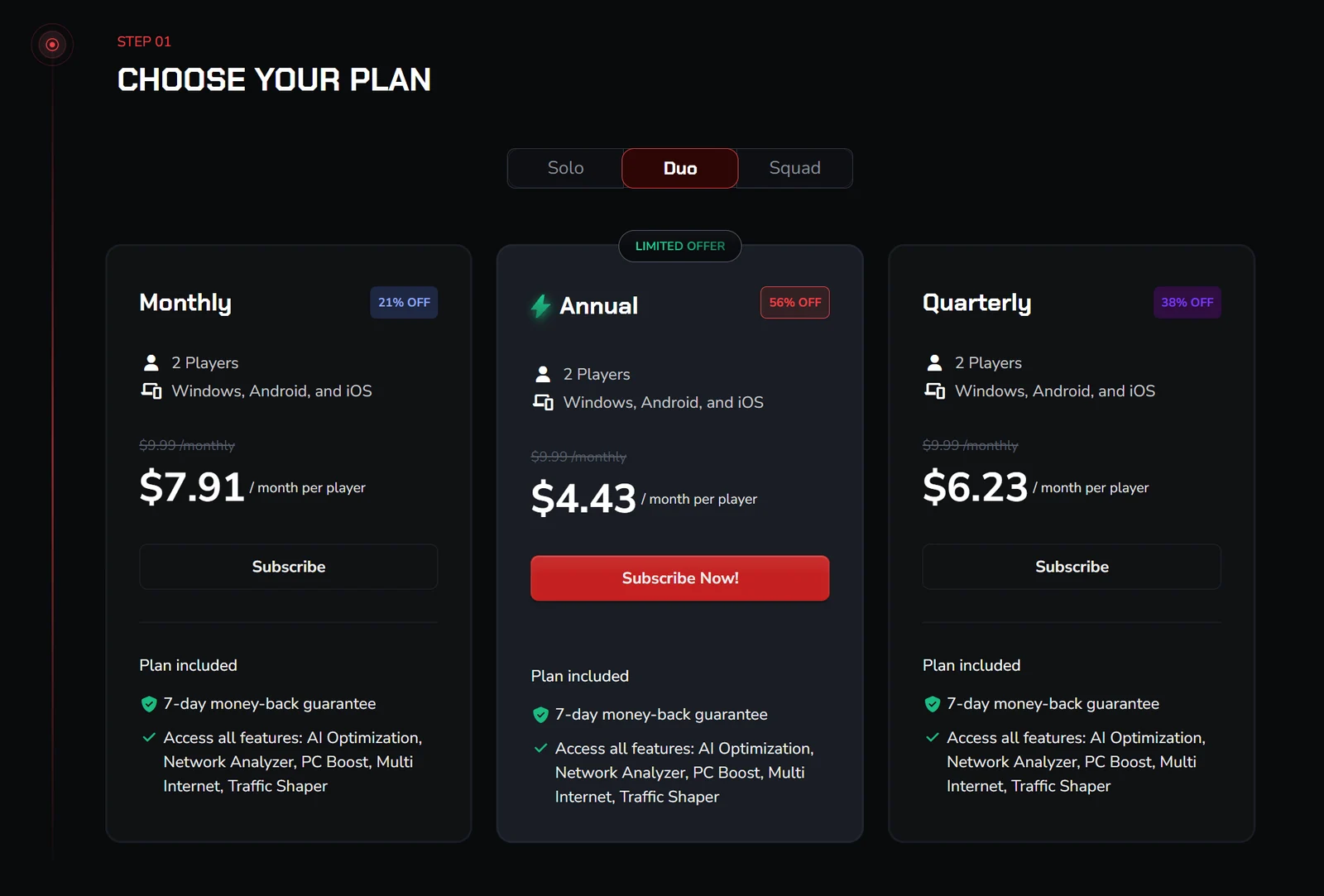
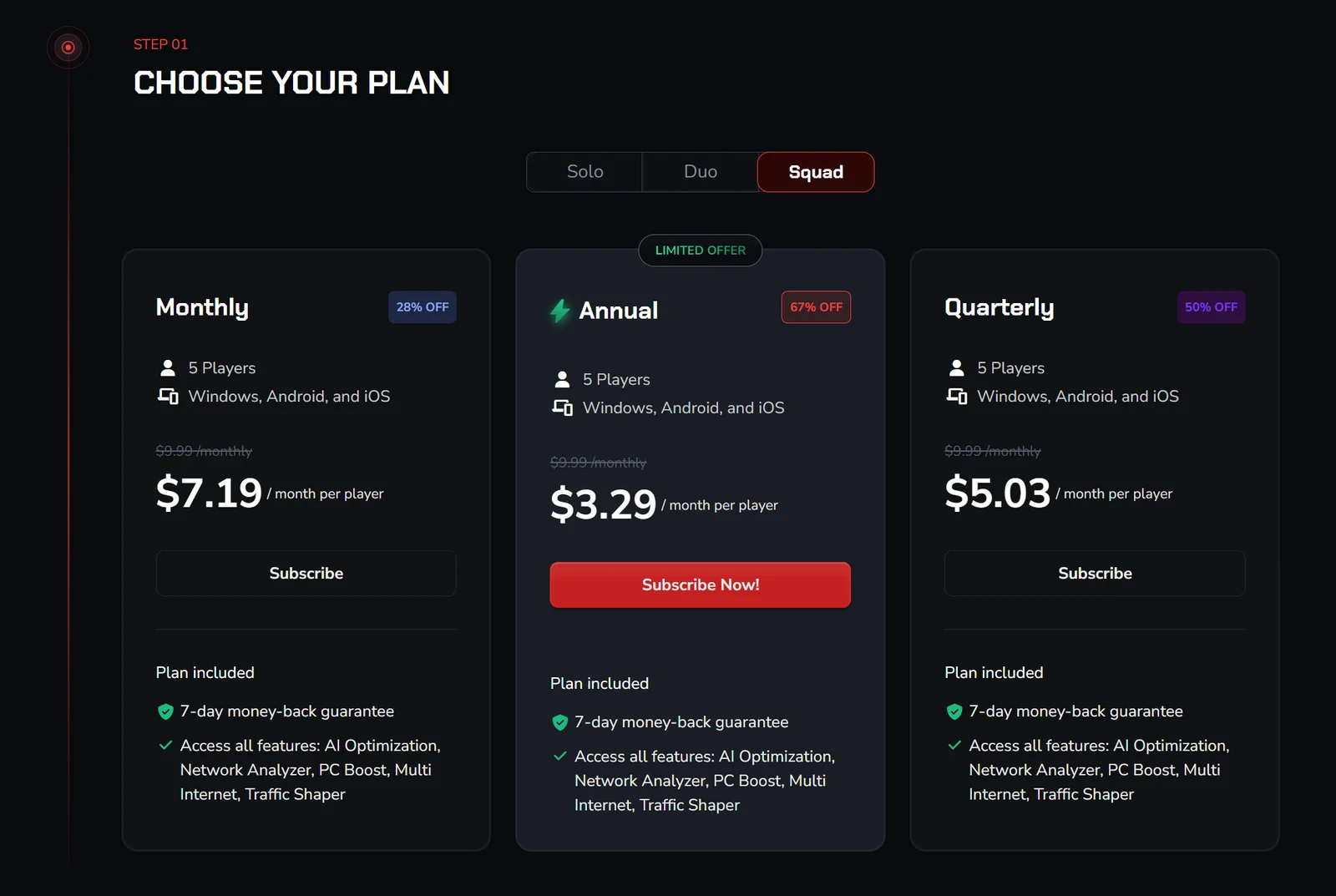
The Solo plan was $9.99 monthly, $24.98 for three months or $75.00 for a year in the public cart we checked. Duo covers two players and Squad covers five. The cards below show the annual options; the full table includes every billing period. These are dated public prices, not an exclusive coupon or a guaranteed future rate.
Solo annual
$75.00total for 12 months
$6.25 per month per player, as advertised.
A single player who has already confirmed the benefit.
View Solo options (affiliate link, opens in a new tab)Select Solo on ExitLag. The link opens the general offer.
Duo annual
$106.15total for 12 months
$4.43 per month per player, as advertised.
Two regular players, each using their own account.
View Duo options (affiliate link, opens in a new tab)Select Duo on ExitLag. The link opens the general offer.
Squad annual
$197.39total for 12 months
$3.29 per month per player, as advertised.
A group that can make useful use of all five slots.
View Squad options (affiliate link, opens in a new tab)Select Squad on ExitLag. The link opens the general offer.
| Plan | Term paid for | Advertised / player / month | Whole-plan cart total |
|---|---|---|---|
| Solo · 1 player | Monthly | $9.99 | $9.99 for 1 month |
| Solo · 1 player | Quarterly | $8.33 | $24.98 for 3 months |
| Solo · 1 player | Annual | $6.25 | $75.00 for 12 months |
| Duo · 2 players | Monthly | $7.91 | $15.82 for 1 month |
| Duo · 2 players | Quarterly | $6.23 | $37.39 for 3 months |
| Duo · 2 players | Annual | $4.43 | $106.15 for 12 months |
| Squad · 5 players | Monthly | $7.19 | $35.96 for 1 month |
| Squad · 5 players | Quarterly | $5.03 | $75.39 for 3 months |
| Squad · 5 players | Annual | $3.29 | $197.39 for 12 months |
Source: public USD cards and pre-login cart, September 30, 2026. No coupon entered. Final taxes and the payable amount depend on checkout. Automatic renewal was displayed; a distinct future renewal amount was not established.
Use the cart total, not rounded multiplication. Duo annual advertises $4.43 per player per month, but its observed total was $106.15, not $106.32. Squad annual showed $197.39, not the $197.40 obtained from multiplying $3.29 by five players and twelve months. Small rounding differences also occur on quarterly and monthly group plans.
Do not interpret an annual monthly equivalent as a month-to-month payment. Compare the full commitment with how often you play and whether the people sharing the plan will still need it in six months. If your route changes after moving house or changing ISP, repeat the test before another long renewal.
ExitLag cost calculator: account for unused player slots
Select a plan and the number of players who will actually use it. The calculator divides the verified whole-plan bill by the paid term and active players. It does not change ExitLag’s charge, promise a refund for empty slots or predict a future renewal.
For example, five active players sharing Squad annual allocate about $3.29 per player per month. With only two active players, the same $197.39 purchase works out to about $8.22 each per month. Duo annual would instead cost those two players $106.15 in total. An unused slot is not a saving.
How Duo and Squad work for friends and families
ExitLag’s multiplayer documentation describes Duo as the subscriber plus one guest, and Squad as the subscriber plus four guests. Use the account’s invitation and team-management system rather than handing everyone the same password.
Choose the plan owner deliberately. That person should understand who pays, who gets access and what happens if somebody leaves. Before purchase, confirm how member replacement works and whether the invited users are eligible. The account-management guide describes a seven-day association with a removed member’s slot, so do not assume instant rotation between an unlimited number of friends.
- Two stable users: compare Duo against two individual subscriptions.
- Three or four users: compare the entire Squad price with the combination of smaller plans, including any spare slot.
- Five regular users: Squad is easier to justify when everyone has already found the service useful.
- A temporary team: weigh a shorter billing term against coordinating a full year of access.
One person’s performance result is not enough for a group purchase. Ask every participant to test their own location and game. Sharing the bill does not mean all five connections follow the same route or see the same benefit.
ExitLag free trial: 3 days on PC and 7 days on mobile
The current free-trial help article describes three days for desktop and seven days for mobile, available to eligible new users without registering a credit card. The days run consecutively, including days when you do not play; the trial cannot be extended.
The help article explicitly says an account created through the mobile app does not receive the desktop trial. Check eligibility before creating your first account.
Start when you can actually use the test window. An account created just before a trip or a busy workweek wastes much of the evidence you could gather. Plan at least a normal session and a session during your usual busy evening, then follow the comparison checklist below.
After the trial, paid access is a separate decision. A free diagnostic feature is also different from unlimited free game optimization. Check the specific account screen rather than treating every “free” message as the same offer.
Open the official trial registration
Direct non-affiliate link. Read the eligibility and timing rules first. This is separate from a paid subscription with a refund window.
Refunds, automatic renewal and cancellation
ExitLag’s service terms provide a seven-day withdrawal window for first-time subscribers and exclude several payment routes, including cryptocurrency, Russian SBP, Perfect Money and P2P Cards. The same page contains restrictive non-refund wording. Treat the benefit as conditional; ask support if your payment or purchase channel is unclear.
Cancellation stops a future renewal; it is not the same request as refunding an existing charge. Cancel before the next billing date, retain the confirmation and verify the account’s status. The terms say access continues through the paid period. Uninstalling the app does not cancel the subscription.
- Check the merchant and billing channel on your receipt.
- Open the account’s subscription-management area and complete its cancellation flow.
- For a refund, contact the relevant billing/support channel promptly and specify the order and purchase date.
- If a mobile store billed you, check that store’s subscription and refund process rather than assuming website cancellation controls the charge.
Keep a reminder several days before renewal. If you only want a short test, the no-card trial is a clearer starting point than paying first and relying on a refund.
ExitLag discounts and promotional claims: what to check
The supplied homepage screenshot contains promotions that differ from the standard plan cards. We have not established that every visitor through our affiliate link receives those benefits, or that separate promotions can be combined. There is no verified exclusive coupon code in this review.
For any offer, record the plan name, player count, paid term, total due, eligibility, bonus redemption conditions and renewal amount. A percentage can compare a long commitment with a monthly reference rate; it does not necessarily measure the saving against the plan you would otherwise buy.
View the supplied homepage promotion screenshot
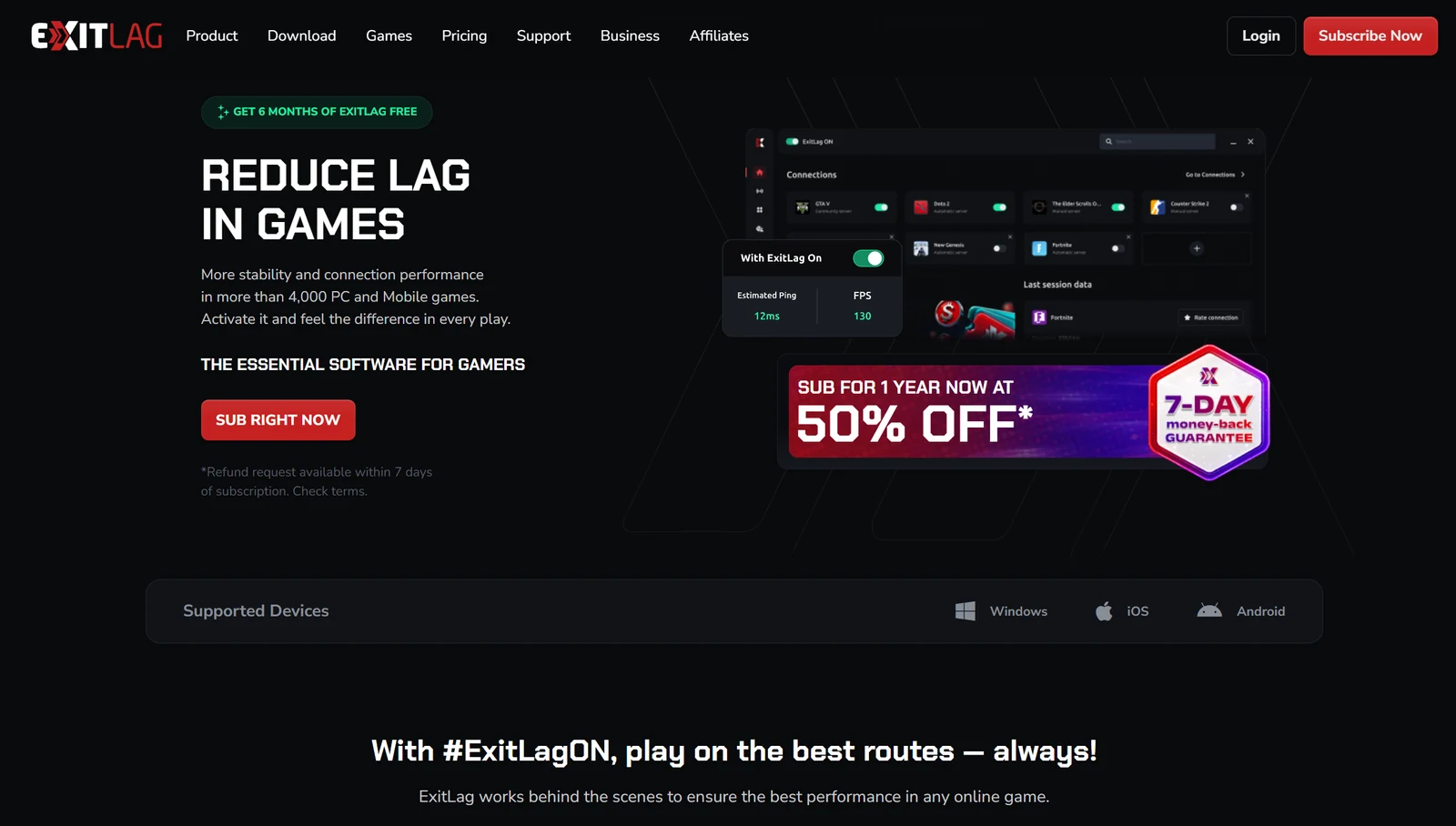
Use our ExitLag offer link (affiliate link, opens in a new tab) to inspect the current destination, then judge the checkout on its own terms. Avoid third-party “cracked” installers or shared credentials as a substitute for a legitimate trial.
Supported devices and games: check your exact setup
| Device or environment | What we verified | Before subscribing |
|---|---|---|
| Windows PC or laptop | Official download page specifies Windows 10 64-bit or later. | Check current requirements, supported game and publisher restrictions. |
| Android | Official mobile download and store routes are listed. | Check store compatibility, mobile game coverage and billing channel. |
| iPhone / iPad | An official App Store route is listed. | Check the current store device and OS requirements; desktop features differ. |
| macOS / Linux | No native download listed on the download page we reviewed. | Do not buy on the assumption that a Windows license provides a native app. |
| PlayStation / Xbox / Switch / routers | No native installer verified in the reviewed download list. | Ask support about your exact setup; a PC app does not automatically cover a console. |
Use the official download page and game directory rather than a third-party installer mirror. A publisher may offer different regional editions, launchers or mobile and desktop versions under a similar name. Check the edition you actually play.
The supplied interface illustration includes recognizable games such as Fortnite and Dota 2, but an illustration is not a live compatibility list. Search the current library before relying on a specific title. Confirm that the region you choose matches the destination used by your actual matches, not merely your physical location.
How to set up ExitLag for a useful first test
- Establish a baseline. Play a normal session, record the game region and note ping, spikes, packet loss and FPS separately.
- Check trial eligibility. If testing Windows, use the desktop registration route before creating a mobile account.
- Download from the official source. Use ExitLag’s download page or its linked mobile store. Review installer permissions and keep your security software enabled.
- Select the exact game. Match the supported entry to the version you use; start with the documented default route selection.
- Apply optimization before the comparison session. Follow the current app prompts; labels may differ from supplied screenshots.
- Keep the same destination and conditions. Use the same game region, device, connection and comparable playing hours.
- Record the outcome. Decide after repeated sessions whether the improvement is meaningful enough to pay for.
On a managed school or work device, follow the administrator’s software policy. If security software flags an installer, verify its source and contact official support; do not use a broad security exception as a troubleshooting shortcut.
Do not run another routing tool or VPN during the initial baseline. It introduces another path and makes attribution harder. If a VPN is essential to your use case, test the combined configuration separately and check whether both providers support it.
How to test whether ExitLag actually helps you
Use repeated off/on comparisons with the same game region. Aim for ordinary, representative play rather than the single best dashboard reading. An A/B/A sequence—direct connection, ExitLag, then direct again—helps reveal whether general network conditions changed during the comparison.
- Keep a short test log. Record date, local time, ISP, Ethernet or Wi-Fi, game, region and enabled ExitLag features.
- Separate the metrics. Record typical latency, spikes, packet loss, disconnects and frame-rate problems in separate columns.
- Match session conditions. Use comparable modes and durations. Keep downloads, streams and background uploads consistent.
- Repeat at the hours that matter. Include your normal evening or weekend window, not only a quiet daytime session.
- Check practical impact. Did rubber-banding stop? Did voice chat remain stable? Did a good median hide rare but severe spikes?
- Test the off switch. Confirm that you can return to the direct connection and reproduce the comparison.
| Session | Route | Typical / spike ping | Loss or disconnects | FPS / notes |
|---|---|---|---|---|
| 1 | Direct connection | Record in-game readings | Record observed issues | Record separately |
| 2 | ExitLag, same region | Use the same measurement | Use the same duration | Do not change graphics |
| 3 | Direct connection again | Check if conditions shifted | Compare like for like | Explain any differences |
Download a blank ExitLag comparison log (CSV)
There is no universal percentage that makes the service worthwhile. Decide what matters before measuring: fewer disconnects, fewer noticeable spikes or a reduction in latency large enough to feel in your game. A difference smaller than normal session-to-session variation is weak evidence for buying a long subscription.
A speed test to a nearby testing server does not measure the complete route to your game server. Similarly, an app’s estimated ping and an in-game ping may describe different endpoints or methods. Prefer a consistent in-game metric, and record what each number represents.
What to do if ExitLag does not improve your ping
First, return to your baseline. If the direct connection is better, leave optimization disabled for that game while investigating. A subscription is not useful merely because its dashboard shows that it is active.
| Problem | Next step |
|---|---|
| Ping rises with ExitLag enabled | Verify the game region, remove other routing tools from the test and compare another documented route option. |
| Loss affects every game and device | Try a wired connection; investigate the router, cable, Wi-Fi interference and ISP before paying for an alternative route. |
| Spikes appear when someone uploads or streams | Pause the competing task and retest. Consider router traffic management or bandwidth scheduling. |
| A game is missing or the wrong edition appears | Search the official library and ask support to confirm exact support. |
| FPS is low but network readings are stable | Investigate temperatures, frame times, drivers and game settings; test performance tools independently. |
| Improvement disappears after an ISP or game update | Repeat the same-region baseline; previous results may no longer represent your route. |
For a support request, prepare your device and app version, game and server region, connection type, times of the problem and an off/on comparison. Share sensitive account details only through the official support channel. We have not measured support response speed, so do not base a purchase on an assumed response time.
Sometimes the appropriate outcome is to keep the direct route. That is a useful result from a trial and avoids paying indefinitely for a tool that does not fit your connection.
ExitLag vs a VPN: which problem are you trying to solve?
| Decision | ExitLag | A conventional consumer VPN |
|---|---|---|
| Main purpose | Optimize supported gaming traffic and connection routes. | Provide an encrypted tunnel and a VPN exit for covered traffic. |
| Main evaluation | Match stability, latency and packet loss on your route. | Privacy properties, app behavior, security evidence and device compatibility. |
| Lower ping | Possible for an inefficient route; needs your own test. | Also route-dependent; not an automatic benefit of encryption. |
| Whole-device privacy | Do not assume gaming optimization protects all browsing. | Depends on the app, platform, exclusions and connection state. |
| Best buying question | Does it reliably improve the games I play? | Does it provide the protection and platform support I need? |
If your priority is browsing privacy, start with our VPN comparison and the feature boundaries in our NordVPN review and Surfshark review. If your problem is a specific game’s unstable route, test a gaming optimizer on that basis. These are different purchasing criteria, even though both products affect network traffic.
Read VPN vs proxy for the distinction between forwarding traffic and broader protection. A feature called a safe connection, or an operating system’s network-permission prompt, should not be treated as proof of a no-logs policy or an independently audited privacy service.
Is ExitLag safe, and can it get you banned?
Download through the official site, keep the app current and use a unique account password. Those are sensible starting steps; they are not a substitute for reviewing what a network-related app does and what information it collects.
ExitLag’s privacy policy describes collection of account details, device and website information, and software usage that can include games and interactions. It also describes service-provider sharing and international processing. We have not conducted a security audit or established an independently audited no-logs claim. Do not buy it for anonymity based on its gaming performance marketing.
The vendor says its software does not modify game files and markets it as compatible with game rules. That is the provider’s position, not an unconditional guarantee from every publisher, anti-cheat vendor or tournament organizer. Check the rules for your particular game and event, especially on a managed competitive setup.
Do not use a routing tool to evade an existing account restriction. For concerns about allowed network tools, get clarification from the game or tournament’s official support before changing your setup.
The supplied Solo, Duo and Squad price screenshots
These supplied captures preserve the per-player headline prices as displayed on September 30, 2026. We separately checked the public cart totals used above. Expand a capture to compare the units and billing terms; screenshots are dated evidence and do not update when an offer changes.
Solo price cards — supplied September 30, 2026
Duo price cards — supplied September 30, 2026
Squad price cards — supplied September 30, 2026
Before you pay: alternatives and free fixes
Start with the cheapest intervention that addresses the suspected cause. A wired connection, a closer game region or pausing a cloud backup can be more useful than another subscription. A change that fixes a local problem also benefits games that a routing service might not support.
- Weak Wi-Fi: improve signal quality or compare Ethernet before changing internet routes.
- Busy home connection: reduce competing transfers and investigate the router’s traffic-management options.
- Distant game server: choose a closer supported game region where possible; routing cannot eliminate distance.
- ISP-specific routing trouble: collect timestamps and comparisons for the ISP, then evaluate ExitLag or another optimizer under the same test conditions.
- Privacy requirement: compare a conventional VPN using our platform compatibility guide, separately from the gaming test.
When comparing paid optimizers, keep their current trial rules, supported games and full subscription bills side by side. Do not mix one product’s estimated dashboard ping with another product’s in-game measurements. Our subscription buying checklist can help you check access, recurring billing and cancellation before committing.
Our verdict: who should pay for ExitLag?
ExitLag deserves a trial if your problem looks like an inefficient or unstable route to a supported game. Its subscription is easiest to justify when repeated comparisons show better match stability during your normal playing hours, and that benefit is worth the full bill to you.
Choose Solo for one active user. Consider Duo or Squad after the other players have independently confirmed a useful result. Use a shorter term when your playing schedule or group membership is uncertain. Prepay annually only when both the product and the commitment fit.
If your connection is already stable, the game server is at fault or the main issue is low frame rate, investigate that problem first. We would rather see a reader reach the right diagnosis than mistake a discount for evidence that the software will help.
Frequently asked questions
Is ExitLag worth it?
It can be worth paying for when repeated tests show an improvement in the supported games you play. It is less compelling when the direct route is already stable, the fault is in your local connection or the problem is mainly low FPS.
How much does ExitLag cost?
The September 30, 2026 public USD cart showed Solo at $9.99 monthly, $24.98 quarterly or $75.00 annually. Duo annual was $106.15 for two players, and Squad annual was $197.39 for five. Check the full bill, tax and renewal terms before paying.
Is ExitLag free?
Eligible new users can try it without a credit card: three consecutive days on desktop or seven on mobile. Ongoing paid game optimization is different from free diagnostic tools or a limited promotion.
Can I use a mobile trial to test ExitLag on my PC?
The help article says accounts created through the mobile app do not receive the desktop trial. If your aim is to evaluate a PC connection, check the desktop trial route before registering.
Does ExitLag always lower ping?
No. The result depends on the game server, route, ISP and network conditions. An additional route may improve, leave unchanged or worsen your result. Test the same game region repeatedly.
Will ExitLag increase FPS?
Network latency and frame rate are different problems. Treat the separate PC performance tools as a separate experiment; we have not measured an FPS increase and do not promise one.
Is ExitLag a VPN?
It is primarily a gaming traffic optimizer, not a substitute for a conventional privacy VPN. Do not assume that it encrypts or protects all of your device’s browsing traffic.
Does ExitLag work on Mac, Linux or consoles?
The official downloads we reviewed listed Windows, Android and iOS. We did not verify native Mac, Linux or console apps. Confirm your exact environment with support before subscribing.
Can friends share an ExitLag plan?
Duo supports the subscriber and one guest; Squad supports the subscriber and four guests. Use the invitation system and separate accounts rather than sharing a password.
Can I get a refund after renewal?
Do not assume so. The published first-purchase withdrawal benefit is separate from stopping renewal, and payment-channel exclusions apply. Read the current terms and request help promptly if you need a refund.
Is there an exclusive ExitLag coupon here?
No exclusive coupon was verified. Our link is an affiliate link to the current offer; the price and eligibility shown at checkout determine any promotion.
Does uninstalling ExitLag cancel my subscription?
No. Manage the recurring subscription through the billing channel that charged you and retain cancellation confirmation. Removing an app is a separate action.
Sources & editorial notes
Official product documentation, trial rules and all nine public USD plan selections were checked September 30, 2026. Exact cart totals were observed before login, without a purchase or coupon. Taxes, account eligibility, app-store billing and future renewal prices may differ. The final checkout and applicable terms control your purchase.
- ExitLag: product overview and VPN distinction
- ExitLag: desktop features
- ExitLag: mobile features
- ExitLag: multipath routing technology
- ExitLag: official downloads and Windows requirements
- ExitLag: supported game directory
- ExitLag: public USD plan cards and cart
- ExitLag: free-trial duration and eligibility
- ExitLag: multiplayer plan allowances
- ExitLag: player invitations and seven-day replacement rule
- ExitLag: cancellation, refund exclusions and service terms
- ExitLag: personal data and software information
- ExitLag: help center
This is a research-based review, not a hands-on gaming benchmark. We did not install ExitLag, buy a subscription or measure ping, packet loss, FPS or support response times. The logo and five supplied screenshots are ExitLag marketing material. Numbers inside the app illustration are demonstration content, not HostingRanker results. Our recommendations and test procedure are editorial analysis. Read our methodology. Report a correction.

About the author
Pavel Stich
Pavel is a co-founder of HostingRanker with a focus on SEO and copywriting for the technology and financial sectors. His interest in early-stage businesses informs his practical approach to software: understand the problem, examine the trade-offs and choose tools that support a sustainable business.