

Our verdict and overall rating
Our verdict on NordVPN
A strong everyday VPN shortlist choice for several devices. Start with Basic unless the additional security tools replace something you actually need; count their renewal cost separately from the VPN decision.
Research-based editorial rating: five equally weighted criteria, separate from our measured Windows results below. No customer-rating aggregate or measured uptime/support score.
Our paid-account Windows test
We used an existing paid NordVPN account on a real Windows PC. We measured three NordLynx locations, tried OpenVPN UDP, compared DNS and WebRTC behavior with a direct connection, and tested Internet Kill Switch during a controlled manual disconnect.
The test started in the Czech Republic. New York is a tested VPN exit, not our physical test origin. These results do not predict the speed a reader in the United States will receive.
Our practical verdict: the nearby NordLynx connection performed well in these short transfers, and none of the three connected browser checks exposed our baseline ISP address or DNS resolvers. The US route had a substantially lower median and a wide spread. Internet Kill Switch blocked the sampled requests after manual disconnection when enabled. This supports shortlisting the Windows app, with a personal connection test before a long subscription.
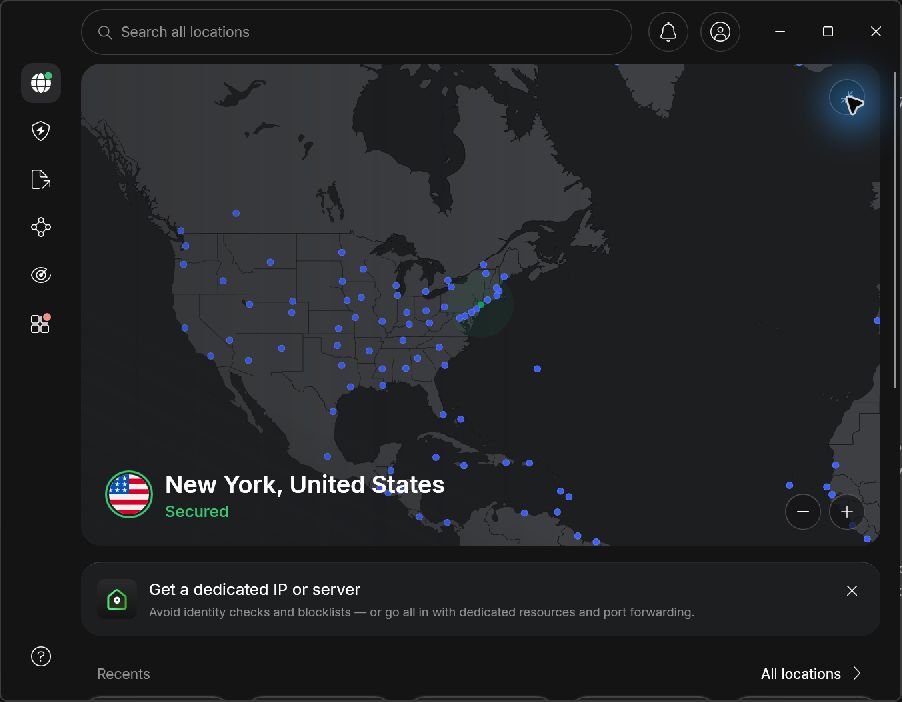
See every speed result · DNS and WebRTC checks · Kill Switch trial · Method and limits
Speed results: nearby and long-distance routes
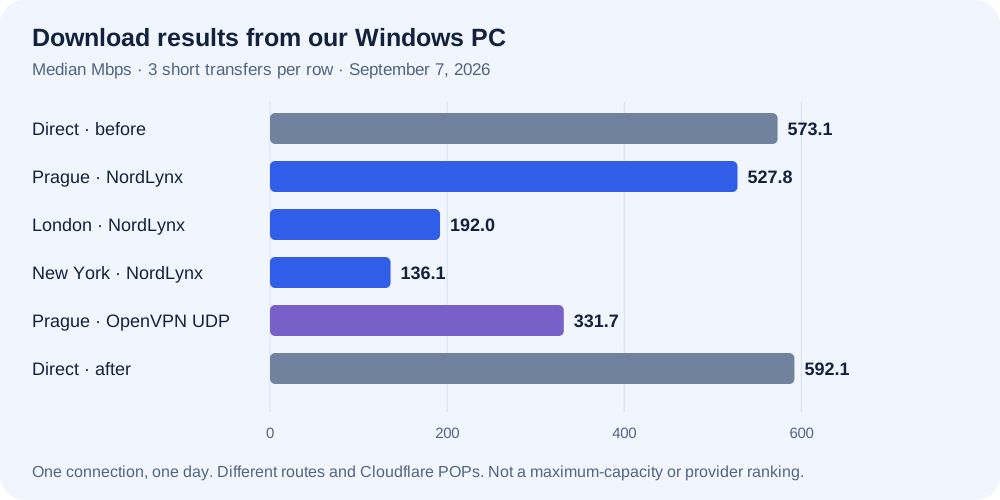
Each row contains three 25 MB downloads and three 5 MB uploads through the same HTTPS test hostname. We report the median and full observed range. A separate set of seven empty-response requests gives HTTPS time to first byte (TTFB). TTFB is not ICMP ping: it includes the endpoint’s response time.
| Connection / protocol | Download Mbps · median (range) | Upload Mbps · median (range) | HTTPS TTFB ms · median | Cloudflare POP |
|---|---|---|---|---|
| Without VPN · before None | 573.1 316.5–622.4 | 283.1 118.9–337.4 | 35.4 | PRG |
| Prague NordLynx | 527.8 510.5–577.3 | 336.3 204.6–366.8 | 34.4 | PRG |
| London NordLynx | 192.0 150.6–202.7 | 278.7 138.8–437.7 | 372.3 | LHR |
| New York NordLynx | 136.1 103.7–319.0 | 94.0 35.5–180.4 | 398.9 | EWR |
| Prague OpenVPN UDP | 331.7 318.3–380.5 | 95.5 93.3–343.4 | 44.3 | PRG |
| Without VPN · after None | 592.1 232.7–716.3 | 294.2 97.8–393.9 | 35.6 | PRG |
What we take from the numbers
Prague was the best starting point for this Czech connection. NordLynx delivered a 527.8 Mbps download median, compared with 573.1 Mbps in the initial direct control. London returned 192.0 Mbps and New York 136.1 Mbps. That is a result for these routes on this day, not evidence that all UK or US NordVPN servers behave alike.
Protocol choice made a visible difference in our sample. The additional Prague OpenVPN UDP run returned 331.7 Mbps down and 95.5 Mbps up. NordLynx was higher in both directions here. The app selected servers for each connection; we did not hold the exact server hardware constant, so this is not a pure protocol-overhead experiment.
Do not read the largest number as your connection’s capacity. Transfers were deliberately short, so connection ramp-up, endpoint behavior and ordinary traffic can have a large effect. For example, New York downloads ranged from 103.7 to 319.0 Mbps, and direct downloads also varied substantially. The final direct medians were 592.1 Mbps down and 294.2 Mbps up. This control helps show the underlying connection still worked, but does not remove all variation.
We used Cloudflare’s anycast network: Prague reached PRG, London LHR and New York EWR. The endpoint therefore changed with the route. Our calculation uses bytes divided by complete HTTPS request time; it is our own benchmark, not the score produced by Cloudflare’s official speed-test page. We did not run a multi-provider race or a US-origin benchmark.
Public IP, DNS and WebRTC: what changed
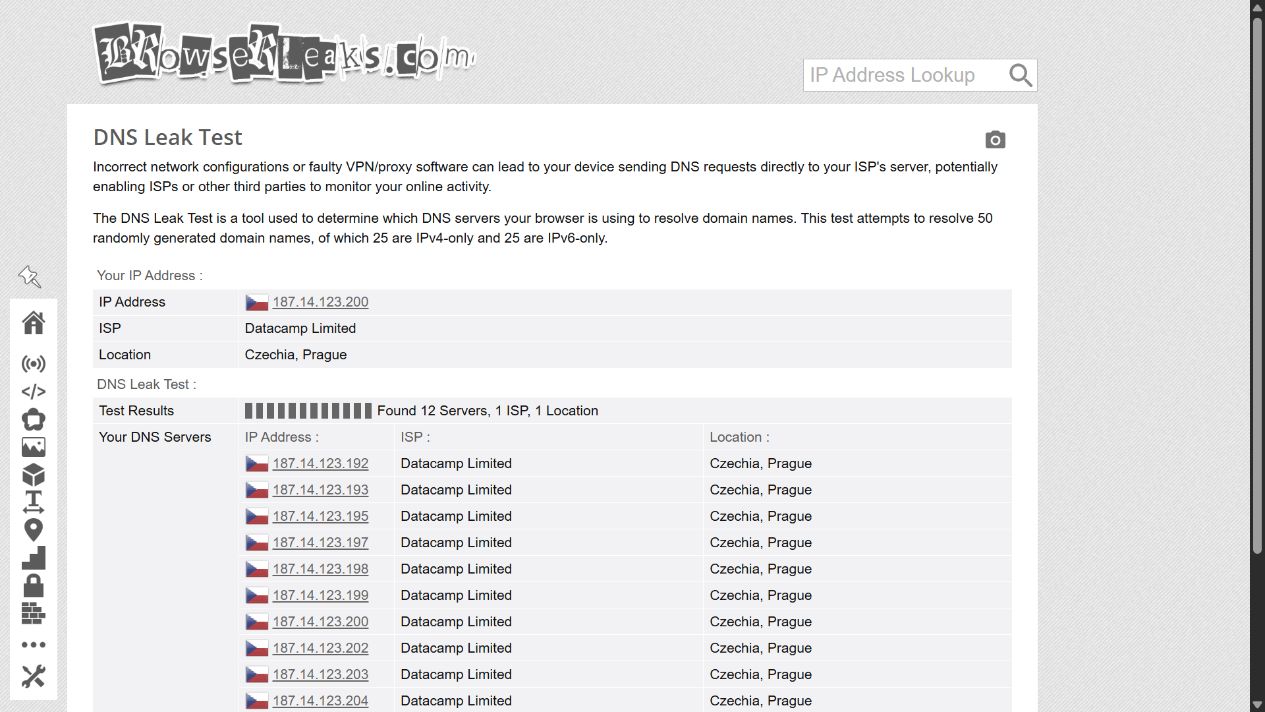
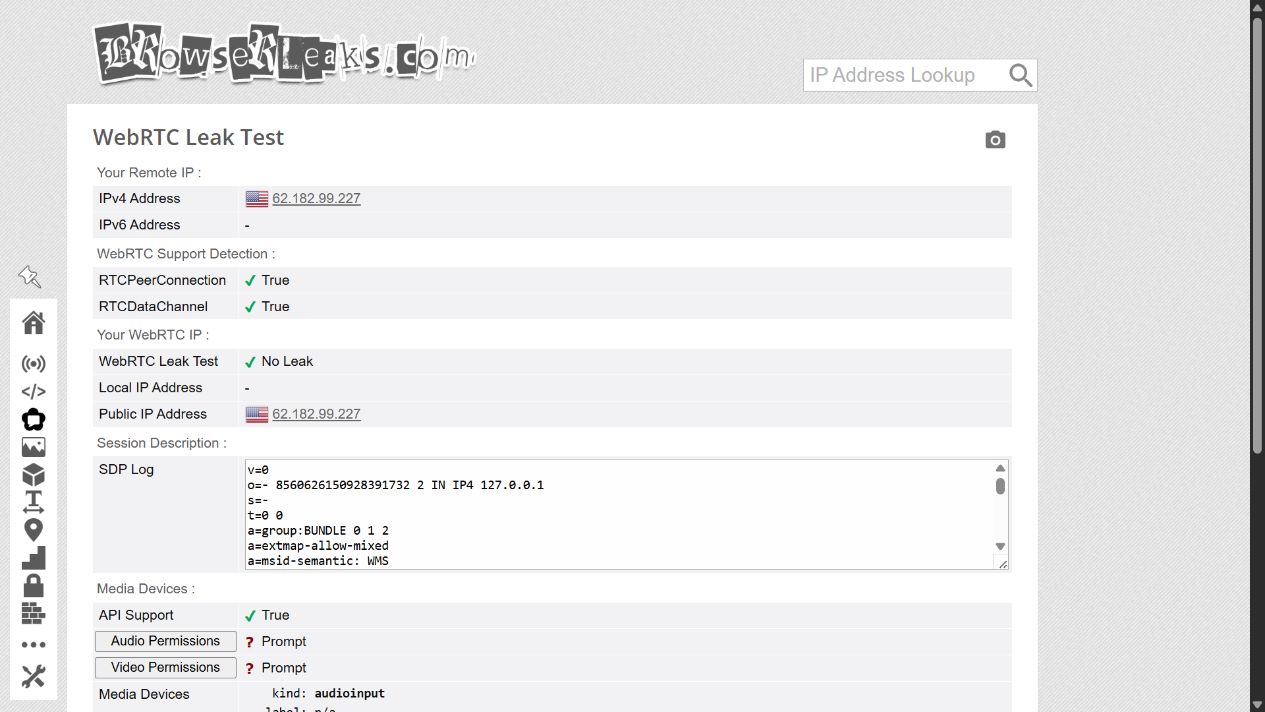
We ran BrowserLeaks DNS and WebRTC checks first without VPN, then with NordLynx connected to each location. The direct control returned the connection’s original public IPv4 and two DNS resolvers from its Czech access networks. This established that the tests could see the direct route before we checked the tunnel.
| VPN exit | DNS result observed | WebRTC result | Baseline ISP address or DNS seen? |
|---|---|---|---|
| Prague | 12 resolvers · Datacamp Limited · Czech Republic | Public WebRTC IPv4 matched the VPN-facing HTTP IPv4. | No, in this browser check. |
| London | 13 resolvers · PacketHub S.A. · United Kingdom | Public WebRTC IPv4 matched the VPN-facing HTTP IPv4. | No, in this browser check. |
| New York | 10 resolvers · Clouvider Limited and PacketHub S.A. · United States | Public WebRTC IPv4 matched the VPN-facing HTTP IPv4. | No, in this browser check. |
The VPN-facing public address differed from our direct connection in every measured VPN row. Each transfer series also ended on the same public address with which it began. Resolver counts and network names are what the test displayed; they do not establish who controls every server or prove a no-logs policy. We found no address overlap with the baseline DNS results.
IPv6 remains an open test, not a pass
No working public IPv6 connection was detected in either direct control or any VPN transfer series. The browser also showed no public IPv6. Because the baseline lacked usable IPv6, we cannot assess NordVPN’s protection against an IPv6 leak on a dual-stack connection. An IPv6 address belonging to a remote recursive DNS resolver would not by itself demonstrate IPv6 connectivity on the test PC.
These observations apply to this Chromium-based in-app browser and its existing settings. We did not alter browser secure-DNS settings or test every browser and app. The first DNS service we tried, dnsleaktest.com, failed to resolve on the direct connection; we used BrowserLeaks for both the successful direct control and all three connected comparisons. That unsuccessful attempt is not counted as a VPN pass or failure.
Internet Kill Switch: a controlled disconnect test
Internet Kill Switch and App Kill Switch were both off in the supplied setup. We tested Internet Kill Switch twice: first off as a control, then on. In each trial, a local script requested a manual disconnect using NordVPN’s documented Windows command-line interface, made harmless HTTPS probes, and requested a US reconnection at 12 seconds. The reconnection timer ran locally, so it could restore the tunnel while internet traffic was blocked.
| Setting | Probes in the 2–12 second window | Successful direct connections | Observed result |
|---|---|---|---|
| Internet Kill Switch OFF | 19 | 19 | All probes used the baseline direct connection. |
| Internet Kill Switch ON | 20 | 0 | 20 blocked/failed requests; no direct-IP response. |
With the feature enabled, all 20 sampled requests in the settled disconnect window failed, while all 19 control requests with it disabled succeeded on the original connection. The endpoint address was resolved before the trial, so a missing DNS response alone could not explain the blocked probes. New HTTPS connections still used normal certificate validation.
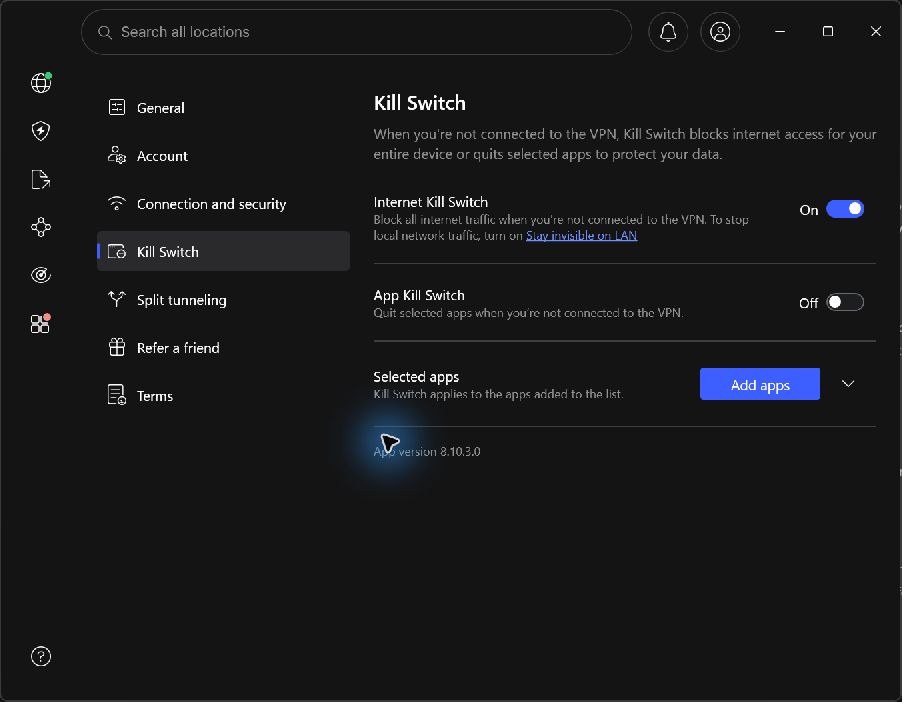
The first successful US response arrived about 5.0 seconds after the reconnect command in the control trial and 4.5 seconds in the protected trial. These are two sampled observations, including application startup/connection work, polling and HTTP response time; they are not a precise or general connection-time guarantee.
Scope matters: this was manual disconnection, not an unexpected driver crash, a reboot, a sleep/wake cycle or packet-level monitoring. The first two seconds are excluded from the settled-window counts. The complete sequence is available in the JSON export, including transition failures. We did not test App Kill Switch. After testing, we restored the original settings and the New York connection.
For the underlying concept and a repeatable worksheet, see how to test a VPN kill switch. It explains why this manual-disconnect observation does not cover every failure state.
Using the Windows app and choosing a protocol
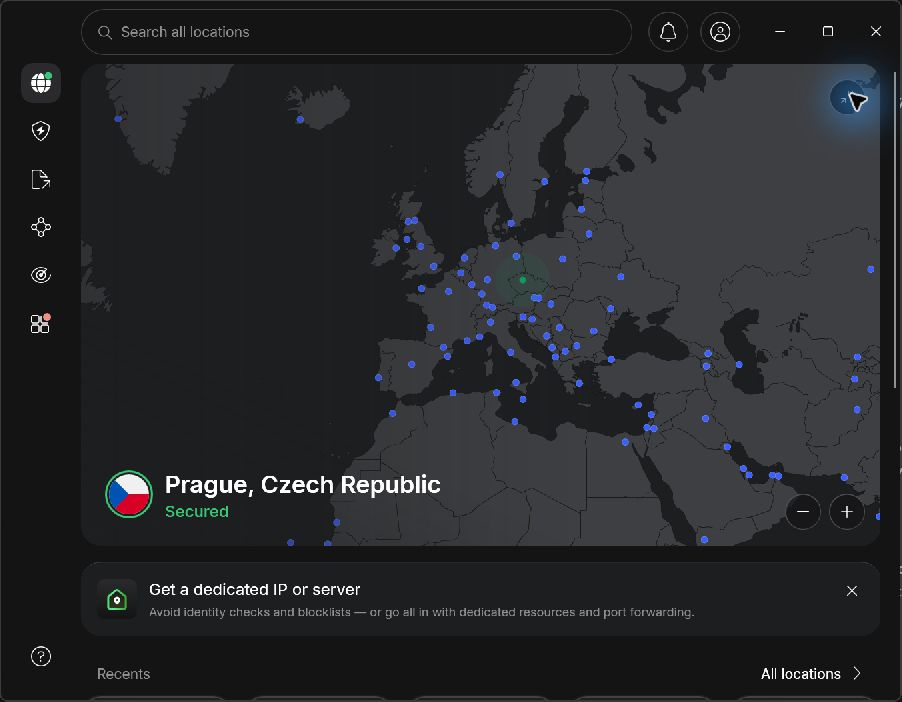
In version 8.10.3.0 we could choose a country from recent connections and confirm Prague, London and New York in the connected map. The interface separated connection settings, Internet/App Kill Switch and split tunneling. Selecting a country picked a server for us; we did not select a numbered server.
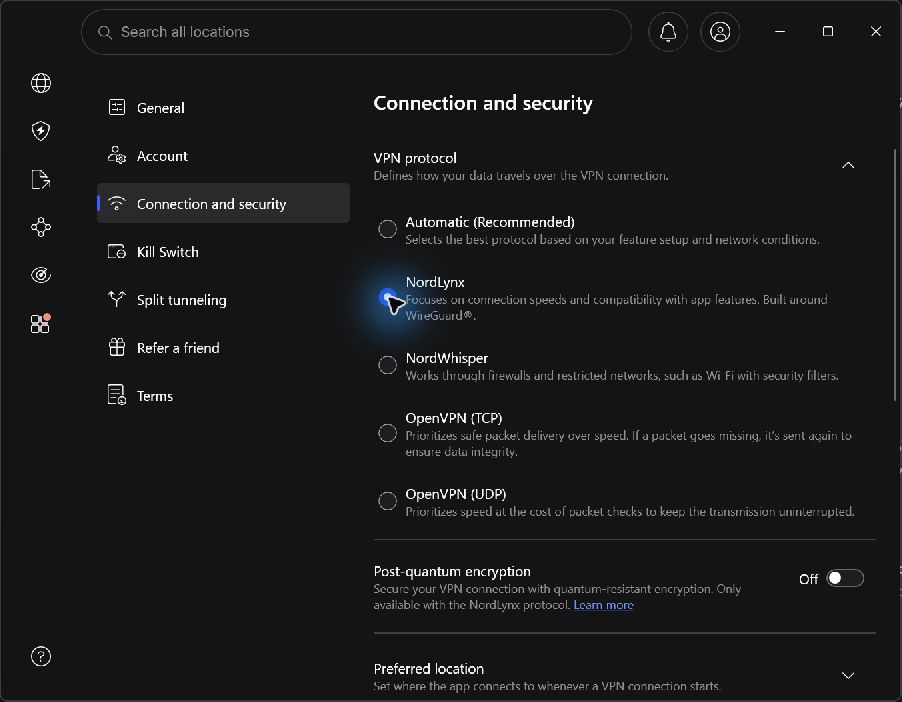
The selector also displayed NordWhisper, OpenVPN TCP and OpenVPN UDP. We successfully connected and measured OpenVPN UDP; we only observed the other alternatives. The active Windows network interface changed from NordLynx to “OpenVPN Data Channel Offload for NordVPN” in the UDP run.
Threat Protection was on throughout the speed series. Post-quantum encryption and custom DNS were off. Split tunneling was present but off, and we did not change its application list. These are recorded test conditions, not recommended settings for every reader or claims that the optional protections were independently verified.
More original app screenshots: Prague, London and OpenVPN UDP
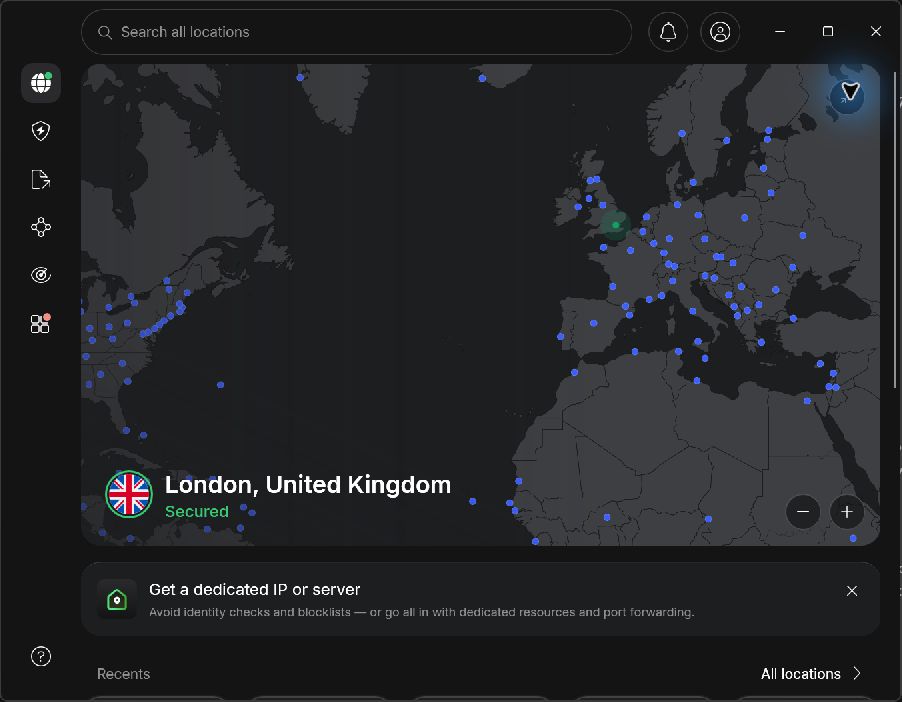
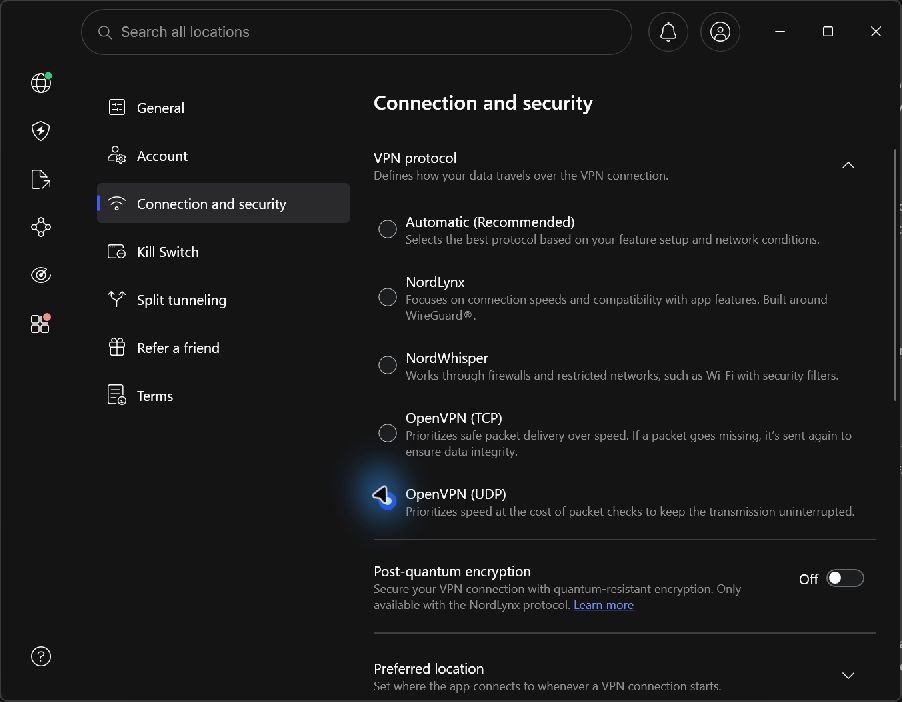
Our practical advice is to test the closest suitable location first, then the destination you actually need. Check how Internet Kill Switch behaves before relying on it. A working Windows configuration does not establish identical behavior on macOS, Linux, Android, iOS or a router; use our platform matrix for the documentation comparison.
Test conditions, reproducibility and limits
Session date: September 7, 2026. Recorded transfer series ran from 09:22:13 to 09:38:34 UTC. Browser checks and controlled disconnection trials took place between those series. This is a short observation session, not an uptime study.
| Condition | Recorded setup |
|---|---|
| Device | Windows 11 Home, build 26200, x64; AMD Ryzen 7 9800X3D. |
| Connection | Wired Realtek Gaming 2.5GbE adapter in the Czech Republic. Its 2.5 Gbps LAN link is not a claimed internet-plan speed. |
| App and account | NordVPN for Windows 8.10.3.0; an existing paid publisher account. No purchase, cancellation or refund test. |
| Order | Direct control → Prague NordLynx → London NordLynx → New York NordLynx → Prague OpenVPN UDP → direct control. |
| Transfer method | Node.js HTTPS client, one reusable connection, 1 MB warm-up, seven empty-response latency requests, then three alternating 25 MB downloads and 5 MB uploads per row. Upload payload was random test bytes, never personal files. |
| Calculation | Decimal Mbps = transferred bytes × 8 ÷ complete request duration in seconds ÷ 1,000,000. Report median, minimum and maximum; no peak-based score. |
| Leak checks | BrowserLeaks DNS and WebRTC, direct control plus three NordLynx exits. HTTP egress also checked before and after each transfer series. |
| Automation and evidence | App interaction and collection used automation. Figures come from actual network responses; screenshots are direct captures, not generated illustrations. |
Other applications remained open on this everyday PC; background traffic was not instrumented. The transfers are short and the sample is small. Endpoint load, routing, server choice, protocol and time all affect the result. We did not measure a fastest VPN, independently audit security, inspect NordVPN’s logging systems or extrapolate an uptime percentage.
Not tested in this session: streaming subscription playback or regional libraries, torrent transfers, mobile apps, router setup, support response time, purchase/refund handling, App Kill Switch, split-tunneling behavior, post-quantum protection, Threat Protection malware detection, sleep/wake recovery and unexpected tunnel crashes. These remain documented features or open questions, never claimed test successes.
The five-component editorial rating elsewhere in this review still uses the published feature/terms rubric. These measurements are presented separately and have not been converted into an invented performance score. The paid-account access does not establish that every optional feature belongs to the least expensive plan.
The export includes series timestamps, every transfer duration and rate, all latency samples, and the timing of every disconnect probe. Public figures are rounded to one decimal. Account details and original ISP addresses stay out of the public files. Read the Cloudflare method description, DNS test explanation and WebRTC test to understand the external endpoints.
Check NordVPN plans (affiliate link, opens in a new tab)Choose the required devices and features first, then compare the full subscription and renewal cost below. Our affiliate relationship does not change the recorded test results.
NordVPN at a glance
| At a glance | Verified information |
|---|---|
| Service types | Consumer VPN; Complete and US Prime add security services. Prime includes Coveron subject to eligibility; Incogni and dedicated IP are optional extras in this US comparison. |
| Starting price | Basic: $94.23 for the first 27 months, then $139.08 per year. US Prime has separate Coveron eligibility and coverage terms. |
| Simultaneous devices | 10 connections, subject to account and platform conditions. |
| Protocols | NordLynx and OpenVPN; availability depends on the app. |
| Server coverage | Global country list, including physical and virtual destinations. |
| Provider base | Panama, as stated on the provider’s no-logs page. |
| Privacy evidence | Provider-announced sixth Deloitte no-logs assurance engagement; not a HostingRanker audit. |
| Free plan / refund | No permanent free tier in this offer; 30-day money-back terms. |
| Support | 24/7 support; feature availability is platform-dependent. |
Plans, prices and renewal costs
Price snapshot: September 7, 2026. US / USD offer · 27-month first term including 3 bonus months, then annual renewal. These are the selected offers, not every available billing option. Optional extras are excluded. Check the final tax treatment and order total before payment.
| Plan / term | Intro rate | First payment | Renewal | Key inclusions |
|---|---|---|---|---|
| Basic | $3.49/mo | $94.23 27 months | $139.08 per year | VPN for up to 10 simultaneous devices. |
| Complete | $4.49/mo | $121.23 27 months | $219.48 per year | VPN, threat-protection features, password manager and 1 TB cloud storage; feature availability varies by platform. |
| Prime | $7.49/mo | $202.23 27 months | $296.28 per year | Complete bundle plus Coveron identity-protection services, subject to its eligibility and coverage terms. |
What the numbers mean for your budget
Basic’s first 27 months cost $94.23. The next stated bill is $139.08 for only 12 months, an equivalent of $11.59 per month. Complete adds $27 to the initial term but $80.40 to the annual renewal compared with Basic. Prime costs $202.23 initially and renews at $296.28 per year; its Coveron services have separate eligibility and coverage terms. Incogni and dedicated IP are optional checkout additions in this US comparison, not automatic inclusions in Prime.
Monthly equivalents are rounded. A prepaid offer is not a month-to-month contract; first-term extras do not necessarily recur.
A budget you can compare
| Plan and market | First bill / service | Renewal | Included / check |
|---|---|---|---|
| NordVPN Basic · 2 years + 3 months US / USD storefront · checked 2026-09-07 | $94.23 for 27 months Includes 3 bonus months | $139.08 / 12 months | VPN for up to 10 simultaneous devices. Official offer source |
| Offer | 12 months: allocated / cash | 24 months: allocated / cash | 36 months: allocated / cash |
|---|---|---|---|
| NordVPN Basic · 2 years + 3 months USD · 27-month first term | $41.88 / $94.23 15 service months remain after the horizon | $83.76 / $94.23 3 service months remain after the horizon | $198.54 / $233.31 3 service months remain after the horizon |
We allocate the first payment across all months it covers, including any bonus months. Cash includes whole billing periods needed to reach the chosen horizon. Renewal rates are held constant for this illustration; they are not guaranteed future quotes. Unknown bills remain unverified. Domains, optional services and taxes are excluded unless explicitly added. Read the calculation method.
Adjust this offer and compare alternatives. The market, currency and verification date are labeled on each table. The screenshot below records the corresponding published offer.
Server locations and what they mean
| Region | Published locations | Scope |
|---|---|---|
| Europe | Examples: United Kingdom, Germany, France, Netherlands | Select the exact country and server type in the current directory. |
| Americas | Examples: United States, Canada, Brazil | A country entry can contain multiple city choices. |
| Asia Pacific | Examples: Japan, Singapore, Australia | Distance and route matter independently of the country count. |
This is a representative location guide, not the complete directory. NordVPN distinguishes virtual destinations from physical deployment; an IP location should not be assumed to be the hardware location. Published network totals can differ between product and support pages, so use the current server list rather than a fixed server-count ranking.
Check the official location information before selecting a server.
A closer look at the official offer
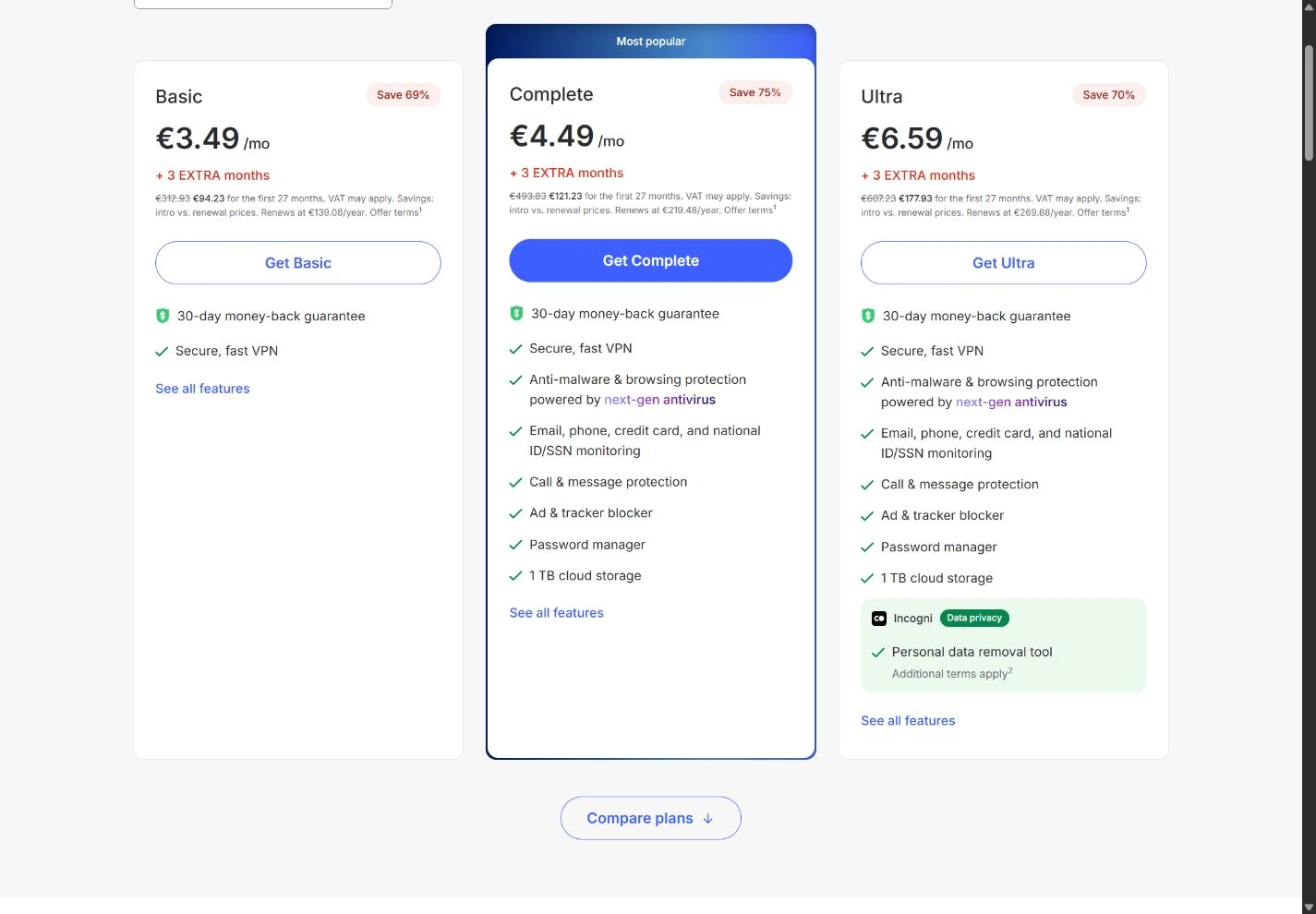
The image records a public page, not a paid customer dashboard or a test result. It may show a region-specific promotion that changes after the capture date. Our tables keep the important figures readable on a phone; use the full-size image to inspect the original context.
Who should put NordVPN on a shortlist?
An everyday VPN has to fit into ordinary routines: a laptop moving between networks, a phone switching to mobile data and an occasional application that dislikes a different IP address. A useful service is one you can understand and keep configured correctly, not simply the one with the longest feature list.
NordVPN’s current documentation describes a ten-device simultaneous connection allowance and apps across major platforms. That makes it a candidate for an individual or a small household with several devices. Count concurrent use rather than merely counting installed apps.
Reasons to consider it
- A ten-device allowance that can cover several personal devices.
- Published app and feature documentation for checking platform fit.
- Optional security bundles that can be evaluated separately from the VPN itself.
Reasons to look elsewhere
- Not every advertised feature is available on every platform or plan.
- A broader bundle can duplicate software you already use.
- A successful VPN connection does not prevent phishing, account tracking or device compromise.
If you need centralized staff access, employee offboarding and organization-wide policies, evaluate a business access product separately. A consumer subscription shared across devices should not be assumed to provide corporate administration.
The features that matter to your routine
The official feature page describes a kill switch, split tunneling and other VPN functions alongside optional security features. The important next step is to check the platform-specific documentation for the exact devices you use.
| Feature | Why you might need it | What to check |
|---|---|---|
| Disconnect protection | Avoid unintended direct connections when a tunnel drops. | Does it block all traffic, selected apps or only a specific failure state? |
| Split tunneling | Let an incompatible app use a different route. | Is it supported on your platform, and what traffic is excluded? |
| Protocol choice | Adapt to the network and device. | Start with a supported default, then change only for a clear reason. |
| Optional security tools | Address a separate malware or scam-protection need. | Plan eligibility, platform support and overlap with existing protection. |
Feature names are not a substitute for testing behavior. A kill switch that protects an unexpected disconnect may behave differently when you manually quit the app or restart the computer. Verify the situations you expect to encounter.
Do not change several advanced settings at once. Begin with a clear baseline, check normal browsing and then make one adjustment at a time. This makes it much easier to find the cause if a local printer, company service or video call stops working.
Ten connections: count your household properly
NordVPN’s device documentation lists up to ten simultaneous connections and explains conditions when several devices connect to the same server using the same protocol. Check that guidance if you run into a connection limit.
List the devices likely to be active together: your laptop, phone, tablet, a second household member’s devices and any television or router configuration. A device allowance does not mean every device has an identical native app or supports every function.
A router can simplify coverage at home, but it also becomes a shared failure point. Confirm the router model, firmware and configuration support. Decide which devices should remain on a direct route and how you will recover access if the VPN route fails.
Do not assume household coverage gives you permission to redistribute access commercially. Use the service according to its current account terms and consider a business product for organizational needs.
Buying a VPN without buying unnecessary extras
NordVPN offers more than one subscription configuration, and promotions can vary by country and term. We do not present a live price quote in this review. Open the cart and identify the total payable, months included, renewal amount, currency and optional additions.
Decide what the VPN itself must do before selecting a bundle. If you already have suitable device protection or other software, an additional subscription may add complexity rather than useful coverage. Conversely, a bundle can make sense when you will use the included services and understand their individual limitations.
A money-back guarantee is a refund process, not the same thing as a free trial. Check the deadline, purchase channel, eligible payment method and how to request the refund. If you buy through an app store, the applicable billing or refund route may differ from a direct website purchase.
Set a reminder to evaluate the product early. Waiting until the final day of a refund window leaves little time to understand whether a problem is a configuration issue or a reason to choose a different service.
Privacy: understand the trust you are changing
A VPN changes part of the network path and who can observe it. The service provider becomes an important party in that path, which is why its privacy policy, ownership, operational practices and published technical evidence matter. A no-logs statement should be read in context: which data, which systems and which exceptions are covered?
We have not conducted an independent security audit of NordVPN or inspected its production infrastructure. Provider references to outside reviews or audits should be followed to their actual scope and date; they are not a universal promise that every part of a service is risk-free.
A website can still recognize an account you log into, and browser identifiers or cookies can connect activity across sessions. The VPN does not make a malicious download safe or remove the need for strong account authentication. Read what a VPN protects before deciding whether it addresses your actual concern.
Traveling to mainland China? Read whether NordVPN works in China before relying on general app compatibility or our separate Windows measurements.
A practical evaluation on your own devices
- Install from the official provider or operating-system store and record the app version.
- Start with a nearby server and the recommended supported protocol.
- Check the public IP and DNS behavior without exposing sensitive activity.
- Test normal browsing, a video call and the applications you depend on.
- Check reconnection after sleep and after changing between networks.
- Test the documented disconnect-protection behavior on a harmless page.
- Record failures and ask support a precise question before changing several settings.
Our paid-account Windows results and original screenshots are in the test sections above. We have not run a multi-provider speed comparison or a streaming-playback test. Throughput depends on your base connection, route, server load, protocol and device; our single-device observations are not a universal speed ranking.
Alternatives and our verdict
Proton VPN: consider its Free plan if you need a no-data-cap starting point on one device, or compare Plus for a paid alternative.
Private Internet Access: consider it if you regularly need more simultaneous connections and want to inspect detailed app configuration.
CyberGhost VPN: compare it if a task-oriented server interface interests you, while checking feature availability and the refund term.
NordVPN earns a place on an everyday shortlist because the published device allowance and app options can fit a common household setup. The final choice should depend on your platform-specific needs and how the app behaves on your actual network. Our NordVPN vs Proton VPN comparison makes those differences easier to assess.
Check NordVPN plans (affiliate link, opens in a new tab)How we reached the rating
| Criterion · 20% each | Score / 5 | Why it received this score |
|---|---|---|
| Value and commitment | 3.5 | The initial VPN-only offer is competitive, but renewal is an annual bill at a much higher monthly equivalent. |
| VPN features | 4.5 | A broad VPN feature set and optional security bundles; dedicated IP remains an extra. |
| Privacy evidence | 4.5 | Repeated provider-announced independent no-logs assurance adds evidence, with report scope and access limits. |
| Devices and app coverage | 4.5 | Ten simultaneous connections and broad app support suit a mixed-device household. |
| Pricing and documentation clarity | 4.0 | Plan cards show initial totals and annual renewals, but bundle names and platform inclusions require care. |
Overall: (3.5 + 4.5 + 4.5 + 4.5 + 4.0) ÷ 5 = 4.2/5, rounded to one decimal. Scores reflect the documented offer and its fit for the reader described in our verdict. A small score difference should not override an essential requirement.
Scale: 1 = substantial documented limitations; 2 = limited fit or evidence; 3 = adequate with material trade-offs; 4 = strong documented fit; 5 = exceptionally complete in this coverage set. Half-points express an intermediate judgment. Missing information lowers confidence or documentation scores, not an invented measurement of service quality. Full rating methodology.
Compare the next decision
NordVPN pricing: compare the term before the discount
Compare monthly, annual and promotional NordVPN terms, separate VPN needs from bundles and calculate renewal costs.
NordVPN vs Private Internet Access: devices and the full bill
Compare NordVPN and PIA using a matched EUR budget, app-specific features and the number of devices you need.
Best VPN for multiple devices: match the whole household
Build a VPN shortlist for 1, 5, 7, 10 or more concurrent connections, with platform limits and household costs in view.
NordVPN vs CyberGhost: app fit, term and household size
Compare documented features, ten versus seven connections and subscription conditions without invented speed winners.
Another option for your requirements
Need more than ten simultaneous direct VPN connections? Compare Surfshark’s unlimited allowance and its Starter / One / One+ bundles. The connection limit, platform features and renewal cost are separate decisions; this is not a head-to-head performance test.
Frequently asked questions
Has HostingRanker tested NordVPN with a paid account?
Yes. On September 7, 2026 we tested Windows app 8.10.3.0 on one wired Czech connection, with three NordLynx locations, an additional OpenVPN UDP run, DNS/WebRTC checks and a controlled Internet Kill Switch trial. The method, screenshots, individual measurements and limits are included above.
Did Internet Kill Switch work in the test?
In one controlled manual-disconnect trial with it enabled, all 20 sampled HTTPS requests in the 2–12 second window failed and none used the original ISP address. With the feature off, all 19 control requests used the direct connection. This does not cover driver crashes, reboots or every application.
How many devices can use NordVPN at once?
The checked official documentation lists up to ten simultaneous connections, with specific conditions for several devices using the same server and protocol.
Does every plan include all security features?
No blanket assumption is safe. Check the current tier and operating-system requirements for each feature you intend to use.
Will NordVPN make me anonymous?
No. Logged-in accounts, browser identifiers, device compromise and other forms of observation can still identify activity. A VPN addresses only part of a privacy model.
Has HostingRanker verified streaming access?
No. We have not conducted a live streaming-access test, and availability can change by service, region and time.
Sources & editorial notes
USD pricing, the pricing screenshot and the Windows test were checked on September 7, 2026. Other product documentation was checked on September 6, 2026. Product terms can change; prices in this review remain dated snapshots.
- NordVPN: features and platform links
- NordVPN: simultaneous-device conditions
- EFF: choosing a VPN and understanding trust
- NordVPN: captured USD plans and renewal terms USD offer and original screenshot checked September 7, 2026.
- NordVPN: current server locations
- NordVPN: sixth no-logs assurance announcement
- nordvpn.com · official plans and billing evidence
- nordvpn.com · official plans and billing evidence
- Cloudflare: network and official speed-test methodology
- BrowserLeaks: DNS leak test used in our session
- BrowserLeaks: WebRTC leak test used in our session
- NordVPN: documented Windows connection and disconnect commands
This review combines a measured Windows session on September 7, 2026 with dated provider documentation and editorial analysis. The method, measurement export and scope are stated above. We have not conducted an independent security audit or live streaming-access test. Read our methodology. Report a correction.

About the author
Pavel Stich
Pavel is a co-founder of HostingRanker with a focus on SEO and copywriting for the technology and financial sectors. His interest in early-stage businesses informs his practical approach to software: understand the problem, examine the trade-offs and choose tools that support a sustainable business.