

Our verdict and overall rating

Our verdict on HostPapa
Consider HostPapa when cPanel, email and business website services in one account simplify real work. Growth is worth comparing for staging; check backup renewal before treating the bundle as complete.
Research-based editorial opinion. Five equally weighted criteria; no measured speed, uptime or support results and no customer-rating aggregate.
HostPapa at a glance
| At a glance | Verified information |
|---|---|
| Hosting types | Shared, WordPress, reseller and VPS; Essentials/Growth/Premium/Elite shared plans shown. |
| Starting price | $2.95/mo equivalent for a 36-month Essentials introduction. |
| Free SSL | Yes; premium certificate type and duration vary by tier. |
| Control panel | cPanel. |
| Entry resources | Essentials: 1 website, 25 GB NVMe. |
| Backups | 1 GB allowance on Essentials for the first year; higher tiers list larger first-year allowances. |
| Staging / CDN | Listed from Growth, rather than the entry plan. |
| Support / refund | 24/7 support; 30-day hosting guarantee, with domain and other exclusions. |
Plans, prices and renewal costs
Price snapshot: September 6, 2026. US shared-hosting offer · 36-month initial and renewal terms · taxes excluded from renewal schedule. These are the selected offers, not every available billing option. Optional extras are excluded. Check the final tax treatment and order total before payment.
| Plan / term | Intro rate | First payment | Renewal | Key inclusions |
|---|---|---|---|---|
| Essentials | $2.95/mo | $106.20 36 months | $8.99/mo · $323.64 per 36 months | 1 site · 25 GB NVMe · 1 GB first-year backup |
| Growth | $5.95/mo | $214.20 36 months | $13.99/mo · $503.64 per 36 months | 5 sites · 100 GB NVMe · staging and CDN |
| Premium | $6.95/mo | $250.20 36 months | $19.99/mo · $719.64 per 36 months | Unlimited sites · 200 GB NVMe |
| Elite | $9.95/mo | $358.20 36 months | $27.99/mo · $1,007.64 per 36 months | Unlimited sites · unmetered NVMe under usage policy |
What the numbers mean for your budget
Essentials requires $106.20 for the first three years of hosting. At the listed three-year renewal it then requires $323.64, before extras and tax. The one-year renewal is a different purchase at $131.88; comparing its monthly equivalent with a three-year offer without stating the term would be misleading. The 1 GB backup allowance is much smaller than the 25 GB hosting allocation, so confirm whether all essential data fits and what happens after year one.
Monthly equivalents are rounded. A prepaid offer is not a month-to-month contract; first-term extras do not necessarily recur.
A budget you can compare
| Plan and market | First bill / service | Renewal | Included / check |
|---|---|---|---|
| HostPapa Essentials US / USD storefront · checked 2026-09-06 | $106.20 for 36 months | $323.64 / 36 months | 1 site · 25 GB NVMe · 1 GB first-year backup Official offer source |
| Offer | 12 months: allocated / cash | 24 months: allocated / cash | 36 months: allocated / cash |
|---|---|---|---|
| HostPapa Essentials USD · 36-month first term | $35.40 / $106.20 24 service months remain after the horizon | $70.80 / $106.20 12 service months remain after the horizon | $106.20 / $106.20 |
We allocate the first payment across all months it covers, including any bonus months. Cash includes whole billing periods needed to reach the chosen horizon. Renewal rates are held constant for this illustration; they are not guaranteed future quotes. Unknown bills remain unverified. Domains, optional services and taxes are excluded unless explicitly added. Read the calculation method.
Adjust this offer and compare alternatives. The market, currency and verification date are labeled on each table. The screenshot below records the corresponding published offer.
Server locations and what they mean
| Region | Published locations | Scope |
|---|---|---|
| Canada | Toronto | Provider data-center directory. |
| United States | Los Angeles; Buffalo | Provider facility coverage. |
| Europe | Amsterdam, Netherlands | Confirm availability for your selected shared product and region. |
These are documented provider locations, not a promise that every shared-hosting checkout offers all of them. Ask for the assigned location and whether a migration changes it. Also establish whether mail and backups use the same location as the website.
Check the official location information before selecting a server.
A closer look at the official offer
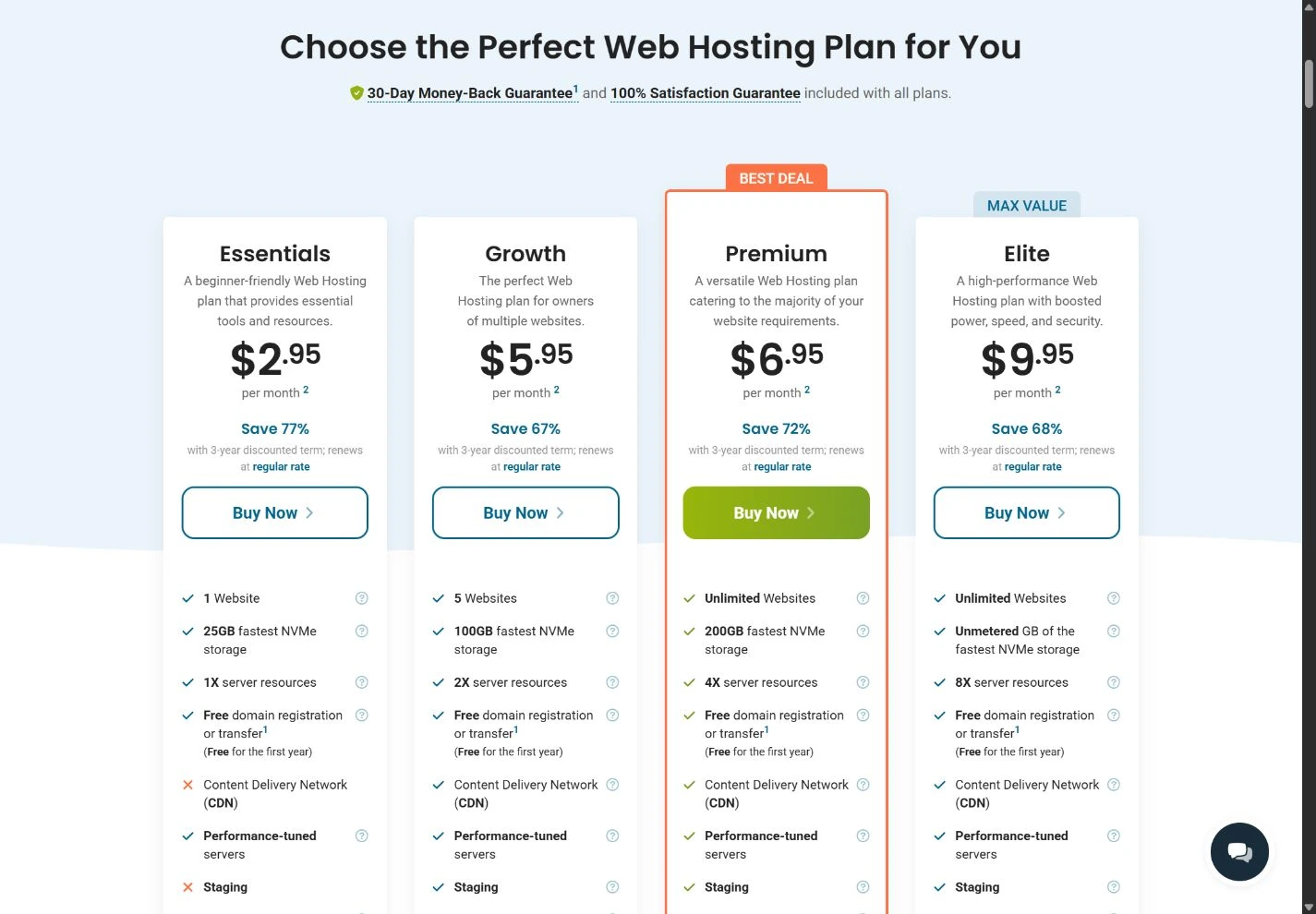
The image records a public page, not a paid customer dashboard or a test result. It may show a region-specific promotion that changes after the capture date. Our tables keep the important figures readable on a phone; use the full-size image to inspect the original context.
Start with the business tasks
A small business website has to do more than load a homepage. Customers need to find the phone number, submit an enquiry, make a booking or receive a confirmation. The owner also needs access to the domain, website files and business email when something goes wrong.
HostPapa offers shared hosting alongside website and business services. The convenience is a shorter list of suppliers; the responsibility is understanding which products you have actually purchased. A bundle can be good value, but only when its components are useful and their renewal costs are visible.
Reasons to consider it
- A conventional cPanel route for business websites.
- A separate published renewal schedule makes ongoing pricing easier to inspect.
- Related website services can be sourced from one provider if that suits the business.
Reasons to look elsewhere
- Optional services can turn a low entry price into a larger recurring bill.
- Backup and security inclusions differ by plan and product.
- Shared hosting, optimized WordPress and builder products should not be treated as interchangeable.
Before reading the feature list, write down the business’s essential workflow. A local consultant may need five pages, a contact form and reliable email. A shop needs a much more demanding recovery and transaction plan. Those projects should not be forced into the same purchase just because the entry offer is attractive.
Which HostPapa product are you comparing?
The current shared-hosting page uses the Essentials, Growth, Premium and Elite names. Other HostPapa pages may describe WordPress packages or older product generations. Compare the same product family all the way from the feature table to checkout and renewal.
| Area | What to establish | A useful acceptance check |
|---|---|---|
| Website software | Shared hosting, WordPress hosting or a proprietary builder. | You can update the site and export what you need. |
| Mailbox limits, storage and any separate subscription. | Send and receive a real message with the domain. | |
| Backups | Included automation, retention and restore scope. | Recover a private copy without overwriting the live site. |
| Security extras | What the base service covers and what is an add-on. | The added service has an identifiable purpose and owner. |
Free SSL is listed on the current hosting range. A certificate encrypts the browser’s connection; it does not establish that a website’s application is free of vulnerabilities. Do not buy an additional certificate simply because “premium” sounds more secure. Choose according to the domain coverage and support requirement.
The renewal schedule is part of the purchase
HostPapa publishes renewal rates separately. In the US dollar table checked for this review, shared Essentials is listed at $12.99 for monthly billing or $131.88 for a one-year renewal. Longer billing terms have different effective rates. Your country and product version may change the numbers.
Do not compare a three-year introductory monthly equivalent with a one-month renewal price. Put the first invoice, contract length and next invoice on separate lines. If the first-term offer includes a domain, confirm the registration period and the price when that period ends.
Optional backups, security services, email tools and website assistance can each be reasonable purchases. The question is whether they overlap with something already included or already paid for elsewhere. Remove an optional item only after understanding the capability you would lose.
For a business owner, the total cost includes time. If the bundle reduces repeated support coordination and the recurring bill remains affordable, it may be preferable to a cheaper collection of disconnected services. Put that expected benefit into concrete tasks rather than assuming that more bundled items always means more value.
Define a backup and security routine
Check whether automated backups are included in your exact tier or selected as an additional service. Ask about frequency, retention, storage location and restoration fees. Those details are more useful than a generic statement that a website is protected.
Take a complete copy before a major update and store it outside the hosting account. A provider-side copy and an independently stored copy protect against different failure scenarios. Test restoring both the files and the database to a private destination.
Protect the account with a unique password and available multifactor authentication. Keep domain ownership and recovery email details current. If an agency manages the site, arrange access that can be revoked without losing the business’s ownership of the domain or hosting.
Application maintenance remains necessary. Remove unused plugins, apply supported updates and check the public site afterward. A host’s server-level security service cannot be assumed to correct every vulnerable extension or an overly permissive administrator account.
Support and onboarding: ask for a concrete outcome
HostPapa publishes multiple support channels and around-the-clock availability. We have not tested response speed or the quality of a technical resolution. Treat published availability as a way to ask questions, not as a measured support score.
When requesting help, describe the outcome you need: move an existing WordPress site, preserve business email, keep the domain registered in the company’s name or restore a single database. Ask whether that task is covered by the selected plan or requires a separate service.
For a migration, request a scope that names website files, databases, mailboxes, DNS records and scheduled tasks individually. This prevents an assumption that “website migration” includes every service currently attached to the domain.
After onboarding, make sure a second authorized person can find the account details and recovery information. A business website is easier to maintain when it does not depend on one employee’s inbox or an agency’s private account.
Test what the business depends on
A useful trial is a set of completed business tasks. Open the site on a phone, submit an enquiry, confirm the message arrives, check the address and telephone links and test any booking or payment integration in a safe test environment.
Then perform an ordinary content change and an application update. Record how many separate tools or support requests the work required. A product that looks simple in a demonstration can feel different during maintenance.
We have not measured HostPapa’s speed or uptime. If you compare performance, use the same page and test configuration across candidates. Keep images, scripts, cache state and visitor region consistent. For a dynamic store, assess the uncached steps as well as the homepage.
Alternatives and our verdict
Hostinger: compare it for an integrated account experience with a proprietary dashboard. Check the length of prepaid offers and the cost of email after any included period.
eUKhost: compare its cPanel range for a UK-oriented business and inspect the published backup retention and VAT treatment.
SiteGround: compare it when a WordPress maintenance workflow is the central requirement rather than the breadth of bundled business services.
HostPapa makes the most sense when you can name the work its bundle will simplify and can sustain the renewal total. Match the exact product, avoid duplicate extras and create an independent recovery routine. The right purchase is the smallest complete setup that your business can maintain reliably.
Check HostPapa plans (affiliate link, opens in a new tab)How we reached the rating
| Criterion · 20% each | Score / 5 | Why it received this score |
|---|---|---|
| Value and commitment | 3.5 | The bundle can reduce supplier count, but renewal and first-year-only extras need a separate budget. |
| Included features | 4.0 | Useful business essentials; Growth adds staging and CDN while upper tiers increase capacity. |
| Backup and recovery | 3.0 | Included automatic-backup storage is limited and the listed allowance lasts only the first year. |
| Administration and support options | 4.0 | cPanel and related services offer a conventional business workflow with documented support channels. |
| Pricing and documentation clarity | 4.0 | A separate renewal schedule supports term-matched cost comparisons. |
Overall: (3.5 + 4.0 + 3.0 + 4.0 + 4.0) ÷ 5 = 3.7/5, rounded to one decimal. Scores reflect the documented offer and its fit for the reader described in our verdict. A small score difference should not override an essential requirement.
Scale: 1 = substantial documented limitations; 2 = limited fit or evidence; 3 = adequate with material trade-offs; 4 = strong documented fit; 5 = exceptionally complete in this coverage set. Half-points express an intermediate judgment. Missing information lowers confidence or documentation scores, not an invented measurement of service quality. Full rating methodology.
Compare the next decision
Hostinger vs HostPapa: a small-business bundle comparison
Compare the right tier for a business website, email and maintenance, including prepayment and first-year-only extras.
Best hosting for multiple websites: plan for 3 or 10 sites
Compare eligible hosting tiers for three or ten websites, with shared capacity, backup needs and full-term costs.
Best web hosting for a small business: budget for keeping it running
Choose among our hosting partners by email, recovery, administration and predictable ongoing costs for a company website.
Best WordPress hosting: choose the maintenance workflow
Compare documented WordPress hosting features, staging and backup limits, with a practical update-and-recovery checklist.
Frequently asked questions
Is HostPapa’s promotional price permanent?
The initial promotion and renewal rates are separate. HostPapa publishes a renewal schedule, but you should match it to your country, product and billing term.
Are all backup services included?
Do not assume so. Verify automated backup coverage, retention and restoration on the exact tier and inspect any optional backup subscription in the cart.
Does shared hosting include a complete website design service?
Hosting and design are different services. Confirm whether you are buying an account to manage yourself, a builder or a separate website-design service.
Should I buy every security add-on?
Choose services according to a defined need and check for overlap. Understand the base plan’s coverage before adding another recurring subscription.
Sources & editorial notes
Sources checked on September 6, 2026. Product details can change by country, platform and billing term. Prices shown are snapshots, not live quotes.
- HostPapa: captured shared-hosting introduction
- HostPapa: renewal rates by billing term
- HostPapa: products and optional services
- HostPapa: provider data centers
- www.hostpapa.com · official plans and billing evidence
- www.hostpapa.com · official plans and billing evidence
This guide combines published documentation with our editorial analysis. We have not measured provider performance or conducted an independent security audit. Read our methodology. Report a correction.

About the author
Vlastimil Stich
Vlastimil founded HostingRanker in 2020. His work spans 3D graphics, entrepreneurship and investing, with close to 100 web projects created during his business career. He writes about hosting, website infrastructure and the practical decisions behind building and maintaining a website.