
How does a VPN kill switch work?
Imagine uploading a file through a VPN while your laptop changes networks. The tunnel stops, but the upload app keeps trying. Without a blocking rule, a new connection may use your ordinary internet route. A kill switch is meant to prevent that fallback for the traffic it covers.
It trades temporary connectivity for a predictable privacy boundary. A paused upload or a page that fails to load can be the intended result. The feature does not repair the tunnel, boost encryption or stop your router from working; it controls whether traffic can continue outside the required route.
- 1 · ConnectedTraffic uses the tunnel
The VPN is available and the apps included in its routing policy can communicate.
- 2 · InterruptedDirect fallback is blocked
The protected route is unavailable. The kill switch keeps covered traffic from using an ordinary internet connection.
- 3 · ReconnectedProtected traffic can resume
The tunnel is restored. Some apps reconnect automatically; others need a retry.
A client can enforce this through operating-system network filters, firewall rules or other platform facilities. For example, Windows provides a network-filtering framework. This does not mean every VPN uses the same design. Closing an app window may leave a background service and its rules running, so the window itself is not a reliable protection indicator.

The two differences that matter: coverage and trigger
Kill-switch names mix two separate questions: which traffic is affected and when blocking applies. Do not treat “system-wide,” “automatic” and “permanent” as interchangeable.
Coverage: internet blocking or selected applications?
| Coverage | What it does | What to check |
|---|---|---|
| Internet / system kill switch | Blocks covered internet traffic at the network level. | App exclusions, local-network exceptions, DNS and IPv6 handling. |
| App kill switch | Closes selected programs or applies an app-specific restriction, depending on the product. | Which programs and helper processes are included; other apps may remain online. |
| Browser-only protection | Controls the browser connection or proxy extension. | A separate mail client, game or backup app may be outside its scope. |
NordVPN, for example, distinguishes its Windows Internet Kill Switch from an App Kill Switch that closes selected programs. Its platform guide explains the distinction. App closure is not the same mechanism as filtering traffic, and it can interrupt unsaved work.
Trigger: unexpected loss or whenever the VPN is off?
| Situation | Standard / dropout-only mode | Strict / persistent mode |
|---|---|---|
| Unexpected tunnel interruption | Designed to block covered traffic. | Designed to block covered traffic. |
| You deliberately disconnect | May permit the direct connection. | Normally continues blocking according to its policy. |
| Before the first connection | Do not assume protection. | Check whether startup protection is actually supported and enabled. |
| App exit or device restart | Product-specific; verify separately. | Persistence must be documented, not inferred from the name. |
Surfshark uses Soft and Strict for the accidental-disconnect versus VPN-off distinction. Proton calls its persistent option Advanced. Check which choices exist in your installed app; a provider’s general feature page may cover several platforms.
A concrete iPhone exception appears in the VeePN kill-switch documentation reviewed here: its website Bypasser and iOS kill switch cannot be used together.
What does a kill switch protect, and what does it not?
The main benefit is preventing unintended traffic outside the VPN during a covered interruption. That can stop a website or peer from receiving a fresh connection from your regular public IP. Depending on the implementation, it can also keep DNS lookups from falling back to an unintended resolver.
This is about the route of future traffic. It cannot recall a request that already left, remove identifying cookies or hide activity from software monitoring your device. A signed-in website can still recognize your account after the VPN reconnects.
Your HTTPS passwords do not suddenly become plaintext
A VPN dropout does not automatically remove a website’s correctly validated HTTPS encryption. TLS still protects content between its endpoints; see the TLS specification. The privacy change may instead be the public IP, route and metadata exposed by a direct connection. Conversely, a kill switch does not make an HTTP website secure or an untrustworthy VPN operator trustworthy.
For the bigger picture, read what a VPN does and does not protect. If you use an extension, our VPN vs proxy guide explains why browser coverage can differ from a device VPN.
Should you keep your VPN kill switch on?
Usually yes, if you want the activities you put through the VPN to stop when that route fails. Choose the trigger deliberately. A dropout-only setting may suit occasional VPN sessions; a persistent setting fits a device you intend to keep off the direct internet route.
Travel and changing networks
Check Wi-Fi-to-mobile transitions and sleep/wake behavior. The question is whether apps resume before the VPN is ready, not merely whether the phone eventually reconnects.
Long uploads and background apps
Decide whether you would rather pause a transfer or allow it to continue directly. A browser test cannot establish the route used by a backup client.
Authorized peer-to-peer transfers
Check the actual client’s peers, discovery traffic and supported interface binding. Do not infer its protection from a browser’s VPN IP.
Calls, games and work access
Blocking can interrupt a call or game. If uninterrupted access matters more for that app, review supported exceptions and their consequences. On a managed device, use your employer’s configuration.
The best setting is one you can keep enabled consistently. If strict mode repeatedly interferes with something essential, investigate the cause and define the intended exception. Randomly toggling protection off whenever a page stalls makes the result harder to trust.
How to enable a VPN kill switch on your device
Use the official app for your operating system. Find the kill-switch setting, read its mode description, apply the change and reconnect if requested. Record the app version. The routes below are starting points from current documentation, not a claim that every edition has identical menus.
Windows
- NordVPN: find Kill Switch in settings and distinguish Internet protection from the selected-app list. Read the on-screen disconnect policy before testing.
- Proton VPN: open the Kill switch control, enable it and select Standard or Advanced, then apply the change. The Advanced guide also describes the connection-settings route.
- Surfshark: open Settings → VPN settings and enable Kill Switch. Check any mode selector shown by your version. Surfshark’s setup guide includes the app screens.
Android
For compatible apps using Android’s system controls, open the device VPN settings, select the VPN’s settings icon and enable Always-on VPN plus Block connections without VPN. Menu names vary by phone. Always-on handles the service lifecycle; the blocking option is the separate restriction on non-VPN traffic. Android’s developer documentation also explains why unsupported apps may not offer these controls.
macOS, iPhone and iPad
Use the instructions for the exact app edition. A switch demonstrated on Windows does not establish Apple-platform behavior. As checked on September 9, Proton’s guide reports a macOS exposure window during server switching and Apple-service DNS exceptions on macOS and iOS/iPadOS; it also notes local-network restrictions. Read those platform notes before relying on a demanding setup. These are documented limitations, not findings from a new test here.
Linux, routers and TVs
Check whether the instructions are for a graphical app, command-line client or manual VPN profile. Those are different setups. A router’s “block if tunnel down” rule has to cover the intended devices and routes; installing a VPN profile alone is insufficient. Do not copy desktop firewall commands onto a router or assume an Android TV app has the same controls as a phone.
Use our VPN compatibility matrix to narrow the platform questions, then confirm the current provider instructions.
Using an Apple phone? Our iPhone VPN guide covers automatic kill-switch behavior, website exceptions and the iOS-specific limits to check before choosing an app.
Before configuring NordVPN disconnect protection, use our NordVPN download guide to choose the right app distribution, especially on Mac.
Before choosing Surfshark settings, our Surfshark installation guide helps identify the correct app distribution and complete the first connection.
Does a kill switch work before the VPN connects?
Only if its design and configuration cover that state. Auto-connect at startup means the client tries to establish a tunnel. It does not, by itself, prove that another app cannot send traffic first.
Think about a cloud-sync client that starts as soon as you sign in. Your desired sequence may be “block, connect VPN, permit sync.” Testing a dropout after ten minutes of connected browsing says nothing about that initial sequence.
Proton documents restart persistence for Advanced mode on supported platforms. Its guidance also flags a Windows sign-in risk when online authentication is required but traffic is blocked. Review the startup and recovery notes before depending on a persistent configuration.
Before testing a restart, save work, keep recovery instructions available offline and make sure you can sign in and control the device locally. Do not trial a setting that might sever the only remote session you have to the machine. Separately check startup, sleep/wake, logout and app exit; they are not equivalent events.
How to test a VPN kill switch without fooling yourself
A browser IP checker is a useful observation tool, not a complete leak audit. A credible check needs a known working connection, a defined interruption, traffic attempted during that interruption and an observation of the route used.
- Prepare a harmless test. Save work and pause sensitive activity. Use a device and network you control. Note the VPN version, protocol, mode, exceptions and what should happen. Keep the undo instructions offline.
- Establish a baseline. Before the protected session, use an IP-check page to record your normal public IP privately. Then connect the VPN and record its exit. If the two are not distinguishable, fix your method before interpreting results.
- Make fresh network requests. Refresh the IP check or use a controlled endpoint while recording the timing. Cached pages, buffered videos and already loaded content can remain visible without a working connection. Avoid rapid polling that burdens a public test site.
- Test the documented manual-disconnect policy. Use the app’s supported Disconnect control. A strict mode should keep covered requests blocked; a dropout-only mode may deliberately allow them. Interpret the result against the policy you selected.
- Check ordinary transitions separately. Observe sleep/wake, a permitted network change and server switching. If you briefly disable Wi-Fi, the interesting period is after connectivity returns but before the VPN is ready.
- Confirm recovery. Reconnect and verify that requests use the intended VPN exit again. Check the real apps you care about, including a call or upload. A kill switch that blocks correctly still needs a usable recovery path.
- Record the scope of the result. Save the scenario, timestamps, observed routes and any uncertainty. Repeat after a meaningful app, OS or routing change. One pass is evidence about that setup and event.
What about an unexpected tunnel failure?
A manual disconnect is not a simulation of every driver, service or server failure. For a stronger check, the underlying internet connection must remain available while the VPN route becomes unavailable, and requests must be observed throughout that period. Use a documented provider procedure or an isolated test environment you can restore.
Do not casually kill network services or modify firewall rules on a working machine. That can change the very mechanism you are evaluating. If you cannot isolate a dropout safely, label that scenario not tested rather than claiming that manual disconnection proves it.
When packet capture helps
An experienced tester can capture on the physical network interface and compare traffic with the expected VPN endpoint and exclusions. The Wireshark guide explains interface selection. A capture on a virtual tunnel interface answers a different question. DNS, IPv6, background apps and short transition windows require deliberate coverage.
Not every packet outside a tunnel is leaked browsing: establishing the VPN and communicating on the local network can require separate traffic. Interpret destinations and protocol roles. Keep captures private because they can contain sensitive metadata. For a broader workflow, use our VPN setup and leak-testing guide.
A practical kill-switch test worksheet
Use one row per event. Record what you expected before the test so you do not redefine success after seeing the result.
| Scenario | Question to answer | Avoid this mistaken conclusion |
|---|---|---|
| Unexpected VPN loss; internet remains available | Can a covered request escape directly while the tunnel is unavailable? | A later VPN IP proves the transition was protected. |
| Manual Disconnect | Does the selected mode permit or block deliberate direct access? | Direct access always means the kill switch is broken. |
| Server change | Is covered traffic blocked between exits? | A connected icon proves continuous coverage. |
| Sleep / wake or network change | What route do fresh requests use while recovering? | Nothing loaded during the physical network outage, so protection passed. |
| App exit / device restart | Does the documented policy persist and when does it begin? | Closing a window stops every VPN service. |
| Split tunneling or local access | Which apps, destinations and DNS paths are intentionally excluded? | An excluded route is necessarily an accidental leak. |
Download the test worksheet (TXT)
A useful result is specific: “On this app version, fresh browser requests stayed blocked after manual Disconnect in strict mode; traffic resumed through the VPN after reconnecting.” Avoid upgrading that observation into “this VPN never leaks.”
A real example from our NordVPN Windows test
Our September 7, 2026 review session tested NordVPN 8.10.3.0 on Windows 11 using an existing paid account. It provides a concrete illustration of the method, with an important limit: this was a controlled manual disconnect, not an unexpected crash.
| Setting | Requests in settled window | Successful direct responses | Blocked / failed requests |
|---|---|---|---|
| Internet Kill Switch off | 19 | 19 | 0 |
| Internet Kill Switch on | 20 | 0 | 20 |
With Internet Kill Switch off, all 19 sampled control requests in that window succeeded through the original connection. With it on, all 20 sampled requests failed and none returned a direct-IP response. The endpoint address had been resolved before the trial, so DNS failure alone could not explain the blocked probes.
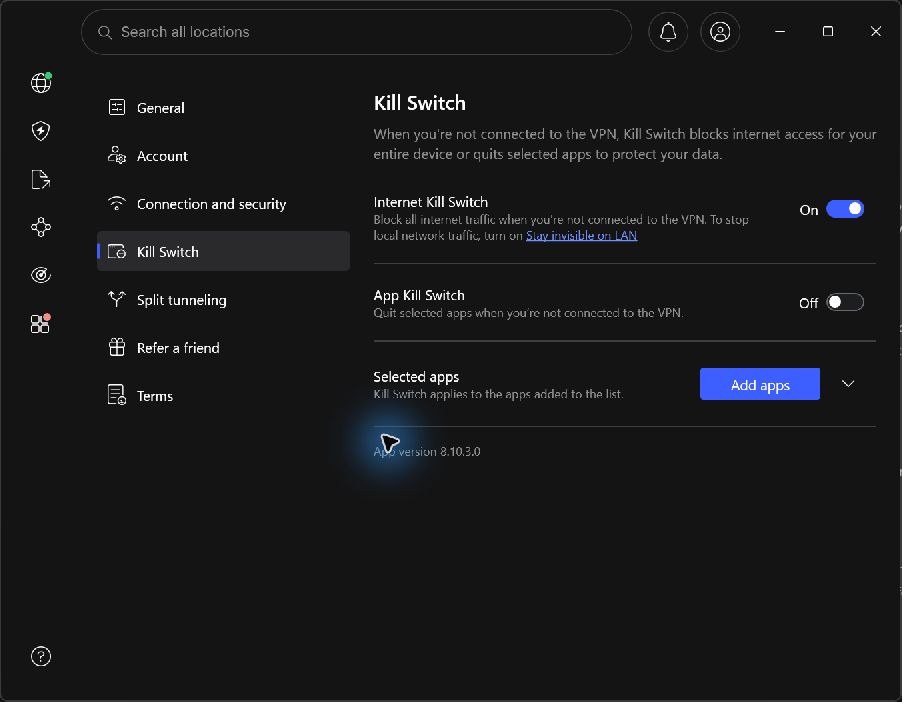
What this does not prove: the first two seconds were excluded from the settled-window counts, and the trial did not capture every packet. It did not test IPv6 disconnect behavior, App Kill Switch, unexpected service failure, startup or sleep/wake. The counts are not a provider-wide success rate.
Read the full kill-switch trial and its limitations or inspect the original measurement data. This guide reuses that dated evidence; it does not claim that a new test was performed today.
Split tunneling, DNS, IPv6 and local-network exceptions
A working kill switch can still leave a deliberately excluded application outside the VPN. Start with the routing policy. Microsoft’s routing documentation shows why a connected tunnel and an all-traffic tunnel are different things.
Split tunneling changes the question
Suppose the browser uses the VPN while a video-call app bypasses it. Decide whether that call should remain direct during a VPN outage or lose access. Providers handle the combination differently. Proton documents Windows support for using split tunneling with its kill switch, while noting incompatibility on most other platforms. Check its current compatibility notes.
Android’s blocking setting can also remove connectivity from apps excluded from the VPN; Google explains the allowed-list and disallowed-list behavior. An app losing access may therefore be the configured result.
DNS and IPv6 deserve their own observations
A failed browser page might reflect a DNS problem while other traffic still works. A successful IPv4 block says little about IPv6 unless you tested it. Check the address families your network actually provides and whether the client tunnels or blocks them. Do not label an unavailable IPv6 test a successful IPv6 protection result.
Local access is separate from internet access
Printers, a NAS, casting and local administration can depend on LAN exceptions. Write down any allowed destinations and check that their scope is appropriate. Avoid disabling the entire kill switch just to solve one printer problem before reading the local-access documentation.
Kill switch blocking your internet? Use this recovery sequence
First check whether the block is expected. A strict mode can leave Wi-Fi connected while internet requests fail because the VPN is off. That can be successful enforcement rather than a broken network.
- Check the VPN state and mode. Is it connected, reconnecting, signed out or deliberately disconnected? Compare that with your selected policy.
- Try restoring the intended route. Reconnect through the app. If that server is unavailable, use another supported location or the provider’s documented troubleshooting flow.
- Separate one-site problems from all-traffic problems. A single blocked website, failed login or DNS error is not enough to identify the kill switch as the cause.
- Check overlapping network tools. Another VPN, proxy setting, endpoint-security client or recent configuration change can affect routing. Return to a known configuration one change at a time; keep your device firewall enabled.
- If you intentionally need direct access, pause protected work first. On a device you control, disable the relevant kill-switch or OS blocking setting through its normal controls. This explicitly permits a different route. Restore protection and verify the VPN exit before resuming the activity you wanted covered.
- Use provider support if the state remains inconsistent. Record the OS, app version, protocol, mode, exact error and recent changes. Avoid an unexplained firewall reset or deleting network adapters as a first step.
Hotel and airport Wi-Fi login pages
A captive portal can require a network login before a tunnel can connect. Complete that through the supported OS or network flow. If direct access is necessary, stop other online activity and consciously permit it only for the setup period; then reconnect the VPN and restore the required protection.
Strict modes can also complicate VPN account authentication or remote administration. Keep a recovery route you control. On an employer-managed device, contact IT rather than removing its network policy.
Five kill-switch assumptions worth correcting
| Assumption | More useful interpretation |
|---|---|
| Auto-reconnect is the same thing. | Reconnect tries to restore the tunnel. Blocking controls traffic while it is unavailable. |
| The strongest label always means every packet is covered. | Platform limitations and intentional exclusions still need checking. |
| A green toggle proves it works. | The toggle records configuration. Requests or captures provide behavior evidence. |
| It makes the VPN slower by adding another encryption layer. | Blocking is not another encrypted hop. Measure a reproducible problem on the same route before blaming the setting. |
| One browser leak check tests the entire computer. | Other apps, DNS, IPv6, startup and failure transitions may need separate observation. |
The useful distinction is between a feature being available, being enabled and being observed doing the required job. A review should tell you which of those it established.
VPNs to consider for your device and protection needs
If your current VPN has a documented, working kill switch that fits your setup, you do not need another subscription just for this feature. If you are comparing providers, these three providers illustrate different options. Plan buttons are affiliate links.
Proton VPN: start without a subscription bill
Proton documents kill-switch availability on free and paid plans. Use our Free vs paid comparison to check the wider limits and the full review for context. Choose by your platform’s supported behavior, including the limitations discussed above.
Explore Proton VPN options (affiliate link, opens in a new tab)NordVPN: examine a dated Windows example
Our Windows disconnect trial includes a control run, request counts and explicit limits. It is a useful starting point if that is your platform; it does not establish the behavior of every NordVPN app. Read the review before selecting a plan.
View NordVPN plans (affiliate link, opens in a new tab)Surfshark: compare the mode you actually want
Surfshark’s published Soft/Strict distinction is useful when deciding whether manual disconnection should leave you online. Confirm the choices on your device. Our Surfshark review covers platform details and bundles so you can separate the VPN requirement from optional extras.
View Surfshark plans (affiliate link, opens in a new tab)Also compare the other providers in our VPN shortlist. Check device compatibility and the full subscription and renewal cost, rather than choosing solely by a feature badge.
Set a clear rule, then verify it
Finish this sentence: “When my VPN is unavailable, these apps should…” If the answer is “stop communicating,” enable a kill switch whose coverage and trigger match that intention. If the answer differs by app or by manual versus accidental disconnection, inspect the supported modes and exceptions.
Then test one scenario at a time, keep a short record and confirm recovery. That gives you a useful, repeatable configuration instead of relying on a switch name or a connected icon.
Frequently asked questions
What is a VPN kill switch in simple terms?
It is a blocking rule that prevents covered traffic from falling back to the regular internet route when the VPN is unavailable. Whether it also blocks after a manual disconnect or before startup depends on its mode and implementation.
Should I turn my VPN kill switch on or off?
Keep it on when you want included activities to pause instead of continuing outside the VPN. Choose a dropout-only or stricter policy deliberately, check important apps and keep a documented way to restore access.
Does a kill switch disconnect my Wi-Fi?
Usually the visible effect is blocked internet traffic, not removal of the Wi-Fi connection. Your device can remain connected to the router while covered requests fail. The exact mechanism depends on the client and operating system.
Why do I still have internet after disconnecting my VPN?
A standard mode may allow intentional disconnection. Other possibilities include a disabled setting or traffic outside its coverage. Check the documented manual-disconnect policy and your app exclusions before calling it a failure.
Does a VPN kill switch work when the app is closed?
It depends on what closing means and how the client works. Closing a window may leave its service active; exiting the service or rebooting is different. Persistent protection must be documented and checked for your app version.
Is always-on VPN the same as a kill switch?
Not necessarily. Keeping or starting a VPN service and blocking traffic outside it are different jobs. On compatible Android configurations, check both Always-on VPN and the separate Block connections without VPN setting.
Can I test a kill switch by turning off Wi-Fi?
The lack of internet while Wi-Fi is off does not demonstrate blocking. Observe the recovery period after the physical connection returns. That still does not replace a defined test of tunnel loss while the underlying internet remains available.
Can a kill switch prevent every IP or DNS leak?
No universal guarantee follows from the feature name. Results depend on platform behavior, exclusions, address families and the event tested. It also cannot undo traffic already sent. Test the setup and scope you actually need.
Do free VPNs have a kill switch?
Some do. Check the current plan and platform documentation instead of assuming the feature requires payment. Also compare the service’s connection limits, operator, supported apps and other restrictions.
Will a kill switch stop a video call or download?
It can interrupt covered traffic during a VPN outage. The app may resume after reconnection or need a retry. That interruption is the intended trade-off when you prefer blocking over continuing through your regular connection.
Is an app kill switch the same as binding an app to a VPN interface?
No. Closing selected programs and restricting an app to a particular interface are different mechanisms. Interface names, helper processes and reconnection behavior can matter. Check the specific app’s documentation and test its actual traffic.
How do I turn a kill switch off if the internet is blocked?
Pause the activity you wanted protected. Use the VPN app’s normal kill-switch control or, where relevant, the operating system’s VPN blocking control. Turning it off may permit direct traffic. Re-enable it and verify the VPN before resuming protected work.
Sources & editorial notes
Official documentation checked September 9, 2026. Settings and platform support can change. The NordVPN example comes from our separately recorded September 7 Windows test.
- NordVPN: Internet and App Kill Switch by platform
- Proton VPN: setup, availability and platform limitations
- Proton VPN: Advanced kill switch and startup behavior
- Surfshark: enable Kill Switch in the apps
- Surfshark: Soft and Strict modes
- Android Developers: always-on VPN and blocked connections
- Google: Android VPN settings and per-app exclusions
- Microsoft: VPN routing and split tunnels
- Microsoft: Windows Filtering Platform
- RFC 8446: TLS confidentiality and integrity
- Wireshark: choosing an interface and starting a capture
The timelines, scenarios and test worksheet are explanatory material. This guide does not report a new multi-provider leak test. Its measured example is limited to the dated NordVPN manual-disconnect trial, with the method and original data linked beside the result. Read our methodology. Report a correction.

About the author
Pavel Stich
Pavel is a co-founder of HostingRanker with a focus on SEO and copywriting for the technology and financial sectors. His interest in early-stage businesses informs his practical approach to software: understand the problem, examine the trade-offs and choose tools that support a sustainable business.