


What is VeePN, and what does it protect?
VeePN is a consumer VPN service with desktop and mobile apps, browser extensions and security-bundle subscriptions. A VPN routes the traffic it covers through a remote server. That changes the public IP address seen by the destination and adds an encrypted tunnel between your device and the VPN endpoint.
The useful distinction is the traffic covered. A device VPN can cover applications beyond your browser, subject to exceptions and platform behavior. An extension operates within its browser’s scope. An antivirus scanner, breach-monitoring service and email alias each solve a different problem; buying a bundle does not make those protections interchangeable.
A VPN does not remove the identity attached to a signed-in account, undo information you submit to a website or automatically make a harmful download safe. Keep software updated and use strong account security alongside it. Our guide to what a VPN protects explains these boundaries.
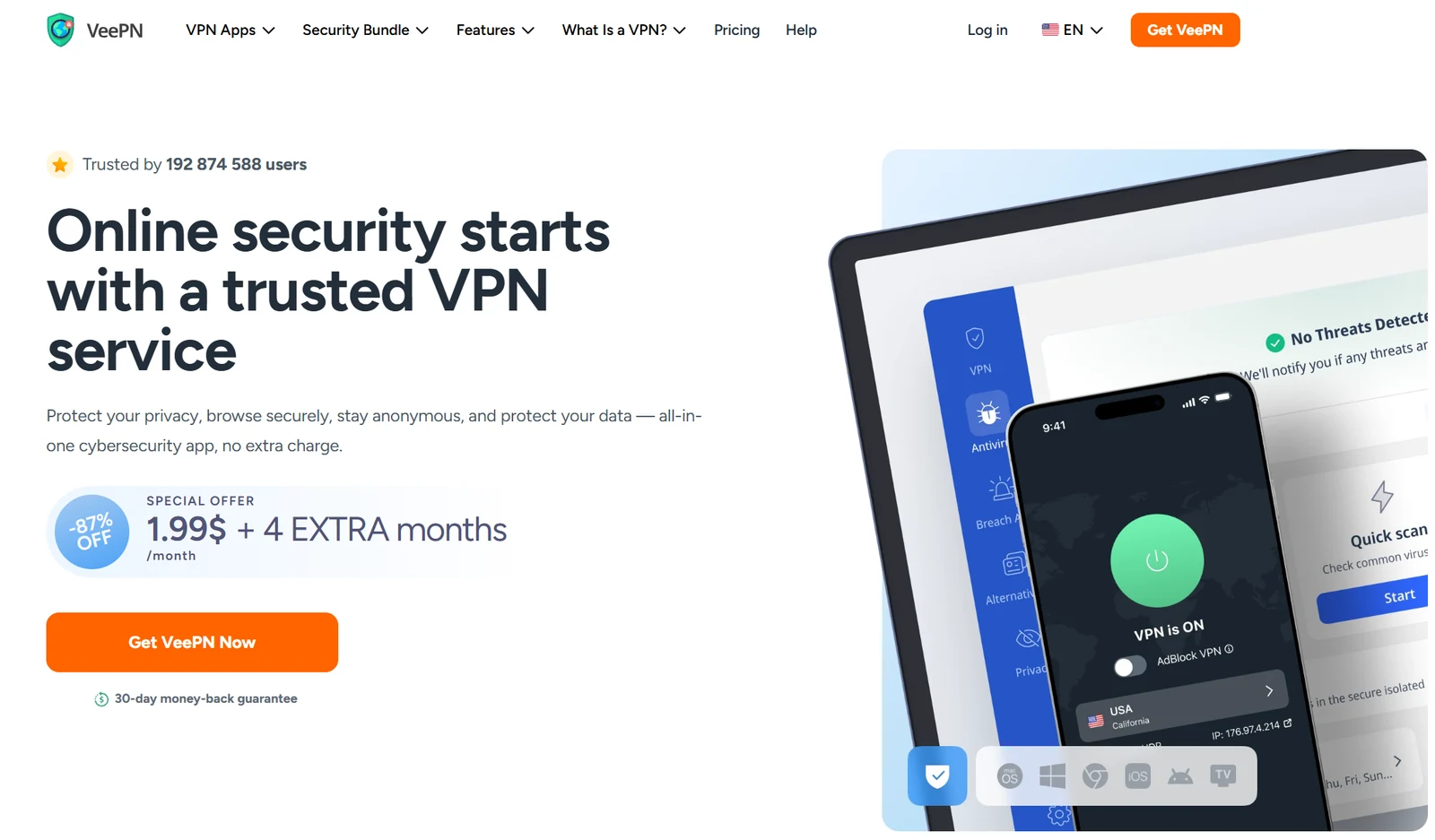
VeePN pros and cons: who should shortlist it?
Reasons to consider it
- Three tiers let you separate a basic VPN purchase from extra security tools.
- Long-term introductory totals are much smaller than keeping the same monthly plan for the entire term.
- Official support documents explain important kill-switch and routing exceptions.
- Apps, extensions and setup routes cover several kinds of devices.
- Web checkout discloses a specific next annual bill for the 28-month offers.
Trade-offs to weigh
- A long subscription requires payment upfront.
- Renewals cost more per covered month than the introductory term.
- Published plan limits and general terms disagree about device allowances.
- No-log marketing needs to be read alongside service-data disclosures.
- Bundle features do not all run on every operating system.
Our best-fit reader: someone who understands their device requirements and wants to compare a reasonably priced first term with optional tools. Look more closely at alternatives if you require a verified audit report, Linux feature parity, an organization-wide subscription or proven access to a specific streaming catalog.
Decide on your must-have outcome before comparing percentages. A reliable connection for your laptop and phone is a different purchase from antivirus for a Windows household. If you already pay for a security suite, the extra bundle may overlap with tools you use.
VeePN pricing: Basic, Pro and Max in USD
The supplied screenshots and the English price selector showed these nine options on October 12, 2026. A “12 months” promotion includes four extra months, making its displayed first period 16 months. The “24 months” promotion similarly covers 28 months.
| Plan | Monthly billing | 12 + 4 months: first bill | 24 + 4 months: first bill |
|---|---|---|---|
| VeePN Basic | $11.99 each month | $47.84 upfront $2.99/mo equivalent | $55.72 upfront $1.99/mo equivalent |
| VeePN Pro | $12.99 each month | $54.24 upfront $3.39/mo equivalent | $69.72 upfront $2.49/mo equivalent |
| VeePN Max | $14.99 each month | $95.84 upfront $5.99/mo equivalent | $111.72 upfront $3.99/mo equivalent |
The Basic 28-month calculation is $1.99 × 28 = $55.72. Do not multiply the advertised rate by 24 and expect to pay $47.76. The monthly equivalent already spreads the displayed total over the complete promotional period.
The same approach avoids confusion with the shorter offer: Basic is $47.84 across 16 months. Buying the longer Basic term requires $7.88 more upfront and covers another 12 months. That is attractive only if you expect to keep using it; an unused subscription still costs money.
See the supplied 28-month, 16-month and monthly price captures
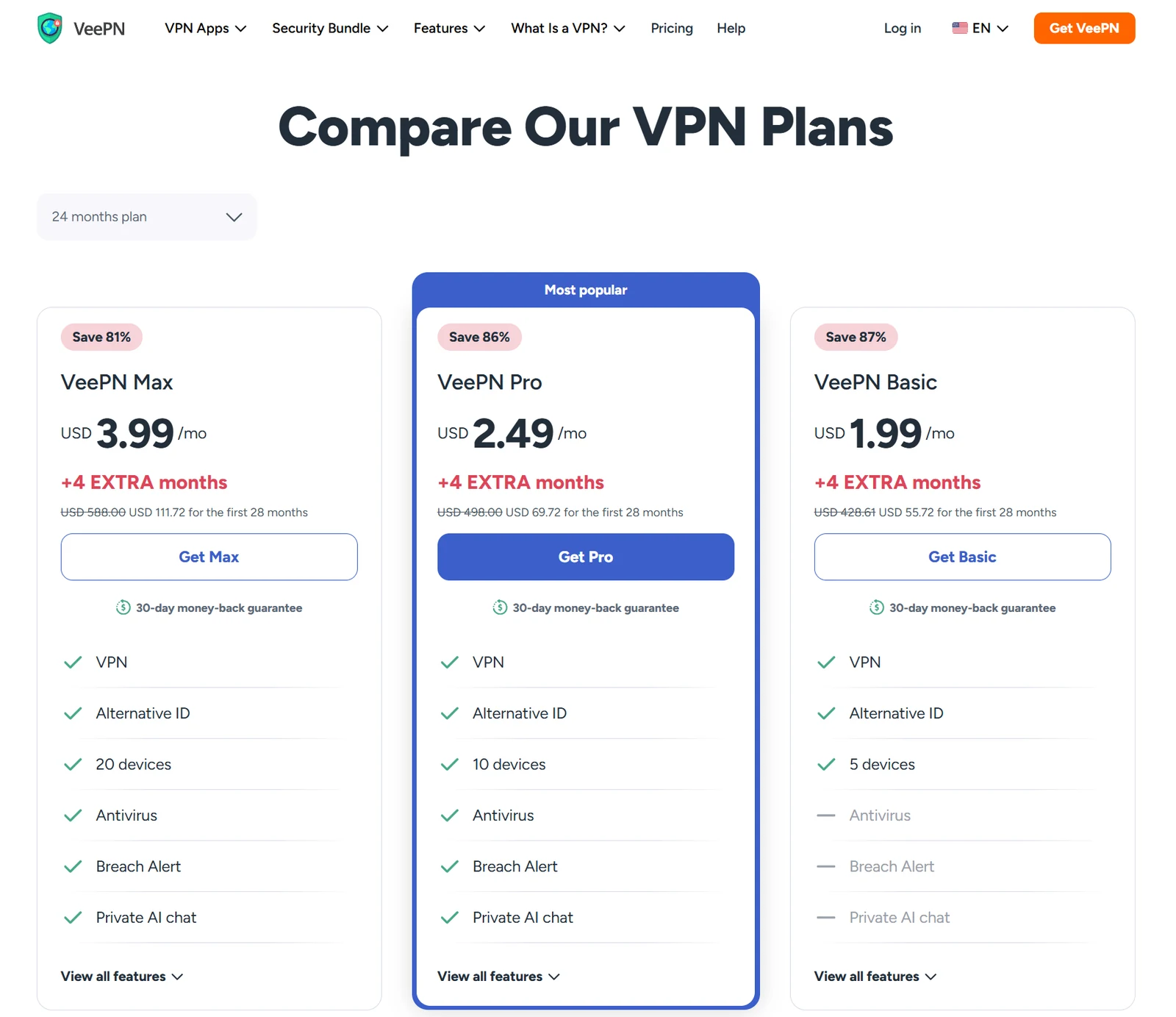
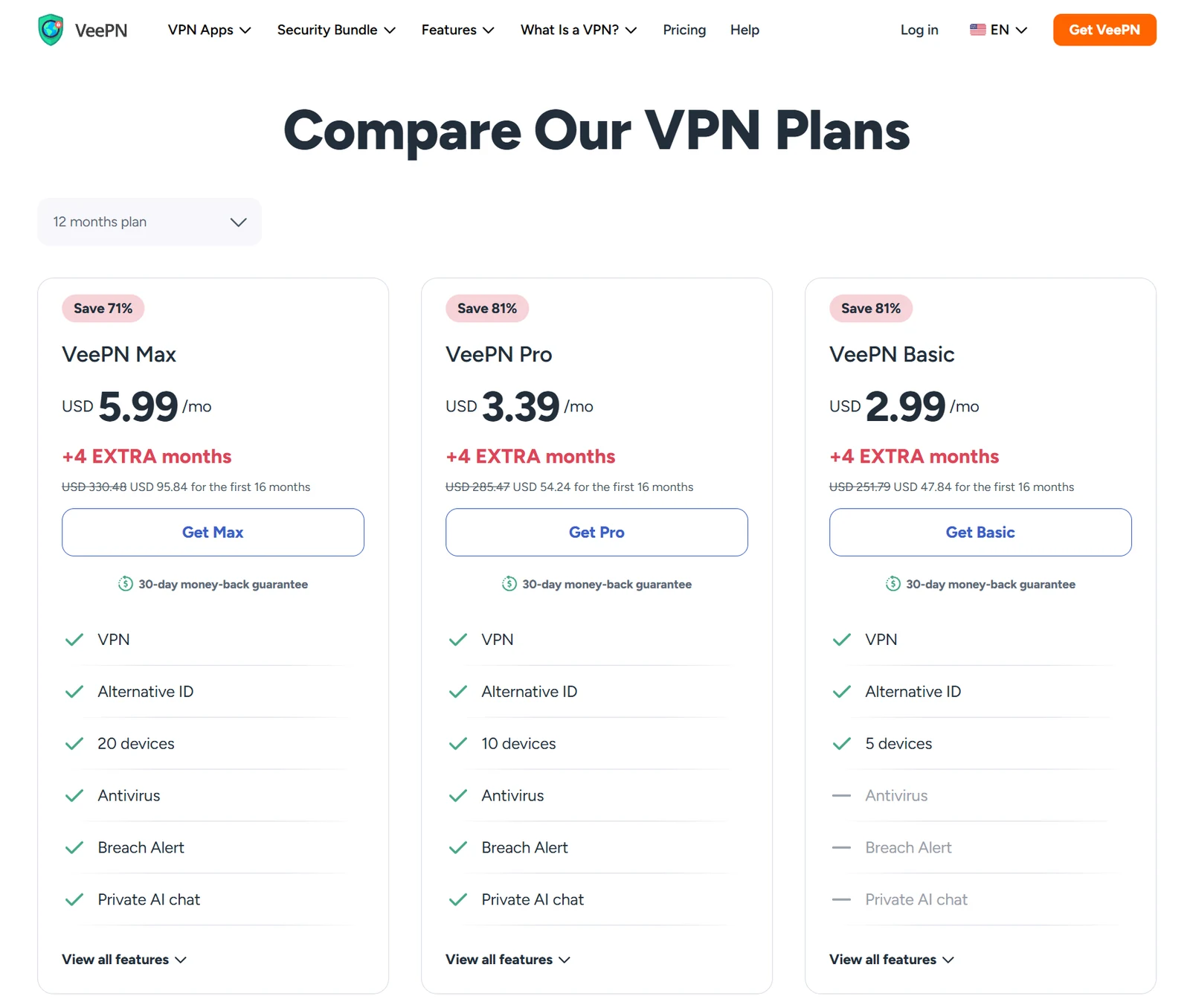
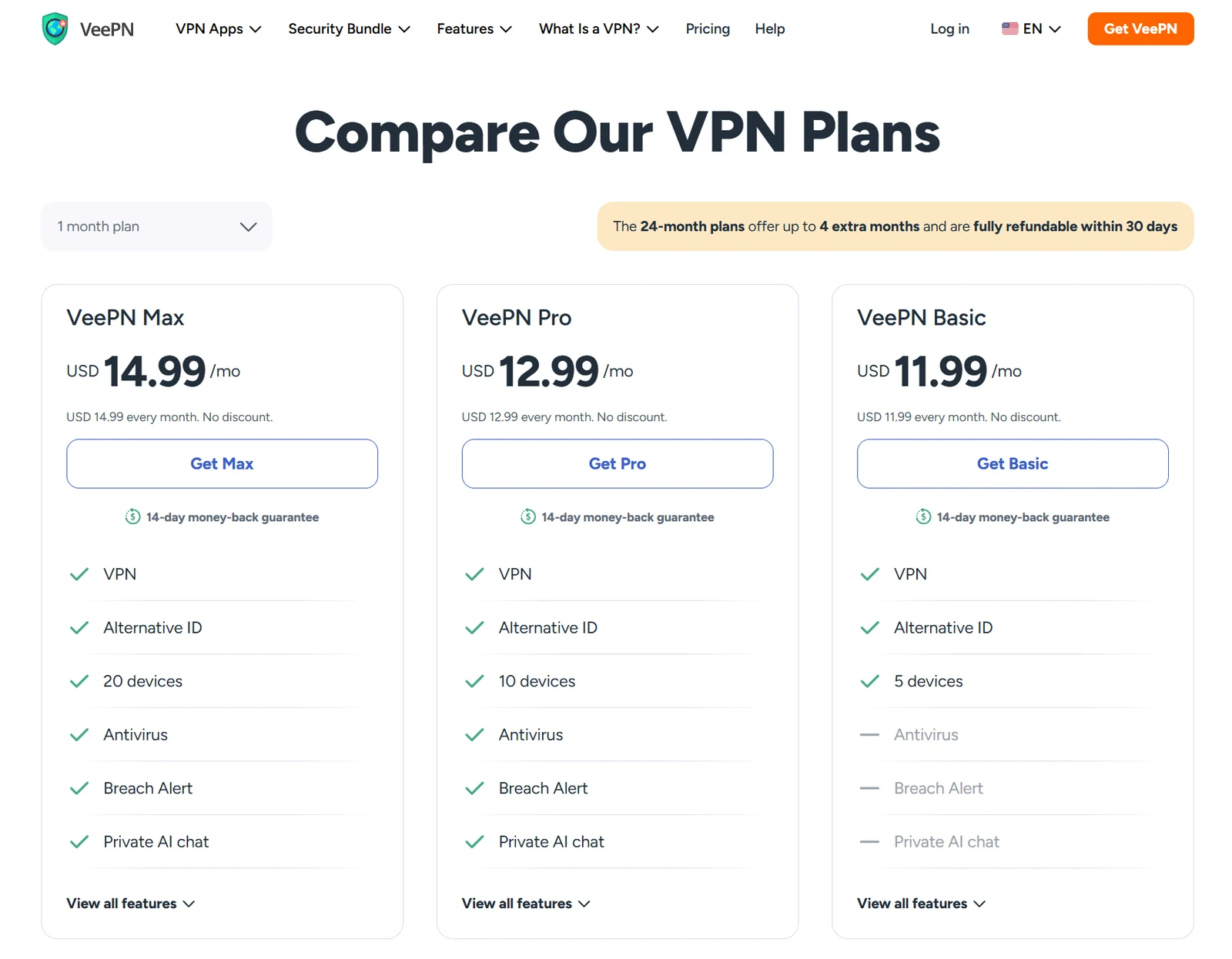
These figures exclude any additional charge that appears in your own checkout. App-store subscriptions, special campaigns and different payment routes can have different terms. Our link is an affiliate link, not a promise of an exclusive coupon or the lowest available price.
What happens when the introductory VeePN deal ends?
We opened the three 28-month web checkouts without entering account or payment information. Their recurring-payment disclosures showed the following next bills:
| 28-month offer | First payment | Next annual renewal | First term + one renewal |
|---|---|---|---|
| Basic | $55.72 | $59.76 / 12 months | $115.48 / 40 months |
| Pro | $69.72 | $79.00 / 12 months | $148.72 / 40 months |
| Max | $111.72 | $99.00 / 12 months | $210.72 / 40 months |
Basic checkout, Pro checkout and Max checkout are the sources for those renewal observations. The checkout also says renewal prices can change. Other payment methods can differ, so retain the disclosure shown for your own purchase.
Basic example: $55.72 initially plus $59.76 at renewal totals $115.48 for 40 covered months, assuming the observed renewal still applies. Its average is about $2.89 per covered month; that does not turn the two full payments into a monthly subscription.
Do not project the $1.99 headline rate indefinitely. Nor should the annual rate above be automatically assigned to the 16-month promotion: we did not verify that checkout’s renewal. Before paying, note the next charge, its date, the period it buys and how to cancel it.
VeePN cost calculator: first payment and annual renewals
Compare the money actually paid with the number of months covered. For the 28-month offer, you can add one or two annual renewals at the observed rate. For monthly and 16-month offers, the calculator shows only the initial period.
For a short trip, compare the amount you will actually spend. Two monthly Basic payments total $23.98, below the long-term upfront bill, even though the monthly rate is higher. A long deal makes more sense when the service fits a continuing need and you can afford the commitment.
Which VeePN plan should you choose?
Basic: start with the VPN requirement
Basic is the natural starting point if your priority is a VPN and you do not need the paid security extras. The supplied comparison lists Alternative ID alongside VPN access. Its advertised five-device allowance should be checked against your intended simultaneous use.
Pro: decide whether you will use the bundle
Pro adds the advertised antivirus, Breach Alert and Private AI chat features and lists ten devices. At the 28-month snapshot, Pro costs $14 more upfront than Basic. That is a modest difference across the term, but useful value depends on whether those tools work on your operating system and replace something you actually need.
Max: verify the larger allowance first
Max lists twenty devices and the security bundle. It costs $42 more initially than Pro in the 28-month offer. Because the general terms still discuss ten connections, get confirmation of the allowance attached to your exact order before buying Max for a large household.
Do not choose a tier just because it is labeled popular or carries a larger percentage discount. Compare three things: the feature you need, the platforms on which it runs and the complete payment. Extra features are not automatically evidence of stronger core VPN privacy.
Does VeePN support 5, 10 or 20 devices?
The current plan table advertises Basic: 5, Pro: 10 and Max: 20 devices. However, the general service terms still describe ten simultaneous VPN connections and include restrictions on router use to circumvent limits. This is a documentation inconsistency, not evidence that we successfully connected twenty devices.
If more than ten connections are essential, ask VeePN to confirm the plan-specific entitlement in writing and retain the answer with your order. Also clarify whether a limit concerns registered devices, active connections or a particular bundled product. Do not assume a VPN allowance is the antivirus allowance.
Make a quick inventory: your work laptop, personal laptop, phone, tablet and shared TV may already consume five connections. Count devices that need coverage together, rather than every device you have ever owned. A router configuration also changes the security setup and should not be treated as an automatic way around subscription rules.
Our multi-device VPN guide compares household needs. For alternatives with different connection policies, read the Surfshark review and Private Internet Access review.
Is VeePN safe? Privacy claims and what is actually established
VeePN identifies its service company as VeePN Corp. in Panama. Its privacy policy says it does not retain browsing history, network traffic or IP-address logs. The same policy describes account and payment information, technical and app-use data, advertising identifiers and information supplied for optional breach monitoring. “No logs” therefore should not be read as “no data collected.”
The no-log feature page separately describes service information including session duration, transferred megabytes and selected server location, and says troubleshooting data is not tied to users. Its broad marketing statements are less precise than these detailed disclosures. Read both documents, especially if connection metadata is important to your threat model.
We did not verify an independent audit report for this review. That is a limit of our evidence, not a claim that an audit cannot exist. We do not award a measured security score, infer a complete absence of records or present jurisdiction as a substitute for technical verification.
For a higher-risk use case, ask for a dated report identifying the auditor, what was examined, what was excluded and whether findings were resolved. An app review, a customer star rating and a penetration test of one component answer different questions.
For routine privacy, focus on the whole setup: use HTTPS, keep sensitive accounts protected with multi-factor authentication, review optional analytics settings and avoid sending unnecessary personal details to extra services. A VPN provider becomes part of your trust chain. Choosing it thoughtfully matters more than treating any privacy slogan as an absolute guarantee.
Protocols: WireGuard, OpenVPN, IKEv2 and Shadowsocks
The official protocol guide lists WireGuard, OpenVPN and IKEv2, with availability depending on the app. VeePN also lists Shadowsocks; its dedicated explanation identifies this as an encrypted proxy-based option rather than a traditional full VPN protocol.
| Option | Practical starting point | What to check |
|---|---|---|
| WireGuard | Everyday use on a supported app | Reconnect reliability and the features you need |
| OpenVPN UDP / TCP | Try an alternative when one transport is unreliable | Whether your network permits it; performance may differ |
| IKEv2 | A supported mobile connection option | Behavior when changing networks |
| Shadowsocks | A supported proxy-based connection option | Which traffic the implementation actually covers |
Start with the app’s recommended setting and change one variable at a time if there is a problem. If you change protocol, reconnect and repeat your IP, DNS and disconnection checks. A successful connection icon does not by itself establish that every application follows the same path.
A protocol name is not a benchmark. Implementation, server load and your own network still affect the result. For the distinction between a device VPN and a proxy, see VPN vs proxy.
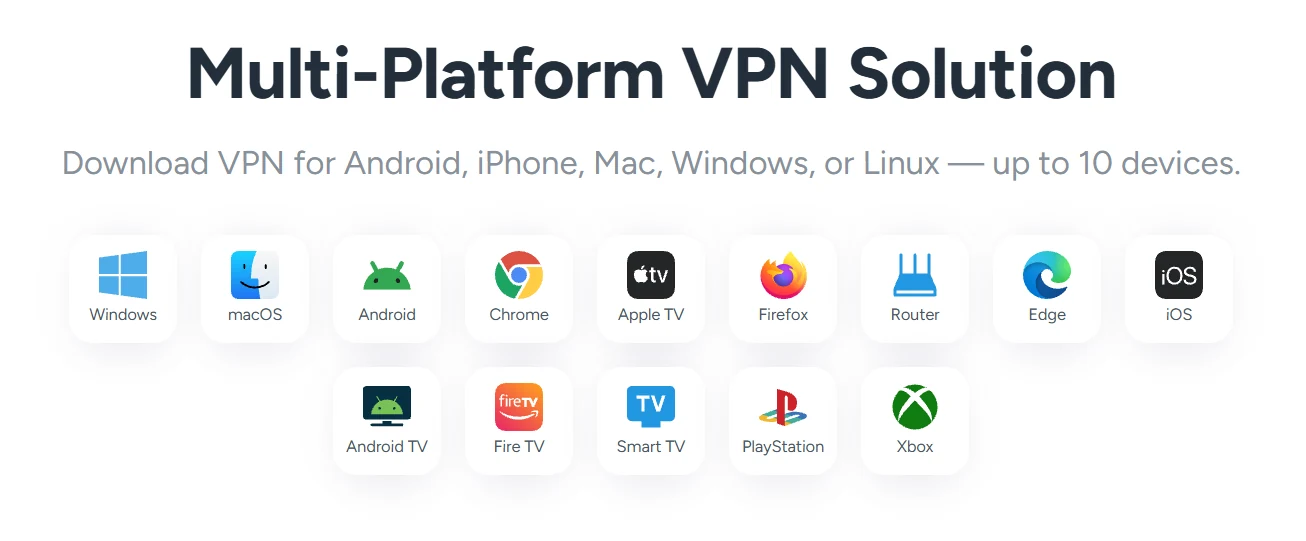
VeePN apps and supported devices: check the actual setup
Use the official app directory to reach the correct downloads or stores. A platform logo is a starting point, not proof that every feature is identical.
| Platform or route | Practical check before subscribing |
|---|---|
| Windows and macOS | Use the desktop app; confirm OS requirements and the controls visible in your version. |
| Android | Use the official store route; check VPN permissions, background operation and the selected protocol. |
| iPhone and iPad | Check current store compatibility. The iOS product page lists iOS/iPadOS 17.2 or later; website bypass rules differ from per-app routing. |
| Linux | The Linux page directs users to configuration instructions. Do not assume the same native app or feature controls as Windows. |
| Chrome, Firefox and Edge | Extensions act within their browser scope; they are not evidence that other apps are covered. |
| TVs, routers and consoles | Check the exact device, store or firmware. Some setups rely on a router rather than a native app. |
iOS requirements and Linux setup documentation help identify two especially important exceptions. Verify compatibility before buying for an older phone, a work-managed computer or a router you cannot configure.
For travel, install and sign in before leaving, then check the connection on the devices you will bring. Keep a way to recover the account without relying solely on the device you might lose. Network restrictions can change; this review does not establish working access in any particular restricted country.
Kill switch and split tunneling: the platform exceptions matter
VeePN’s kill-switch support guide documents controls for Windows, macOS, Android and iOS. It also states that the iOS Bypasser and kill switch cannot be enabled together, and that with split tunneling the kill switch applies to traffic routed through the VPN.
That matters when you exclude an application: it has a direct route by design. Do not assume the kill switch turns that deliberate exception into protected traffic. Our kill-switch guide explains why unexpected tunnel loss, manual disconnect and reconnect behavior need separate checks.
The platform-specific routing instructions distinguish app rules on Windows and Android from website rules on iOS and browser extensions. They list WireGuard and OpenVPN for split tunneling. The iOS Bypasser is not a general ability to choose arbitrary apps.
| Platform | Documented routing control | Key limitation |
|---|---|---|
| Windows / Android | App-based bypass or routing through the VPN | Support guide says website rules are not supported in this setup |
| iOS | Website Bypasser | Not per-app; cannot be used alongside the documented kill switch |
| Browser extensions | Website bypass list | Browser scope, not device-wide application routing |
| macOS / Linux | No per-app control established by the cited split guide | Ask about your specific app and version |
Keep the first setup simple. Add an exception only when you can explain why it is needed, then verify which public IP the affected service sees. A long unexplained bypass list makes it harder to understand what the VPN actually covers.
Are the antivirus and other bundle extras worth paying for?
Antivirus: the antivirus product page names Windows and Android. Do not buy Pro or Max expecting an equivalent full-device antivirus scanner on an iPhone or Mac. We have not measured detection quality, false positives or system overhead.
Breach Alert: monitoring is useful only when followed by action. If an account is exposed, change a reused password, review active sessions and strengthen authentication. An alert does not erase a leak or reverse a fraudulent transaction. Decide which identifiers you are comfortable supplying to a monitoring service.
Alternative ID: an alias can help separate a casual signup from your main inbox. Keep a record of which alias belongs to which service so you can recover the account. Use accurate information when a service requires your real identity; an alternative persona is not a substitute for identity verification.
Private AI chat: this is an additional software service, not a stronger VPN tunnel. Before sending confidential documents or business information, inspect its own processing and retention explanation. We did not test the assistant’s answers or establish that it meets any particular enterprise compliance requirement.
Our buying rule is straightforward: pay for extras you can name a use for. If your existing security product already covers your devices, avoiding duplication may be more valuable than buying the largest bundle.
Speed, streaming, gaming and torrents: set a useful test
We do not have independent VeePN speed or streaming results to report. Server totals, marketing illustrations and bandwidth claims cannot establish how a particular connection behaves in your home. We therefore do not promise a Netflix catalog, a fixed download speed or a reduction in gaming ping.
For a practical evaluation, record your normal connection first. Use the same device, network and time window with the VPN on and off. Check latency, sustained throughput, connection failures and the task you actually care about, such as a video call. Repeat across several sessions so that one unusually good or bad result does not decide the purchase.
For streaming, test the exact service and app you subscribe to. An accepted VPN connection is different from successful playback, and services can change how they handle VPN addresses. Respect the service’s conditions and applicable content rights. A browser test does not prove that the television app works.
For gaming, a nearby VPN endpoint may still add delay or create a worse route. If your real problem is unstable Wi-Fi, a VPN cannot repair weak radio coverage. Compare Ethernet or a better local connection first. Our ExitLag review explains the separate category of gaming route optimization.
For lawful peer-to-peer transfers, check the provider’s current usage rules and client behavior. Confirm the application follows the intended route and what happens on a dropped connection. This review does not establish port forwarding or a particular P2P-server capability.
Is VeePN free? Trials, extensions and paid subscriptions
Separate three different offers: a limited free extension, a temporary trial and a paid subscription with a refund window. They are not interchangeable, and a free download does not establish free ongoing premium access.
The official trial page currently lists a Windows seven-day offer costing $1, seven days for macOS, three days for Android and iOS, and seven days for Android TV and Fire TV. Eligibility and the subscription offered afterward must be checked in the actual signup or store screen. A $1 trial is paid, even when it appears on a page titled “free trial.”
Do not start a trial until you have time to evaluate it. Note the conversion amount and deadline, set a reminder, and retain the confirmation email. If the signup does not show a trial, do not assume our affiliate link automatically adds one. We have no verified exclusive VeePN coupon code.
For a different free-plan approach, read our Proton VPN review. Compare the available features and limitations rather than assuming every free offer has the same purpose or coverage.
VeePN refunds and cancellation: read this before paying
The published refund policy gives monthly subscriptions a 14-day initial window and subscriptions of at least six months a 30-day window. It limits refunds to once, excludes rebilled subscriptions and discounted-trial fees, and says certain upgrades or added licenses waive the guarantee. Apple in-app refunds go through Apple. Account deletion and starting a payment dispute before contacting support can also invalidate the provider’s guarantee.
Cancellation stops future billing; a refund returns an eligible payment. Ask for both explicitly when you need both. Uninstalling the app does not cancel the subscription, and deleting the account is not a safe shortcut.
- Find the receipt and identify who billed you: the website or an app store.
- Use that route’s subscription controls or contact VeePN support from the registered email.
- State whether you want to stop renewal, request an eligible refund, or both.
- Keep the request date, response and cancellation confirmation.
- Check your subscription status and payment account afterward.
For app-store trials and subscriptions, VeePN’s terms instruct cancellation at least 48 hours before the end. Leave a margin instead of treating the final minute as a dependable deadline. These are the provider’s stated conditions; the exact purchase route and applicable consumer rights can also matter.
How to download, install and check VeePN
- Choose your route. Open the official app directory, identify your operating system and follow its download or store link. Avoid third-party installers and “premium unlocked” packages.
- Confirm the order. Save the plan name, first charge, covered months and renewal disclosure. Create the account using an email address you control.
- Install and sign in. Read the requested permissions and approve the VPN configuration only for the app you intentionally installed.
- Connect with a simple setup. Start with a nearby location and the recommended protocol. Leave custom bypass rules off until you need them.
- Check important protections. Review kill-switch availability and the platform limitations described above.
- Evaluate ordinary use. Test browsing, calls, streaming, sleep and reconnection on your own devices.
For a repeatable evaluation, follow our VPN setup and leak-checking guide. Checking your public IP and DNS behavior can reveal configuration problems, but a clean browser check is not a full security audit of the app or operating system.
On a company-managed device, check with the administrator before adding another VPN profile. Work tunnels and consumer VPNs can compete for routes or DNS settings. Keep a record of the previous configuration so you can restore normal access if a change breaks your workflow.
If VeePN is not connecting or a website stops working
Work through one change at a time. Changing the server, protocol, browser and network together makes it difficult to identify the cause.
| Symptom | First useful check | Next step |
|---|---|---|
| No internet before connecting | Check the underlying Wi-Fi or mobile connection | Complete any legitimate captive-portal login before reconnecting |
| VPN connects but one site fails | Try another nearby server and check for a bypass rule | Compare another browser; ask support about that site |
| Connection is slow | Pause large local downloads and try a nearby endpoint | Compare supported protocols using the same test |
| Internet stops after disconnecting | Check the kill-switch setting and connection state | Reconnect; understand the direct-traffic trade-off before changing protection |
| Subscription is not recognized | Compare the account email with your receipt | Use the store’s restore-purchase option if available or contact support |
| Only one app behaves differently | Inspect split-tunnel and browser-extension settings | Remove unintended routing exceptions and retest |
When contacting support, provide the app version, operating system, protocol, approximate time and a concise description of the failure. Do not include passwords, payment-card numbers or unrelated personal information. If asked for diagnostics, review what you are sharing.
A workaround is not automatically a resolution. If turning off a needed feature makes the app usable, decide whether the remaining setup still satisfies your original reason for buying. Evaluate this while the initial refund period remains open.
VeePN vs NordVPN, Surfshark, Proton VPN and PIA
Use alternatives to answer a specific objection, rather than collecting a list of similar logos. Our best VPN comparison gives a broader starting shortlist, while the individual reviews explain their evidence and limitations.
| If your priority is… | Also compare | What to examine |
|---|---|---|
| Published hands-on observations on this site | NordVPN | Read the scope and date of our Windows test; do not generalize it to every device |
| A large collection of personal devices | Surfshark or PIA | Compare connection policy, platform exceptions and full renewal cost |
| A free starting point | Proton VPN | Separate free-plan limits from the paid VPN Plus offer |
| Simple task-based server selection | CyberGhost | Verify the app, server category and subscription relevant to your task |
| An iPhone-focused decision | Our iPhone VPN guide | Compare mobile behavior rather than importing desktop feature claims |
VeePN’s case is strongest when its introductory total, app support and chosen bundle fit your needs together. If an unanswered device-limit or privacy question is central to the purchase, resolve it first. A small price difference should not override a missing requirement.
Our verdict: is VeePN worth buying?
VeePN deserves a place on a price-conscious shortlist, with a careful plan and platform check. The visible first-term totals are easy to compare once the extra months are included correctly. Basic is a sensible starting point for VPN needs; Pro is worth considering when its compatible extras are useful. Max needs particular scrutiny if its advertised twenty-device allowance is the reason you are buying.
The strongest unanswered questions concern evidence rather than the size of the discount. We have not measured performance, verified streaming access or audited data handling. The documentation’s device-limit and logging language also deserves a closer read. Those limitations should remain visible beside the attractive introductory price.
Before committing, answer four questions: does the app support my device, does my required feature work there, can I afford both the first bill and renewal, and do I understand how to cancel? If all four answers are clear, evaluate the service early in the eligible initial period.
Frequently asked questions
Is VeePN a good VPN?
It is a reasonable shortlist option when its price, platform support and bundle fit your needs. This research-based review has not independently measured speed, streaming reliability or leaks, so it does not claim VeePN is the fastest or best for everyone.
How much does VeePN cost?
In the October 12, 2026 USD snapshot, the first 28 months cost $55.72 for Basic, $69.72 for Pro and $111.72 for Max. Those are upfront charges. Monthly subscriptions were listed at $11.99, $12.99 and $14.99 respectively. Check your current offer before paying.
Does the $1.99 VeePN deal bill monthly?
No. The observed Basic promotion requires $55.72 for the first 28 months. The $1.99 figure is the average across that period, not an installment payment.
What is the VeePN renewal price?
The observed 28-month web checkouts disclosed annual renewals of $59.76 for Basic, $79 for Pro and $99 for Max. Future rates and other purchase routes can differ. Renewal for the 16-month promotion was not verified.
How many devices can I use with VeePN?
The current plan table advertises 5 for Basic, 10 for Pro and 20 for Max. General terms still refer to 10 simultaneous connections. Confirm the entitlement for your exact plan if the difference affects your purchase.
Does VeePN keep logs?
VeePN says it does not retain browsing history or IP-address logs, while its documentation describes account, technical and service data. Read the privacy and no-log pages together. This review does not independently verify the logging implementation.
Does VeePN have an iPhone kill switch?
The support guide documents an iOS kill switch, but says it cannot operate alongside the iOS website Bypasser. Check your current app and evaluate the behavior you require.
Does VeePN antivirus work on Mac and iPhone?
The antivirus product documentation checked for this review lists Windows and Android. Buying a security bundle should not be interpreted as getting an equivalent antivirus scanner on every VPN-supported platform.
Is VeePN free or is there a free trial?
Free extensions, temporary trials and paid subscriptions are different offers. Trial availability depends on platform and eligibility; the advertised Windows seven-day trial costs $1. Check the next charge and cancellation deadline in the actual signup screen.
Does VeePN work with Netflix?
We have not independently tested VeePN with Netflix and do not guarantee access to a catalog or device. Evaluate the specific app and service you use; streaming services can change how they handle VPN connections.
Is a VeePN browser extension enough?
It may fit a browser-only task, but it does not establish protection for other apps on the device. Use the appropriate device-level setup when those applications also need VPN coverage.
How do I cancel VeePN?
Identify whether the website or an app store billed you, then use the appropriate subscription route or contact support. Ask separately for an eligible refund if needed and retain confirmation. Deleting the app does not cancel billing.
Sources & editorial notes
Official documentation, the English USD pricing page and the three 28-month web checkouts were checked October 12, 2026. We inspected billing disclosures without entering personal or payment data or making a purchase. Prices are dated observations, not guaranteed offers; checkout, region, tax, payment method and future changes can affect the bill. Renewal rates for the 16-month offer were not verified.
- VeePN: current plans and feature comparison
- VeePN Basic: first 28 months and renewal disclosure
- VeePN Pro: first 28 months and renewal disclosure
- VeePN Max: first 28 months and renewal disclosure
- VeePN: subscription, refund and acceptable-use terms
- VeePN: privacy policy and data processing
- VeePN: no-log explanation and service-data disclosures
- VeePN: protocols and platform availability
- VeePN: Shadowsocks scope and limitations
- VeePN Support: kill switch setup and iOS limitation
- VeePN Support: app rules, website rules and supported protocols
- VeePN: official app and extension directory
- VeePN: Linux configuration route
- VeePN: iPhone and iPad requirements
- VeePN: antivirus availability on Windows and Android
- VeePN: platform-specific trial offers
- VeePN Support: help, cancellation and refund request form
This is a research-based review, not a hands-on speed, streaming, malware or leak test. The logo and five screenshots were supplied for this article and show the provider’s website. Vendor marketing claims and pictured user totals are not our measurements. Recommendations and cost examples are our editorial analysis; we did not verify an independent audit report for this review. Read our methodology. Report a correction.

About the author
Pavel Stich
Pavel is a co-founder of HostingRanker with a focus on SEO and copywriting for the technology and financial sectors. His interest in early-stage businesses informs his practical approach to software: understand the problem, examine the trade-offs and choose tools that support a sustainable business.